
Home › Forums › Ticket Products › Event Tickets Plus › where I can find tickets I bought?
- This topic has 7 replies, 4 voices, and was last updated 9 years, 11 months ago by
Damian.
-
AuthorPosts
-
October 23, 2016 at 9:40 am #1181597
Damian
ParticipantHi,
I have a clean install of wordpress, woocommerce, default 2016 theme, the events calendar, event tickets and event tickets PLUS.
I configure it and it is working.
I go to my shop, choose the event, choose a ticket, register, buy it, pay it. I receive my tickets by email. Perfect.Now I go back to the store, login to my account. I can found my invoice, but I cant find the tickets!!! where are my tickets if I want to print them again?
Thanks,
October 23, 2016 at 12:48 pm #1181665George
ParticipantHi Damian,
Thanks for reaching out!
There is unfortunately no user history of tickets or RSVPs at this time. 🙁 Nor can you currently print them from anywhere other than your original email.
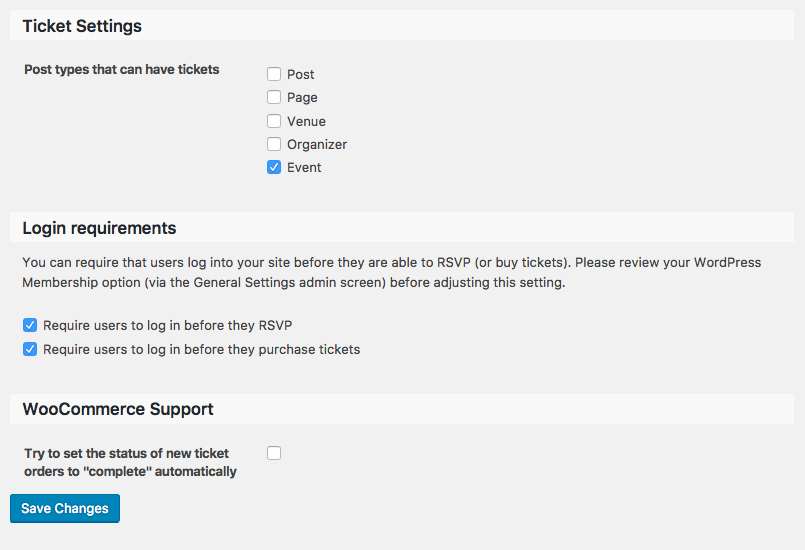
There is a “history” on each individual event that a user RSVPs to (or buys tickets to) if you activate the “Login requirements” features of Event Tickets and Event Tickets Plus, which options are shown in this screenshot (click for a larger-sized image):
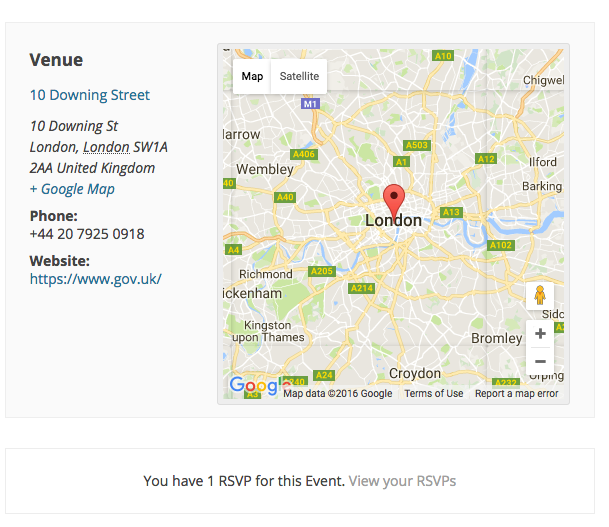
Anytime the logged-in user then views the event they RSVPed to (or bought tickets to), then, they will see a “View your RSVPs” link at the bottom of the event above the tickets form like shown in this screenshot (click for a larger-sized image):
☝️ Other than this, there is no current feature that allows for the sort of user history you describe.
Sorry to disappoint! Please let me know if there are any other issues or questions I can try to help with.
— George
October 23, 2016 at 2:21 pm #1181698ParticipantThanks for the reply!
I understand. Is it something you will be working in a next release?
about the solution you propose, checking “requires users to login…” I already tried and I have two problems:
1) Someone choose 3 tickets. fill all the information about atendees. And after click LOGIN the site ask you to login or create account, and after that, it takes you to the dashboard!!!
so you do not know how to go to that event again, and even worse, imagine if you filled 10 tickets information with name, last name, email, address….
2) even that, imagine we can disable that text area.
I bought a ticket and when I go back to the event page, it do not appear the legend you say.How can I debug to check why is not showing me my tyckets?
Thanks!
Damian
October 24, 2016 at 7:03 am #1181849ParticipantHi Damian,
The idea of a user history is still being fleshed out by our developers and may not ever arrive in our plugins; however, it may arrive in our plugins at some point in the coming months and beyond.
In either case, it is unfortunately not on the horizon any time soon. 🙁 Please do post your ideas for features like this to our UserVoice page here → http://tribe.uservoice.com. Other customers can vote on ideas there, and we pay close attention to what our customers are saying on this page when it comes to new features! 😀
As for your second question, yes, we agree that redirecting to the wp-admin is not ideal for now. We are hoping to change this at some future date although it is currently not possible. I do not have a specific ETA for when this change will arrive, though again it could take many weeks or several months at best before it arrives in our plugins.
Finally, for your third question:
1. Are you saying that you do not see the “You have 1 RSVP for this event. View your RSVPs” text on an event you’ve bought tickets for?
2. If so, then can you please clarify if you bought tickets or did a free RSVP?
Thank you,
GeorgeOctober 24, 2016 at 10:24 am #1181994ParticipantHi,
thanks for the reply. I need to solve this in some way or I will need to find another ticket system 🙁
I confirm that I choose the options in “ticket” tab:
“require users lo login in before they purchase tickets”
After doing this, I bought a ticket (I had to login before purchase), (as an administator) I completed the order, I received the tickets by email (as buyer) and when I return to the event page, I do not have the
“You have 1 ……” you mention on your reply.I’m using twenty sixteen, no more plugins rather than woocommerce and your plugin.
My problem is that I need to have a backup somewhere of the ticket with the QR code. If the user can not find it in his page, then I need to have a backup somewhere.
If it not possible that the user see a copy of the QR ticket, then I (the admin) should have a copy of the ticket.
So if we receive (always receive before an event) an email that says “I loose my ticket, where I can find it??” then I will be able to forward the email with the ticket.The only thing I have modified is to follow this: https://theeventscalendar.com/knowledgebase/selling-tickets-from-the-woocommerce-products-page/ because I want to have the ticket as a product.
October 24, 2016 at 10:50 am #1182005ParticipantHi Damian,
Thanks for this information. To help me proceed and ensure there’s not a bug here, can you please address each of the following points?
1. It sounds like you have only been testing this with WooCommerce Tickets, not RSVPs yet. Is that correct?
2. If “yes”, then what do you find if you make a test event with RSVPs instead of WooCommerce Tickets and then make some RSVPs while logged-in—when you view the event, do you see the “You have 1 RSVP…” text seen in my original screenshot above?
Thank you!
GeorgeNovember 15, 2016 at 8:35 am #1192476Support Droid
KeymasterHey there! This thread has been pretty quiet for the last three weeks, so we’re going to go ahead and close it to avoid confusion with other topics. If you’re still looking for help with this, please do open a new thread, reference this one and we’d be more than happy to continue the conversation over there.
Thanks so much!
The Events Calendar Support Team -
AuthorPosts
- The topic ‘where I can find tickets I bought?’ is closed to new replies.