

Forum Replies Created
-
AuthorPosts
-
George
ParticipantThis reply is private.
ParticipantHey Tim,
In your reply above you say, “I have added Paypal API.”
1. Can you clarify specifically what you mean by this?
Next, you say you’ve enabled logging:
2. Can you do another test purchase and, if the stock does not update, can you share the PayPal logs? You may be able to find these from PayPal but WooCommerce itself also provides debugging — it will show you where the files for the logs can be found.
3. Can you also share a screenshot of the “Order notes” of the WooCommerce order itself? It’s the same as you did above with this screenshot that you previously shared.
Thanks for your patience here, Tim.
Sincerely,
GeorgeParticipantThis reply is private.
ParticipantThis reply is private.
ParticipantHey Chris,
Thanks for this information and your patience here.
Quick question/idea:
• If you head to Events → Settings in your site’s wp-admin, scroll down to the option called “Timezone Settings”.
• What is the option currently set to?
• Try setting it to “Use the local timezones for each event”, as shown in this screenshot:
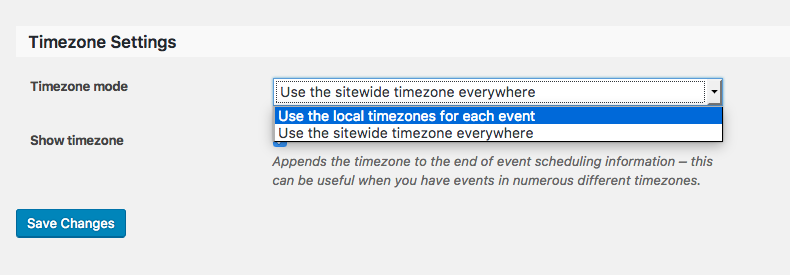
☝️ Do this then take a look at affected events — does anything improve?
Cheers,
GeorgeParticipantHey Tim,
Apologies for another updated here, but I actually want to bear the news that we have not confirmed this as a bug. I was testing locally on my own local site and found your problems, but that is actually by design and PayPal does not communicate with local sites like that! So the order won’t complete and stock won’t reduce.
There are a few different things that could be affecting the stock issues you describe: all of them related to the setup of PayPal on your site.
To be certain that things are set up correctly, I urge you read this piece of documentation from WooCommerce about setting up PayPal Standard correctly:
https://docs.woocommerce.com/document/paypal-standard/#section-9
Check out the section starting with “Debugging IPN issues” specifically, and then check each section from that to the bottom of the article. What you are facing is almost certainly an IPN issue, so do all of the things the article walks through after the “Debugging IPN issues” header: check if you’re on a local site, if fsockopen is enabled, if your paypal email address are correct, enable logging, etc.
Please do let us know if any of the steps in that article help with your issues.
Thank you!
GeorgeParticipantHey Tim,
I wanted to let you know that I have just confirmed the behavior you describe on my own testing site, and thus we have confirmed this is a bug.
This is a significant bug so hopefully we can publish a fix promptly. I do not have a specific ETA for the arrival of a fix, but will keep this thread updated with news of updates!
Sorry for the trouble here, Tim — stay tuned to this thread for news about the bug fix.
And please let me know if there are any other issues or questions I can try to help with in the meantime.
Sincerely,
GeorgeParticipantHey Abby,
Apologies for the delayed response. When it comes to “bypassing” these errors, there’s not really any way to do that here — with Events Calendar Pro or otherwise.
If you get these errors from your theme when even trying use a page template, then that error should persist regardless because it is emerging from within your theme.
Please let me know if this helps clarify the nature of these errors, and if there are any other issues or questions I can try to help with!
— George
Participant😀
ParticipantHey Monica,
Thanks for your followup. Translations are run on wordpress.org directly, and are community-submitted, so if you are missing words or the translations are incomplete, it may be a problem with the translation files on WordPress.org directly.
It looks like the Spanish translation for The Events Calendar is indeed in need of some more contributions → https://translate.wordpress.org/projects/wp-plugins/the-events-calendar
You can submit translations by logging into WordPress.org and submitting contributions for review—if approved, the translation files will be updated, and then the next time you download them they should therefore be more complete.
You can learn more about this whole process here: https://make.wordpress.org/polyglots/handbook/
Sincerely,
GeorgeParticipantHi Blandine,
Thanks for reaching out.
– Instead of showing the calendar, having a list of the events listed by location or date
☝️ There is the default List View, which you can try using, and there are some list widgets that might let you display a more focused list of events by category (learn more about these widgets here). But there is unfortunately no specific listing feature that allows listing by location or date at this time.
– In the search box, is it possible for the search to concern every single months rather than the only one present. For example to be able to search per location. If nothing in London in January, it would be nice to be able to tell the viewer that it is however available in March for example.
☝️ This is unfortunately not possible at this time, either—although you should only find the filtering of search results by month in the Month View, specifically, and ot.
– An option to search by location
☝️ This is possible with the Near: search option which is listed in the Tribe bar next to search, date, and the “View As” selector. You can see this in the following screenshot:
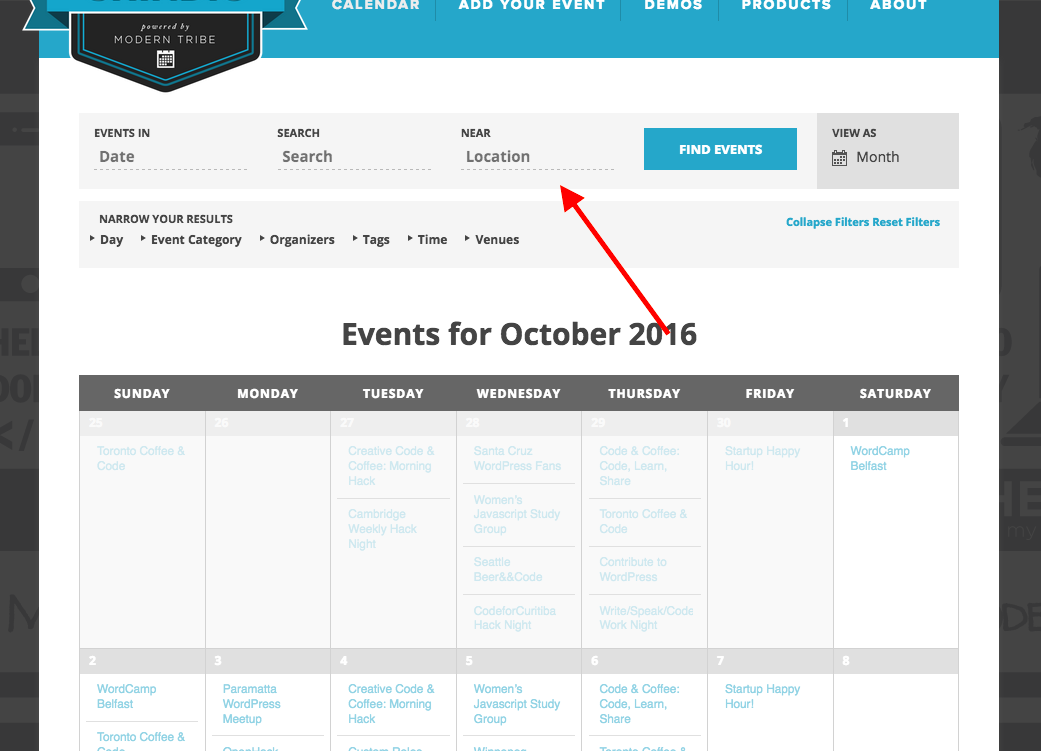
There is no other location search filter at this time.
I hope this information helps! 😀
— George
ParticipantThanks for sharing, Mark!
Glad to hear progress was made — stay tuned for the next few plugin updates, a proper fix should arrive that will allow the default/”not-pretty” permalinks to be used without issue.
Cheers,
GeorgeOctober 26, 2016 at 8:36 am in reply to: Can't upgrade Events Calendar Pro; it get licence error #1183200ParticipantBest of luck with your project!
— George
ParticipantHi Abby,
Thanks for your followups.
When it comes to how specific showcase sites do things, we unfortunately do not know for certain how because we don’t obtain that sort of information from showcase sites—we just notice them doing cool things with our plugins and show them off. You may be able to contact those folks for specific insights from them.
In regards to the error you reported here, it is referencing files within your theme, e.g.:
wp-content/themes/prophoto6/vendor/netrivet/prophoto-classes/src/View.phpSo definitely contact the theme support team as to why their files are producing these errors.
On another note here, Abby, these forums here are our “Pre-sales Questions” forums, so we unfortunately cannot field technical support questions here.
Is there anything else of a pre-sales nature I can try to help with?
Thank you,
GeorgeParticipantThis reply is private.
-
AuthorPosts