

Forum Replies Created
-
AuthorPosts
-
Geoff
MemberHey Jack, thanks for following up!
It’s actually pretty cool how the QR codes work. A unique one is created for each individual ticket that is sold and it gets emailed to the person purchasing the ticket. That ticket contains the QR code which the person can then present at the door of the event to be scanned, resulting in being “checked in” for the event.
You can use any QR reader app on a mobile phone to scan the code. Once the app scans the code, it will open up the phone’s web browser which connects to WordPress and automatically checks that person in, updating their record in WordPress.
Does that clarify things a bit more? Please let me know!
Cheers,
GeoffMemberHey Ian,
Great questions!
At the moment, the syncing portion is completely reliant on the application importing the data. For example, if Google Calendar is importing events from The Events Calendar, then it will need to do a continuous check for new content using the iCal feed as the source.
We don’t have any plans to build continuous outbound sync to iCal Importer, but I do see an open feature request for it that could use more votes — definitely add your vote!
Cheers,
GeoffMemberHey Dave,
Yeah, that can be a common issue. I would suggest using this post as a guide for how to break up the text using CSS:
Handling Long Words and URLs (Forcing Breaks, Hyphenation, Ellipsis, etc)
Another way to do it would be to change the template file so that it shows something like “Visit Website” rather than the full link. Here’s a good example of how to do that:
https://theeventscalendar.com/knowledgebase/url-as-word-button/
Cheers!
GeoffMemberHey Ian,
Ah, gotcha — thanks for clarifying!
iCal Importer does add a hosted iCal file to the calendar. So, in essence, any other calendar the accepts an iCal feed will be able to grab that data and keep it synced with The Events Calendar.
Geoff
MemberHey Oliver, nice work! I was just about to link you to the same post but you beat me to it.
Cheers and thanks for following up!
Geoff
MemberHey Dave,
Absolutely. Any events that are imported from Facebook to WordPress using Facebook Events will automatically integrate and appear in your site’s existing calendar. 🙂
Does this help answer your question? Please let me know.
Cheers!
GeoffMemberHey Ian, thanks for getting in touch!
Yes, indeed we are. In fact, we have a plugin called iCal Importer that will import events from any hosted iCal feed, including Google Calendar. 🙂
Does that look like it will work for you? Please let me know.
Cheers!
GeoffMemberHey Liz,
So glad to hear the issue is all good and resolved. Thanks a ton for following up to let us know and please do feel free to open a new thread if this or any other issue pops up.
Cheers!
GeoffMemberMy pleasure! Cheers and do let us know if any other questions pop up — we’d be happy to help. 🙂
Geoff
MemberHey Molly, thanks for reaching out! I’m stoked to see you’re checking out our plugins and I hope they’re a great fit. 🙂
We do indeed have a city search feature in Events Calendar PRO. When activated, the search bar in the calendar adds a new field that allows visitors to enter in a city name and filter events by that location.
Here’s a quick screencast of how that works:
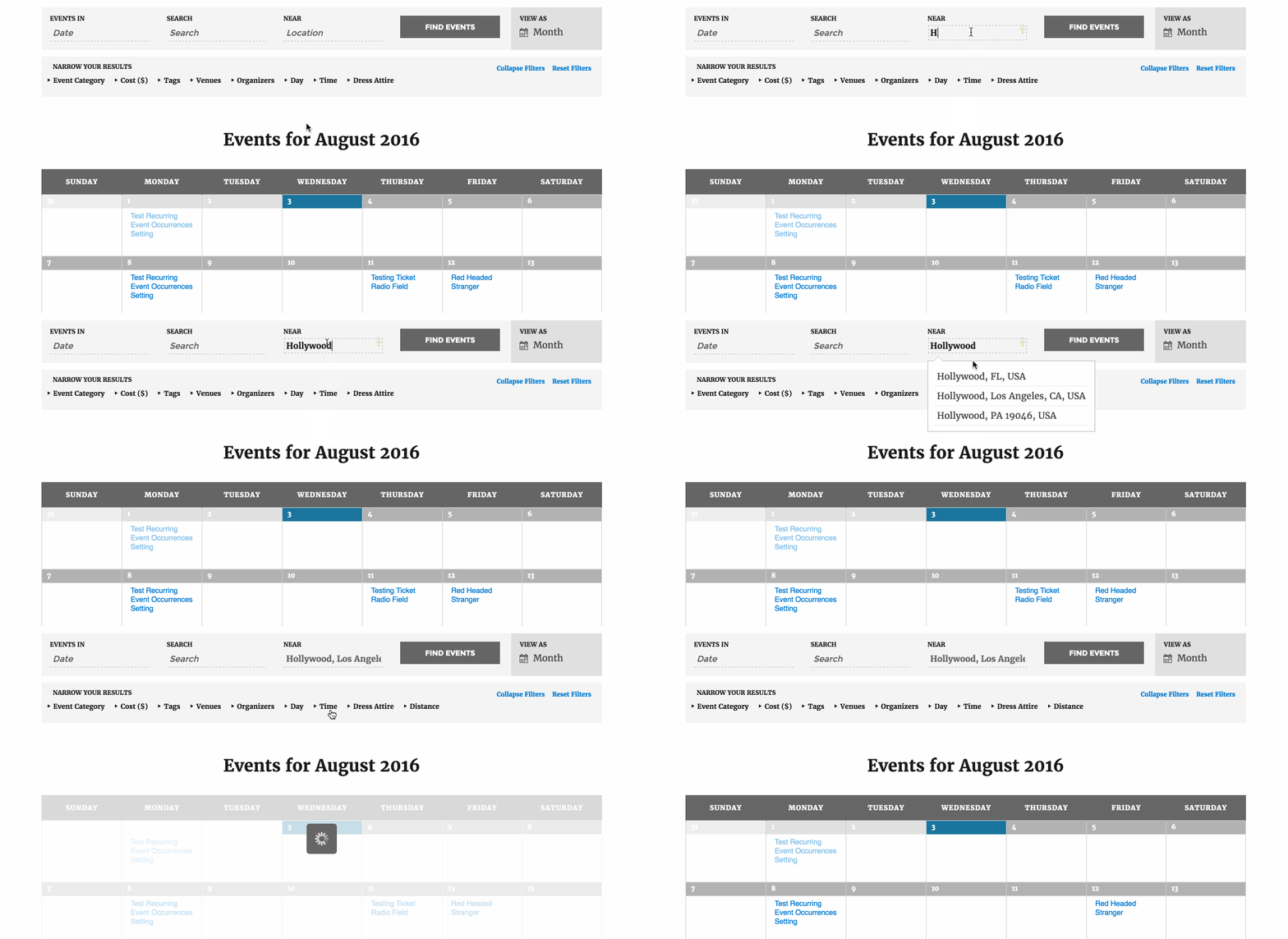
Is that what you’re looking for? Please let me know. 🙂
Cheers!
GeoffAugust 3, 2016 at 8:13 am in reply to: Does Events Tickets/Plus support deposits/partial charges? #1147063MemberHey Sean,
That’s a great question! While the plugins do not support partial payments, WooCommerce does with this extension. Event Tickets Plus integrates with WooCommerce and WooCommerce handles the actual payment transaction, so I would imagine that allows folks to put a deposit on a ticket just as they would with any other WooCommerce product.
Of course, the best way to know if to try it out — and we do offer a full refund on all our products that are purchased within 30 days, so definitely feel free to give it a go and we’d be happy to take the plugin back if it doesn’t work for any reason at all.
Cheers!
GeoffMemberHi Jack and thanks for getting in touch!
Yes, our plugins can help out with this. We have a free plugin called Event Tickets that will allow you to set up free tickets and another plugin called Event Tickets Plus that extends Event Tickets to create paid tickets and QR codes for scanning.
You will need both plugins to set things up. And, once you do, that will enable you to create free tickets that include a QR code that can be scanned at the door to check folks in at the event.
Here is a full overview of how tickets are created and how the QR code works that I would suggest checking out.
Will this work for you? Please let me know. 🙂
Cheers!
GeoffMemberHi Brittany, and thanks for getting in touch!
Do you happen to have a license for one of our premium products? If so, please log in to this site with your account so you can post to our technical support forums. We use this Pre-Sales channel to answer questions about purchasing our premium plugins. If you do not have a license, you can certainly post in our WordPress.org forum. 🙂
In the meantime, I did a quick check and using ampersands in titles seems to work when using the latest version of The Events Calendar (4.2.3) and the default WordPress Twenty Sixteen theme. I would suggest testing for conflicts to find the where the issue is coming from and reach out to the developer of the component that is causing that to happen.
Cheers!
GeoffMemberHey Oliver and great question!
Community Tickets does not provide a fee option for submitting events. However, it has a split fee setting that allows you to take a cut of the ticket sales which you can use as a fee for posting.
Will that work for you? Please let me know. 🙂
Cheers!
GeoffMemberHi Max — love the avatar. 🙂
We actually have a free plugin available called Event Tickets that sets up the ability to make free tickets for events and another premium plugin called Event Tickets Plus that extends Event Tickets to sell paid tickets.
Those will work great for single tickets to single events, but I’m afraid they are well suited to handle something like a season ticket that covers an series of events.
Another idea might be to check out using Eventbrite.com to create a season ticket for an event. Eventbrite has all the features you’re looking for, plus we have a plugin that will import that content into WordPress, if needed.
Does this help answer your question? Please let me know. 🙂
Cheers!
Geoff -
AuthorPosts