

Forum Replies Created
-
AuthorPosts
-
January 4, 2018 at 9:55 am in reply to: [tribe_events category="…"] shortcode causing post meta box callback to break #1418144
Crisoforo
KeymasterHi!
Thanks for taking your time to report this. We have this into our issues bucket as is causing other issues as well with other functionalities when the shortcode is being used, at the moment I don’t have an answer when this one is going to be released or fixed but as I soon as I have more information I will provide more information on this thread.
I’m really sorry for this inconvenience and we appreciate your patience in the meantime.
Best
Crisoforo.KeymasterHey!
First of all thanks for reaching out to support forums. You can use the Event List widget from there you can select how many events you want to display as well as you have the option to limit the events to display only the featured events.
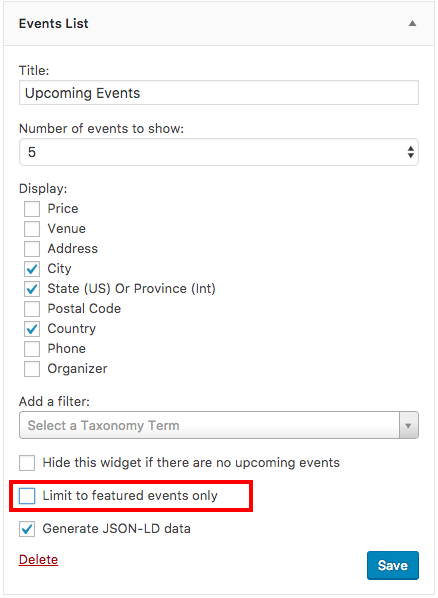
Widgets are located in
/wp-admin/widgets.php
Or by going on the left menu of the admin panel into:
Appearance >> Widgets
You can have more information about our widgets following this article.
Let me know if you have any other particular questions about this or if is there anything else I can do for you.
Best
CrisoforoKeymasterI’m closing this one as seems to be a duplicate of this one:
We can follow up from there.
KeymasterHey thanks for all the information I debug the site and seems there is an problem with your WordPress installation it might be as I wasn’t able to update the plugins on the plugins page but I tried on:
/wp-admin/update-core.php
You can update your plugins from there as well, I did already but you can try from there next times. In regards to the WooComerce notice you can follow this guide, let me know if there is anything else I can do for you.
Best
CrisoforoKeymasterHey Jared,
Thank you for reaching out to us!
We don’t have a bulk action to perform this action, however WordPress already comes with this type of action you can perform an edit on a series of events described as Bulk Edit, you can delete events in this way. Here is a more descriptive way to do it as well, you need to change the status to draft, then you need to go to the draft section by following this section on your site:
yoursite.com/wp-admin/edit.php?post_status=draft&post_type=tribe_events
And then do another bulk update to move them to the trash.
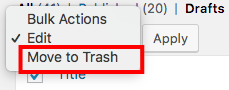
Another thing is you can change the number of events displayed on the page by clicking on the button Screen Options. so you can manage and perform operations in a larger number of events at once.

We have a place for our users to vote or suggest new feature requests as well.
Let me know if there is anything else I can do for you or if you have any other questions about this topic.
Best
CrisoforoJanuary 3, 2018 at 8:43 pm in reply to: Featured Event In Calendar List View Formatting Off #1417636KeymasterHey Steven!
Thanks for reaching out, I take a look at both sites and seems like some styling are missing on the production site, would you mind disable the cache plugins on your dev site as it seems is caching the CSS as an inline style and is hard to debug if styles are coming correctly so we can take another look.
We also have a conflict guide that might be helpful for you as well to try few things to see what’s going on in the meantime.
Let me know once you disabled the cache plugin so I can take another look to your dev site.
Thanks.
CrisoforoKeymasterThis reply is private.
KeymasterHey Alexander!
I hope you are doing great and thanks for reaching out.
In terms of your questions it seems like the issue is on your connection or hosting provider as our plugins does not affect other plugins updates like Yoast. For our plugins you can follow our guide to manual update them, make sure to backup your data in case of something goes wrong.
If you can provide us with the error.log file from your hosting we can take a look at what’s going on with your WordPress installation, this will give us a better insights on what’s going on.
Please let me know if you have any other questions or if there is anything else I can do for you.
Best.
Crisoforo.KeymasterHi Lynden.
Thanks for reaching out.
I’m sorry about this problem you are facing, however I’m not really sure what the code is as it’s not displayed correctly. Would you mind sending the code again or if you have a screenshot it would be easier so we can understand exactly where the problem is so we can give you a better answer.
There is a shortcode as well that you can use in a new post / page to display the events of today.
[tribe_events view="day"]
Or if you want to add this into a PHP file you can to this with the following way:
<?php echo do_shortcode( '[tribe_events view="day"]' ); ?>
Please let me know if there is anything else I can do for you or if you can share the screenshot I would try to give a better answer.
Thanks.
Crisoforo.KeymasterThat’s great. Please feel free to reach out again if you have any other questions.
December 29, 2017 at 3:54 pm in reply to: Move Custom Field Results Above Description in List and Single Event Displays #1414869KeymasterHi Eric.
Thanks for reach out. We have a guide in our docs, that might be helpful in the future that gives you more details about each file as well as descriptions.
But if you want to override the archive it depends on which one is your default view for example if is map you need to change is:
src/views/pro/map/content.phpOn the guide above provides a description of each file as well.
For the single view you have:
src/views/single-event.phpOr depends on the view that you want to change. In the single view you can do this by adding your code, you can add your code above
Or as you see fit better for your needs.
On the other hand if you don’t want to overwrite your templates you can use of actions which allows you to execute code on some areas of the templates for example:
// functions.php file

function tribe_events_single_event_before_the_content_message() {

  echo "This is a custom message before the content";

}
add_action( 'tribe_events_single_event_before_the_content', 'tribe_events_single_event_before_the_content_message' );
Let me know if you have more questions about this, if so I will happy answer your follow up questions.
Best.
CrisoforoKeymasterGlad to know that Steven, please feel free to reach out again if you have any other questions or issues where we can help.
Thanks
CrisoforoKeymasterHey.
Sure thing, you can remove / edit the Attendees of an event by going into the admin panel and then click on Attendees column.
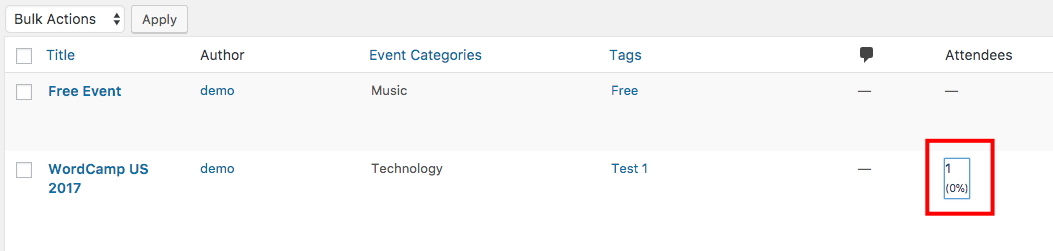
Then you can manage (edit / delete) attendes as required.

Let me know if that helps.
Best.
Crisoforo.KeymasterMy pleasure, feel free to reach out again if you have more questions.
Best
CrisoforoKeymasterHey thanks for reach out.
There is a feature in WordPress that allows you to quickly publish items that hasn’t been published yet. You can do so by following this steps.
1.- Go to the events section on the admin section where all the events are displayed and select the ones you want to publish by clicking on the left box (see read boxes on images)

2.- Select Edit on the “Bulk actions” on the left corner.

3.- Click on Apply

4.- A new box will display all the items you selected previously (on step 1), select Published from status.

5.- Click on Update.

And you should be all set, please let me know if you have any other question about this topic.
Thanks.
Crisoforo. -
AuthorPosts