

Forum Replies Created
-
AuthorPosts
-
Brook
ParticipantHowdy Josh,
I would love to help you with this.
I have seen this before. Typically it is a conflict between a “shim” the theme uses for compatibility with ancient versions of IE, and The Events Calendar. To make sure of the source you can do a conflict test. This guide walks you through how to test for a conflict, and then identify what is conflicting.
There are generally a few fixes for it.
- Remove the Shim, and make it so IE7 are not quite as compatible with your site.
- Remove the placeholders, causing them to be blank.
- Write some custom JavaScript to make a patch between your theme and The Events Calendar.
Does one of those sound like a preferred option for you?
Cheers!
– Brook
ParticipantHowdy!
The Facebook settings page moved in version 4.0 of our plugin. I am sorry for the confusion.
Go to WP Admin > Events > Import. You will see all of your Facebook and import settings there.
Does that answer your question?
Cheers!
– Brook
ParticipantHello Juan,
I would love to help you with this.
Event Tickets Plus generates a QR code that can be scanned with any QR code scanner on your phone or iPad. When anyone scans the code they are taking to their web browser. If they are an Admin in WordPress, then the user is “checked in” and you are taken to the attendees page where you can view the view and the list of attendees. If you are not logged into WordPress on that device, or if you do not have an admin account, then scanning the QR code just takes you to the event page and does not check the user in.
Does that all make sense? Will that work for you? Please let me know.
Cheers!
– Brook
ParticipantThanks for checking back Matt. That feature is not quite ready for release yet. We have been doing a decent measure of research on how best to build it without breaking other things we support like WPML. We have tentatively scheduled releasing that ability in version 4.2 of Event Tickets Plus. We are currently nearly finished with 4.1, then we can begin on the meat of 4.2. If everything goes smooth then Event Tickets Plus will full support recurring events in 4.2.
Does that answer your question?
Cheers!
– Brook
ParticipantThank you for sharing this Thomas. I am going to pass it on to our lead WooCommerce gentleman and see if this sort of modification would be a goodfit for all our users. If so we can do something similar in a future version.
Either way we will share this with folks in similar shoes. Thanks again. Cheers!
– Brook
ParticipantSince this topic has been inactive for a spell it is getting archived. Let us know if you need anything else!
Cheers!
– Brook
January 25, 2016 at 10:30 pm in reply to: Pro user, option for recurring events missing after upgrade! #1062191ParticipantThanks for sharing the system info! Very helpful.
In WP-Admin > Events > Settings do you see a “Licenses” tab?
Would it be possible for you to add a new admin account to your site and share the user/password with me? I would just like to temporarily login and view the problem with my browser’s inspector. No worries if you prefer to not provide this.
Cheers!
– Brook
January 25, 2016 at 10:26 pm in reply to: Event Calendar Pro – CSV Import – Event End Date Incorrect #1062186ParticipantOops I am so sorry my last response is missing! I might have closed the tab before it finished posting my response.
I was unable to reproduce this issue. I was wondering if perhaps this could be the result of a conflicting plugin of theme. Sometimes plugins or events themes alter WP Timezone settings midscript, which can cause dates to drift by one day. Would you mind doing a conflict test? This guide walks you through how to test for a conflict, and then identify what is conflicting. Once we have narrowed this down we will be a big step towards finding a solution.
I hope you enjoyed your weekend as well!
- Brook
ParticipantHowdy timgesic,
Great question. Option B would work really well. I would delete everything you quoted, expect the final } because that one is still needed for the rest of the page to work. Make sense?
- Brook
January 22, 2016 at 11:24 pm in reply to: Plugin update detail, link for plugin page broken #1060805ParticipantThanks you very much for reaching out about this Chris! I will see about getting that fixed. I tried reproducing this, I went to Wp Admin > Plugins and clicked “View Details” link for The Events Calendar. But it took me to a different page. Am I in the right area?
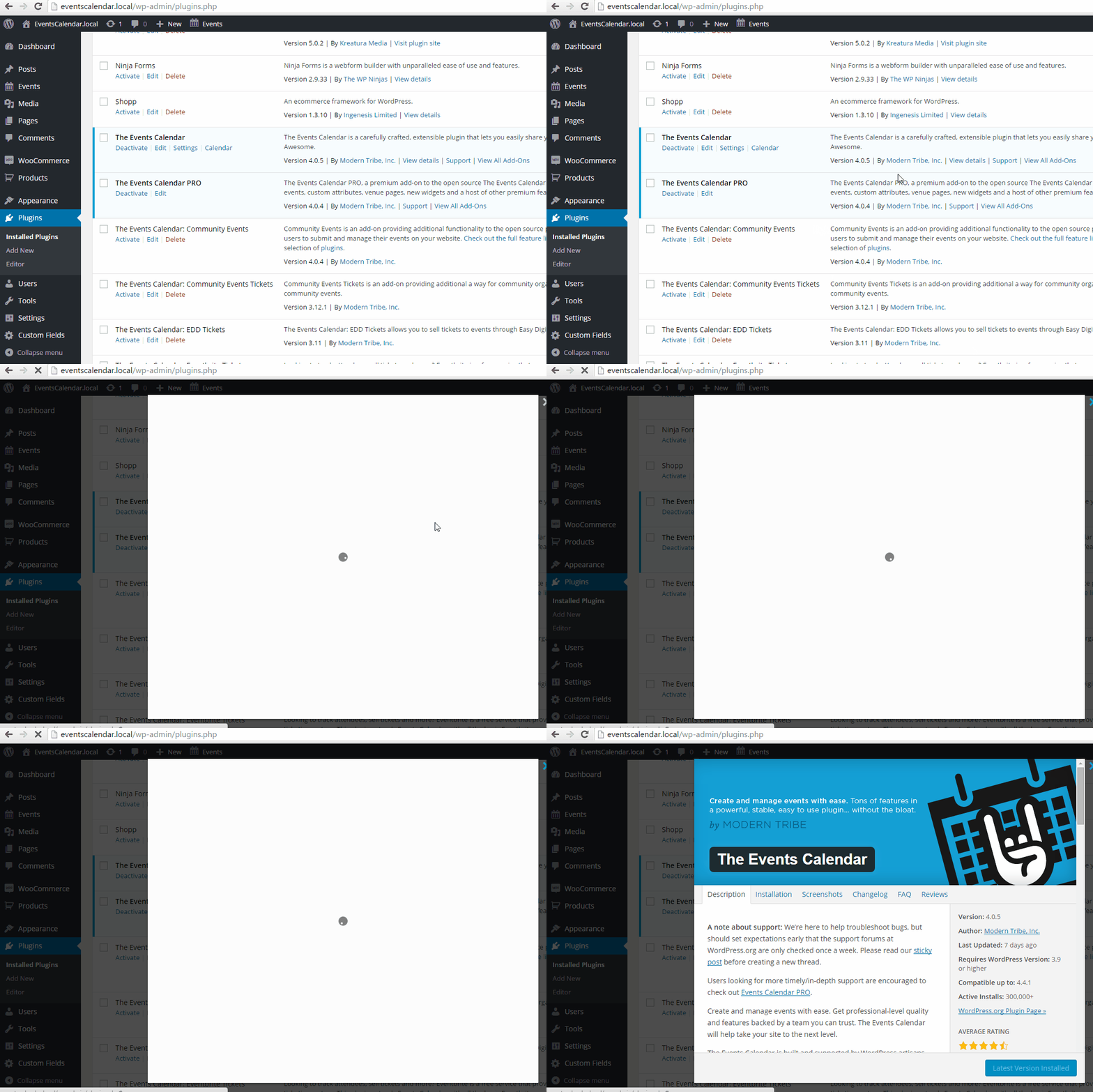
Thanks again! Once we isolate this we can fix it.
– Brook
ParticipantHowdy Marcos,
I would love to help you with this.
You can offer multiple types of tickets for an events. It sounds like you would want 7 types of tickets for that particular event. Event Tickets Plus supports this for sure. The only thing is that there is not global stock count for tickets. Each type of ticket would have it’s own # of tickets available that you set. Sometimes you want to multiple types of tickets to pull from the same stock, such as your male and female options to share the same stock #. This is not yet auotmatic with Event Tickets Plus and will require some manual monitoring if that is your goal.
Does that all make sense? Will that work for you? Please let me know.
Cheers!
– Brook
January 22, 2016 at 10:48 pm in reply to: Pro user, option for recurring events missing after upgrade! #1060796ParticipantIf for some reason our plugin or another one got corrupted during the update, you might try temporarily renaming the plugins folder to plugins-bak. Try loading WP Admin now to disable all of your plugins. The site should be working. Now you can rename the plugins folder back to the original, and reenable them one at a time from WP Admin. If the issue persists even with the plugins folder renamed, then WordPress itself was likely corrupted during the update. You might try reinstalling it.
Let us know how we can be of help. Cheers!
– BrookJanuary 21, 2016 at 11:46 pm in reply to: How to automate posting TEC events to your MailChimp newsletter #1060255ParticipantThanks for sharing Mike. I am going to give this a test myself and see what kind of support we can offer for this sort of tie-in. I really appreciate the tip!
Cheers!
– BrookParticipantHowdy Birgit,
You might try adding the following CSS:
body .tribe-bar-submit {
    margin-left: 6.6667%;
    width: 35%;
}
That’s working in my tests. It working for you too?
Cheers!
– BrookParticipantThanks for sharing the link. For your theme this is the CSS I’d use:
.tribe-mini-calendar-grid-wrapper table.tribe-mini-calendar { border-collapse: collapse; }

.tribe-mini-calendar-grid-wrapper table.tribe-mini-calendar td, .tribe-mini-calendar-grid-wrapper table.tribe-mini-calendar th { padding: 5px 0; }
That do what you wanted?
- Brook
-
AuthorPosts