

Forum Replies Created
-
AuthorPosts
-
Brian
MemberHi,
Thanks for using our plugins. I can help out here.
The license system works for individual installs of WordPress and not the domain itself.
However, the license is only needed for automatic updates and not for the plugin to work.
So you can add the license to the site you are doing the automatic updates and the other does not need it.
You can also move the license from site to site following this guide:
https://theeventscalendar.com/knowledgebase/using-one-license-for-your-live-and-dev-sites/
And we have move license related guides here:
https://theeventscalendar.com/knowledgebase-category/install-licenses/
Let me know if you have any follow up questions.
Thanks
MemberAlso, If you have purchased a plugin from us, please login and post in the premium forums for that plugin and we can help you out there:
https://theeventscalendar.com/support/forums/
Thanks again!
MemberHi,
Thanks for using the Events Calendar.
Here on the pre-sales forum, I’m afraid we do not provide support. I would ask that you take any support questions across to our wordpress.org forum – our staff scan it periodically and other community members may also be able to help out.
Thanks again!
MemberHi,
Thanks for using our plugins. I can help out here.
By default we do not have a subtitle field for events so that is coming from your theme or another plugin.
You can add the coding to display a subtitle in our single event template following our themer’s guide:
https://theeventscalendar.com/knowledgebase/themers-guide/
I can help get the placement in our template right, but I am not sure what coding you have in your site that is needed to display.
If you can find that let me know.
Thanks
MemberHi,
Thanks for using the Events Calendar.
Here on the pre-sales forum, I’m afraid we do not provide technical support. I would ask that you take any technical support questions across to our wordpress.org forum – our staff scan it periodically and other community members may also be able to help out.
Thanks again!
February 16, 2016 at 2:12 pm in reply to: How can I move the RSVP section to the content area #1073996MemberHi,
The End Sale Date is today at 12pm so the RSVP form will stop showing after that.
If you change that time to the future it should show again.
If it disappeared early it could be the sites Timezone is off.
MemberSounds good.
Since this is marked resolved I am going to close this ticket, but if you need anything else related to this topic or another please post a new topic on the forum and we can help you out.
Thanks
MemberHi,
Thanks for the interest in our plugins. I can answer your questions.
We do not have a shortcode for the main views of list, month, map, etc…
We do generate a list, month, map, etc view for each category. That is done in the free version.
This free plugin might help create list views for you where you would like them:
As for Pro we do have our own shortcodes for the Pro Widgets:
https://theeventscalendar.com/knowledgebase/pro-widget-shortcodes/
Let me know if you have any follow up questions.
Thanks
MemberHi,
Thanks for using our plugins. I can help out here.
We do not have a feature to send the tickets as a pdf.
If you think that is something you would like as a feature I encourage you to visit our User Voice Page and either upvote an existing request or make a new request there.
Cheers
February 16, 2016 at 8:32 am in reply to: How can I move the RSVP section to the content area #1073847MemberHi,
It is usually a good idea to create a new ticket for each issue, but I can help out here.
What are the RSVP settings for the RSVP not showing:
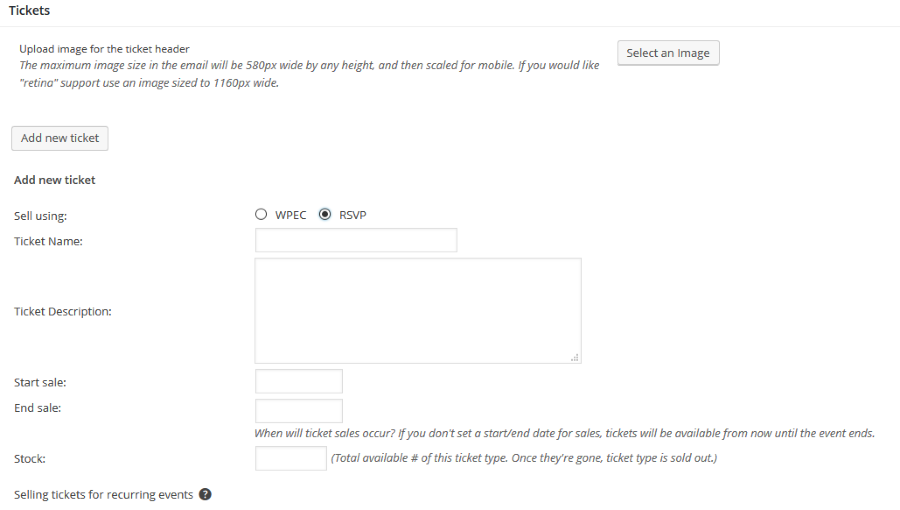
Also, if remove the snippet does the RSVP show then?
Thanks
MemberHi,
Thanks for using our plugins. I can help out here.
We have this setting to
Events >Settings > General Tab > Recurring event instances
When that is checked it only shows the first instance.
It does not give a choice though on the front end.
When given a choice by default it is off and I looked and we do not have coding to change that.
However, if you check that particular box you’ll notice that an extra parameter is added to the URL, something like this:
example.com/events/?tribeHideRecurrence=1
So, one option is simply to update your navigation menu so that any links to the events page include that extra parameter (thus ensuring the checkbox is checked).
Would that work for you?
MemberHi,
Thanks for using our plugins. I can help out here.
To make any edits to the templates a good resource to start with is the themer’s guide:
https://theeventscalendar.com/knowledgebase/themers-guide/
Following that guide you can move this template:
plugins/the-events-calendar/src/views/single-event.php
To your child theme:
childtheme/tribe-events/single-event.php
There you can look to disable these:
<?php do_action( 'tribe_events_single_event_after_the_content' ) ?><!-- Event meta -->
<?php do_action( 'tribe_events_single_event_before_the_meta' ) ?>
<?php tribe_get_template_part( 'modules/meta' ); ?>
<?php do_action( 'tribe_events_single_event_after_the_meta' ) ?>Or go deeper into the templates and remove others from the modules directory.
Let me know if you have any follow up questions.
Thanks
MemberThis reply is private.
MemberHi,
Thanks for using our plugins. I can help out here.
If an event does not import and you believe it has restrictions, the restrictions would be under the Facebook Page settings.
However, I was able to import both of those events so they do not appear to have restrictions.
Please review our setup guide to verify you have everything in there:
https://theeventscalendar.com/knowledgebase/configuring-facebook-events/
We also have a complete guide here for New Users:
https://theeventscalendar.com/knowledgebase/new-user-primer-facebook-events/
Please note I removed your license key from the data, this is a public forum and the license key does not ever have to be included. You do have the option to make a reply private too.
Let me know what you find out.
Thanks
MemberHi,
Thanks for the interest in our plugins. I can answer your questions.
We have this guide to our Non Profit Program:
https://theeventscalendar.com/knowledgebase/do-you-offer-discounts-for-non-profit-organizations/
Let me know if you have any follow up questions.
Thanks
-
AuthorPosts