
Home › Forums › Calendar Products › Community Events › How can I move the RSVP section to the content area
- This topic has 14 replies, 3 voices, and was last updated 10 years, 7 months ago by
Support Droid.
-
AuthorPosts
-
January 11, 2016 at 9:35 pm #1054292
Daniel
ParticipantI found this article useful (link below), but it does not mention anything about moving the RSVP box along with the Tickets. Any advice?
https://theeventscalendar.com/knowledgebase/moving-the-ticket-form/

Thank you,
DanJanuary 12, 2016 at 8:27 am #1054642Brian
MemberHi,
Thanks for using our plugins.
Try out this snippet to move the RSVP Form:
/**

* Move RSVP Tickets form in events template

*/

if (class_exists('Tribe__Tickets__RSVP')) {

	remove_action( 'tribe_events_single_event_after_the_meta', array( Tribe__Tickets__RSVP::get_instance(), 'front_end_tickets_form' ), 5 );

	add_action( 'tribe_events_single_event_before_the_meta', array( Tribe__Tickets__RSVP::get_instance(), 'front_end_tickets_form' ), 5 );

}
Add that to your Theme’s functions.php to work.
Does it help?
Thanks
January 15, 2016 at 9:41 am #1056709ParticipantAdding the code snippet you provided did not move the RSVP to the content area. It still shows up in my sidebar.
It might help to know that I already have this snippet in my Functions.php file:
// ==============================================================
// 2016-01-11: Moving Tickets Plus box to Content Area.

/*
 * Moves the front-end ticket purchase form, accepts WP action/hook and optional hook priority
 *
 * @param $ticket_location_action WP Action/hook to display the ticket form at
 * @param $ticket_location_priority Priority for the WP Action
 */
function tribe_etp_move_tickets_purchase_form ( $ticket_location_action, $ticket_location_priority = 10 ) {
	$etp_classes = array(
		'Tribe__Tickets_Plus__Commerce__EDD__Main',
	//	'Tribe__Tickets_Plus__Commerce__Shopp__Main', // As of ETP v4.0 Shopp will generate errors when referenced, if not active. Uncomment this line if you have Shopp Active
		'Tribe__Tickets_Plus__Commerce__WPEC__Main',
		'Tribe__Tickets_Plus__Commerce__WooCommerce__Main'
	);

	foreach ( $etp_classes as $ticket_class ) {
		if ( ! class_exists( $ticket_class ) ) break;

		$form_display_function = array( $ticket_class::get_instance(), 'front_end_tickets_form' );

		if ( has_action ( 'tribe_events_single_event_after_the_meta', $form_display_function ) ) {
			remove_action( 'tribe_events_single_event_after_the_meta', $form_display_function, 5 );
			add_action( $ticket_location_action, $form_display_function, $ticket_location_priority );
		}
	}
}

/*
 * TO MOVE THE TICKET FORM UNCOMMENT ONE OF THE FOLLOWING BY REMOVING THE //
 */

/*
 * Uncomment to Move Ticket Form Below Related Events
 */
//tribe_etp_move_tickets_purchase_form( 'tribe_events_single_event_after_the_meta', 20 );

/*
 * Uncomment to Move Ticket Form Below the Event Description
 */
tribe_etp_move_tickets_purchase_form( 'tribe_events_single_event_after_the_content', 5 );

/*
 * Uncomment to Move Ticket Form Above the Event Description
 */
//tribe_etp_move_tickets_purchase_form( 'tribe_events_single_event_before_the_content' );
January 15, 2016 at 12:47 pm #1056784MemberThat coding can be removed. It is for the Event Tickets Plus plugin for WooCommerce Tickets, etc…
We do not have a sidebar by default in our templates so not sure where this is coming from.
What theme are you using?
January 18, 2016 at 7:15 am #1057847ParticipantI have the Events Tickets Plus plugin for tickets, and needed to move the Tickets / Purchase info (i.e. descriptions, and Add to Cart stuff) to the content area, so I used that snippet. If I remove that snippet, it will place that back into my sidebar.
Using the Avada theme, most recent version.
January 18, 2016 at 8:05 am #1057883MemberOh ok good to know.
Avada does create that sidebar so maybe something they are doing is preventing the RSVP from moving.
I tested again and that snippet works for me to move the RSVP:
Maybe this will work better with Avada:
/**

* Move RSVP Tickets form in events template

*/

if (class_exists('Tribe__Tickets__RSVP')) {

	remove_action( 'tribe_events_single_event_after_the_meta', array( Tribe__Tickets__RSVP::get_instance(), 'front_end_tickets_form' ), 5 );

	add_action( 'tribe_events_single_event_after_the_content', array( Tribe__Tickets__RSVP::get_instance(), 'front_end_tickets_form' ), 5 );

}
Try that with the different hook.
January 19, 2016 at 6:57 am #1058644ParticipantBrian, thanks for your reply. Please don’t let the bots close the issues, as I’m waiting until this afternoon to implement your suggestion. We have a large event that I don’t want to mess up by tinkering with the website, but registration cuts off at noon today! So tinkering will be done after that.
January 19, 2016 at 7:31 am #1058673MemberOk sounds good. The bot does not close for 2 weeks with no relies so we should be good.
Let me know after your event ends.
Thanks
January 31, 2016 at 12:12 pm #1065341ParticipantBrian, this did work, thank you very much.

Not sure if I need to start a new thread for this part or not but the RSVP input form looks different from the wooCommerce tickets input (see screenshot). Could you please let me know which files you might suggest editing in order to make them look uniform?I understand the CSS would need updating but it seems that the actual input form might need updating as well, and I’m not sure which file would control this bit.
Thank you,
DanJanuary 31, 2016 at 3:41 pm #1065372MemberGreat, glad it is working.
We are limited in supporting theme compatibility issues. So not sure how much we can help with the styling as Avada adds custom styling to everything.
They might be able to help better then us to transfer their styling to the RSVP form.
AS for what to edit. I would not edit any file to change the look, but instead add custom css to change it.
Thanks
February 16, 2016 at 7:56 am #1073824ParticipantBrian, I can change the look myself using CSS, thanks.
The RSVP area that I added using the snippet you provided has disappeared suddenly. Any ideas why? I double-checked the event and the RSVP option is definitely enabled. Any help would be appreciated.
Here is a link to the event I am referring to: https://sipeshouston.org/event/sipes-luncheon-february-18-2016/
-
This reply was modified 10 years, 8 months ago by
February 16, 2016 at 8:32 am #1073847MemberHi,
It is usually a good idea to create a new ticket for each issue, but I can help out here.
What are the RSVP settings for the RSVP not showing:
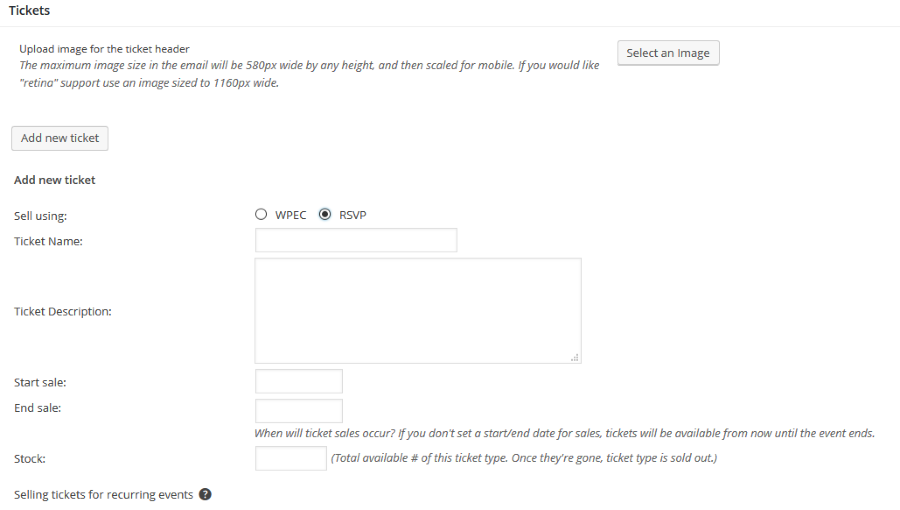
Also, if remove the snippet does the RSVP show then?
Thanks
February 16, 2016 at 9:09 am #1073866Participant
If I remove the snippet below, the RSVP does not show up.
/**
* Move RSVP Tickets form in events template
*/
if (class_exists('Tribe__Tickets__RSVP')) {
    remove_action( 'tribe_events_single_event_after_the_meta', array( Tribe__Tickets__RSVP::get_instance(), 'front_end_tickets_form' ), 5 );
    add_action( 'tribe_events_single_event_after_the_content', array( Tribe__Tickets__RSVP::get_instance(), 'front_end_tickets_form' ), 5 );
}
February 16, 2016 at 2:12 pm #1073996MemberHi,
The End Sale Date is today at 12pm so the RSVP form will stop showing after that.
If you change that time to the future it should show again.
If it disappeared early it could be the sites Timezone is off.
March 2, 2016 at 8:35 am #1084389KeymasterThis topic has not been active for quite some time and will now be closed.
If you still need assistance please simply open a new topic (linking to this one if necessary)
and one of the team will be only too happy to help. -
This reply was modified 10 years, 8 months ago by
-
AuthorPosts
- The topic ‘How can I move the RSVP section to the content area’ is closed to new replies.