

Forum Replies Created
-
AuthorPosts
-
Brian
MemberHi philly00,
Sorry for the issues with the Add to Cart not showing. I can help you out with this.
I took a look at your site and visited the Event and saw the Add to Cart Button and was able to get to the Proceed with Checkout page with the tickets in the cart.
Were you able to make some changes to get it working? Can you please test again and let me know if there is an issue. Please try to view the site in a browser you do not normally login WordPress with or clear your browsers cache.
Let me know if you still need help and I will be happy to provide it.
Thanks
MemberThanks for the information we will take care of fixing the link.
MemberHello, I am going to close this topic as it is a duplicate of another ticket created today and we have responded to that ticket and we would like to keep the conversation in one place.
Thanks
September 15, 2014 at 5:39 pm in reply to: WooCommerce Causing Issues With Events Calendar Pro Recurring Events #745494MemberHello Scott,
We have been testing in WooCommerce 2.2 and the Events Calendar and Add Ons at 3.7 and have not had the issue you are having. We have seen related with some plugins that change the timezone in WordPress, but have not seen WooCommerce do that.
So, we are sorry for the frustrations, but we can help you resolve this. Thanks for letting me know about what you have tested so far.
I took a look at the Calendar and saw all the events are the same for September.
You say this only happens with WooCommerce Active, correct? If that is the case are the Events information correct in the Admin, even with WooCommerce Active?
Also, have you made any customizations to the templates or custom functions and put them in your theme for either WooCommerce or the Events Calendar.
When you click the next month link are those events correct on that month? Please try for a couple months and let me know if any are correct.
Please let me know what you find out and we can take the next step.
Thanks
MemberLet me see if I can come up with some more ideas.
The week View and Filter Bar reply on Javascript and since I am not getting an error, maybe there is some information missing.
I am looking at the source code and it appears that there is some customization for the events template, have you moved the templates to your theme to edit? Or are you using the “Default Page Template” for the Events template on the Display tab?
I also noticed the Body tag does not have the body class function, that could be causing the issue. (although doubtful)
Are you able to add the body class function and can you verify your Events Template setting or if you have any customizations?
Please let me know.
In addition, can you follow the steps below to setup debug on the site and let me know what you find out. Maybe an error will pop up there.
Debug
Can you please follow the section of the WordPress Codex Debug titled “Example wp-config.php for Debugging” on this page:http://codex.wordpress.org/Debugging_in_WordPress
Please add that coding to your wp-config.php file.
After that please turn on debug mode in the Events Calendar.
Go to Events->Settings and in the Miscellaneous Settings at the bottom of the General Tab Please Click on Debug Mode and Save.
Please try to search the site and go to the map view a couple times and then if you can send in your next reply the information in the debug.log in the wp-content directory.
Also, please send me the information in the System Information box under Events->Help.
You can make those both private replies and we can take it from there.
MemberHi jeroenbackx,
I can help you out with your question.
It sounds like a Recurring Event is what you are asking for, unless you are asking to hide some of the recurrences.
You can setup an Event(Class) and a recurrence with the Start and End Date and then choose the recurrence period for weekly. This way if the classes runs on a Thursday it will only show in your calendar every Thursday during that period.
We do have an option in the settings called “Recurring event instances” but then it does not hide in the month view.
If you would like to selective hide recurrences in the month view the only option will be to do some customization to the coding.
Does that help? Let me know if I was off on what you are trying to do and I can provide some more information.
Thanks
Memberjorditost, glad you were able to find a solution and thanks for sharing your solution.
That is the correct way to do things.
Since it look liked you figured this out I am going to close this ticket, if you have any more questions related to this just reference this ticket in a new one.
Thanks
MemberHi,
Thanks for the Interest in our plugins.
You are trying to show the events from your website in a tab on a Facebook Page, correct?
I think it is certainly possible, but our plugins themselves do not have that capability so it would be up to you to create the entire Facebook Tab that would show the events.
Unfortunately, there is not much support we could give on that customization.
It does sound like an interesting idea, so if you would like can you please head to our UserVoice page and create tit as a feature as this is where we take some of our next features from.
http://tribe.uservoice.com/forums/195723-feature-ideas
Thanks!
MemberHello jonswerens,
I can help you out with hiding the meta area on your site.
I took a look at your coding and the your site to see it working.
I think that is going to be the best coding to hide that div on all the Event Pages only.
If you miss one or two more you could add another selector with a body class from that page to do it.
Let me know if you would like any more help.
Thanks
September 15, 2014 at 11:17 am in reply to: Renamed Event Category disappeared in front-end at all #744972MemberHi gonchar,
Sorry for the issues when the Events Categories not showing after your customization.
I can help resolve this with you.
Can you please check in:
Events->Settings->Filter Tab
And let me know if under Available Filters the Events Categories is checked.
Nothing is showing on the front end so it maybe turned off.
What coding did you use to change “Event Category” to “Country”?
Can you put it into Pastebin and provide a link?
Let me know what you find out and we can go from there.
Thanks
September 15, 2014 at 11:12 am in reply to: Custom User Capabilities Event Calendar EventPro integrated with WordPress roles #744969MemberHello wildersites,
I can help you with your capabilities dilemma. The Events Calendar does have built in custom capabilities to create events.
So you can use the Members Plugin to create custom roles with the capabilities.
Once you create a role you can edit the capabilities and it will show the Events capabilities you can assign such as edit_tribe_events.
Then you can just check what you want the role to be able to access.
It can get a little tricky getting the settings correct, so usually I would make a clone of the role that does everything I want and then remove the capabilities I do not want.
Let me know if you have any questions once you get into it about the _tribe_events capabilities.
Thanks
MemberHi Donna,
Thanks for going through the steps of the themer’s guide trying to get this to work. I can help you get unstuck here and hopefully less confused.
You have moved over the correct file to your theme from there the process is going to be adding to the table to display the description.
Since you have Pro you could create a Ticket Description Additional Field then add that to the template in a new row of the table as the description.
If you create that additional field and still would like some help placing it in the template, please let me know what you called it and I can help on the next step.
Thanks
September 15, 2014 at 8:48 am in reply to: Changing Text on Order Reciept + Not getting follow up email. #744817Memberhmclean thanks for sharing that link. Since this is an older post I am going to close it again as it was unmonitored. If anyone has an issue similar to this or needs help please create a new ticket and reference this one.
September 15, 2014 at 8:43 am in reply to: Possibility to have no end date for events , Google import button on calendar #744808MemberHi,
Sorry for the delay in responding.
I can help answer your questions and provide some insight into fixing your issues.
1) Is it possible for an event to have no end time?
Unfortunately there is now way to have an open ended event they all need end dates.
2) Google calendar export option is missing from calendar page
The Export button that is there is for Google Calendar, Apple iCal, and other compatible apps. On the month view there is just the one export button. Individual Events have the two separate buttons.
3) Some of the fields such as Organizer and Venue are missing :
Organizer and Venue are Titles for the section and not references so they do not by default have a colon.
Not sure why your “Cost” Has an extra space, it appears to be coming from a customization.
This is the default view we have for the events which shows how the plugin shows all the information including which have colons.
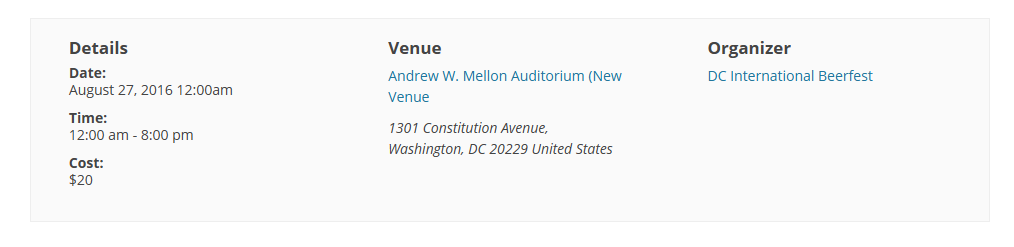
Let me know if you would like anything else.
Thanks
MemberHello corpassets,
Thanks for using our products and I can certainly help you with this and try to avoid using another coder.
Thank you for taking the time to explain the steps you did to find the conflict, that helps a lot.
I am not entirely clear about what is going so if you can please answer my questions I can get back to you a solid solution.
I went to the link you provided and when you say “woocommerce styling on the ticketing page” do you mean all those black borders?
Beyond those black lines, what exactly is breaking in the styling? Can you provide a image of what it should look like?
Also, can you please provide a link to the coding patch provided?
Let me know what you find out and we can go from there.
Thanks
-
AuthorPosts