

Forum Replies Created
-
AuthorPosts
-
Brian
MemberSorry for the trouble webpower,
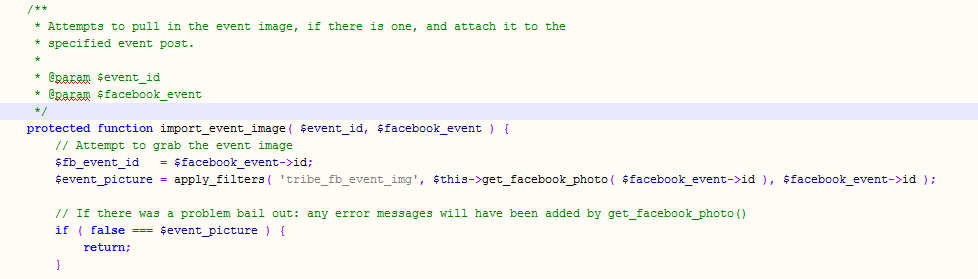
It is saying there is an & in there that should not be. Not sure how that got included it was not in the coding I provided.
This is how it should look:
 Member
Hi,
I can try to help out on the customization, but since we do not support that feature there is not much I can suggest.
As for helping out you may look into using a form system such as Gravity Forms or Ninja Forms that might get you close to what you are looking to do and then you could modify it to fit what your would like.
That is about all we can suggest for something like this, but if you have any follow up question let us know.
Thanks
MemberOk glad it has worked itself out.
I am going to go ahead and close this ticket. If you have a similar issue or another in the future, please do not hesitate to create a new ticket.
Thanks!
MemberHi,
Sorry for the issues you are having.
Do you have a Pro License and can you please login and post in the Pro Forum for Tech Support.
If not please post on the WordPress.org Forum for support questions:
https://wordpress.org/support/plugin/the-events-calendar
Thanks
MemberHi,
Thanks for the interest in the Events Calendar Pro. I can answer your questions.
1. is it possible to create on main menu direct link to a category event list ? For exemple, menu with home / event cat.1 / event cat2 / event cat3 / contact us etc ?
Yes it is possible to create a menu link to a category in the Events Calendar.
So if you have a category called Convention this would be the url:
yoursite.com/events/category/convention/
You could then put that as a custom link in your menu and that will show the Events Views for events in that category.
2. event is it considered as post ? I mean, I will implement a slideshow on my homepage, and I’d like this slideshow showing the 10 latest events created (or the soonest next 10, still don’t know…). Is there any way to do that ? do you have already some plugin doing it or do we have to adapt it ?
A Event is a custom post type, so it is close to being a post, but it is separate. We do not have a slideshow plugin that does as you would like, but if one works with custom post types you maybe to get it working. We are unable to provide support with customizations, but maybe can answer a question or two about it.
Let me know if you have any follow up questions.
Thanks
MemberHi Barry,
That is an interesting project you are working on. I can help answer your questions.
First we do not do paid customizations on the plugin. We only support it and try to help get people started if we can, but that is about it. We do have a list of developers here:
https://theeventscalendar.com/freelance-developers-for-customizations/
As for the RSS.
We do have built in feeds for the Calendar and Categories.
So if you have a category called convention this would be the feed url:
yoursite.com/events/category/convention/feed/
Also there is a feed for the main events view here:
yoursite.com/events/
You can see these all working in the core version of the Events Calendar on WordPress.org
Let me know if you have any follow up questions.
Thanks
January 2, 2015 at 6:37 am in reply to: Trying to update to 3.9, system telling me that 3.8.1 is the latest EC Pro #927766MemberHi,
Sorry for the issues you are having with the update process.
So you are on The Events Calendar 3.8.1 and it will not let you update to 3.9, correct?
I think the quickest way around this is to deactivate and delete the Events Calendar Pro.
Then download from your account on theeventscalendar.com the latest version and upload it to your site and activate it from the WordPress Admin.
This does not cause you to lose any data, but it is best to backup your site just in case.
Let me know if that helps.
Thanks
MemberHi Mark,
Sorry for the issues you are having. I can help troubleshoot them.
I took a look at your site and see what you mean about the donate button and the add an event button.
Those buttons are being included, by your theme and not The Events Calendar so I am not sure how to remove it or change it. I can provide some css to hide the buttons, but that is about it.
Let me know if you would like the css, otherwise the theme developer may have a solution already to remove those buttons.
Thanks
MemberHi,
Sorry for the issues you are having. I can help clarify this.
Not sure what is wrong about the date.
You have it setup to start on the 23rd and end on the 25th.
That is how it is showing on the website and based off your screenshots everything is working as intended by the plugin.
What are you seeing that is wrong?
MemberI looked into this more and unfortunately, no closer to finding the source.
It does not look like a theme or plugin conflict and no other customers are reporting this issue so it is not a known issue.
Also, not sure what is going on with the “Bringing in the light” event I tried to reproduce the error you are having with the changing dates and it did not do it for me.
I think we need to start looking at the server and the debug logs to see if they have any clues to what is causing this.
Can you please turn on the WordPress Debug and the Events Calendar Debug to see if we can get more information.
Events Debug
Go to Events->Settings->Miscellaneous SettingsThen check Debug Mode
WordPress Debug
Please follow the steps in the WordPress Debug Codex in the Example wp-config.php for Debugging section:http://codex.wordpress.org/Debugging_in_WordPress
Please place that coding and load a couple event pages and then check the error log and see if there are any errors.
Hosting
Also, please contact your host and let them know the issue and see if they can check the server error logs and see if they find anything that might help us out.Let me know what you find out and we can go from there.
Thanks
MemberGlad it helps Lee.
And since there is has not been any activity on this thread for over 2 weeks so I am now closing it. Feel free to start a new thread if you have further issues. Thanks! 🙂
January 2, 2015 at 5:41 am in reply to: Have Manually Updated Events Calendar Pro to 3.9; Still can't Activate #927737MemberI would delete this folder:
events-calendar-proThen rename this folder:
events-calendar-pro.3.9.0to this:
events-calendar-proThen you should be able to activate 3.9
Let me know if that works out.
Thanks
MemberIt is not directly our plugin that is having the conflict, but the Google Map’s script being loaded by two difference sources that causes the issue as the scripts that use the Google Map’s script do not know the correct one to use.
I am not sure how to remove Google Maps from the theme, I did also notice that the theme is loading jQuery v1.7.2, which looks to be causing the Widget issue. The Events Calendar needs the latest version which is 1.11.1. It is recommended to load the latest version of jQuery from WordPress and not an external copy such as your theme is doing.
I would work on getting the latest version of jQuery loaded first and then the site still might work even though the Google Map’s script is loaded twice.
MemberGreat, glad it helps, I am going to go ahead and close this ticket, but if you need help on this or something else please post a new ticket.
Thanks!
December 30, 2014 at 7:26 am in reply to: Adding WordPress Events Calendar Pro to Clubix Theme #926761MemberI am going to close this topic as we typically close threads if there is no activity after two weeks. Feel free to create a new thread and reference this one to save you time.
Thanks
-
AuthorPosts