

Forum Replies Created
-
AuthorPosts
-
January 28, 2015 at 7:23 am in reply to: Upgrade from 3.5 to 3.9 > Database field name changes? #938465
Brian
MemberSince I haven’t heard back from you here, I’m going to go ahead and close out this thread. Feel free to start a new thread if you have further issues. Thanks! 🙂
MemberSince I haven’t heard back from you here, I’m going to go ahead and close out this thread. Feel free to start a new thread if you have further issues. Thanks! 🙂
MemberHi,
Sorry for the issues you are having.
We get those coordinates from Google directly after sending them the address, however, sometimes Google has issues. Usually it is outside of the U.S., but can happen anywhere.
We are working to integrate a feature to modify the coordinates and hope to have that in an upcoming release.
In the mean time if you check out the Event Rocket:
It has the ability to modify coordinates if Google and our plugin cannot get it right with the address.
Let me know if you have any follow up questions.
Thanks
MemberHi James,
Sorry for the issues you are having. Glad you found Event Rocket as that does have a way to edit the coordinates directly and would be my suggestion to use.
We get those coordinates from Google directly after sending them the address, however, outside of the United States sometimes Google has issues.
We are working to integrate the feature to modify the coordinates without using Event Rocket and hope to have that in an upcoming release.
Let me know if you have any follow up questions.
Thanks
MemberHi Thomas,
One license will be fine, there is only on place to enter the license key so you cannot even add them to every site.
If you Network Activate the license field is in the license settings. If you individually activate the plugins the license field only appears in the central site.
Let me know if that helps.
Thanks
MemberHi,
Thanks for the interest in our Plugins. Purchasing the Business license does not sync events between sites. There is no feature to do that. They would have to be entered in each site individually.
You could instead use the CSV importer to import events, you could enter them once there and then import to all 3 sites.
Let me know if you have any follow up questions.
Thanks
MemberHi Paul,
Thanks for purchasing our plugins. I can help you out.
There is no feature to add more information to the pop up. It is control by a script.
It could be possible to modify the script.
We can help answer questions about that customization, but are unable to provide support on it.
Let me know if you have any follow up questions.
Thanks
January 28, 2015 at 7:02 am in reply to: Remove "View All Events" link from Advanced List Load Widget #938449MemberHi melody1204,
Glad you figured it out. I am closing this thread as it is over 2 years old and the List Widget has changed since then, but if you have any other issues related to this or something new, please create a new one. And for future reference it is always best to create a new thread for your questions or issues so we can give you our full attention, but we will always help out no matter where you post in the forum.
Thanks
January 28, 2015 at 5:28 am in reply to: Possible conflict with change_tickets_text and theme_filter_text? #938418MemberReplace the two underlined arrays:
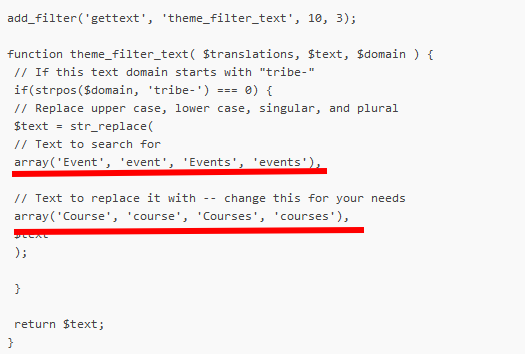
With these:
array('Event', 'event', 'Events', 'events', 'Tickets'),array('Course', 'course', 'Courses', 'courses', 'Bookings'),
January 27, 2015 at 2:56 pm in reply to: Is there a downloadable version of filter bar compatible with 3.8? #938294MemberGreat, glad it helps, I am going to go ahead and close this ticket, but if you need help on this or something else please post a new ticket.
Thanks!
MemberHi,
Thanks for using out plugins. I can help out here.
There is not a direct conflict with Genesis it is more because of Genesis’s hooks sometimes issues come up as that is completely different from WordPress’s standard themes.
However, I use Genesis for almost all my sites and do my testing of the Events Calendar in Genesis so I have a bunch of snippets to help out and make them place nice together.
https://gist.github.com/jesseeproductions/8d0947375b5ba10a1b5e
https://gist.github.com/jesseeproductions/95379b711c5fbf7d5825
https://gist.github.com/jesseeproductions/2df4c4ee76c3c673372f
https://gist.github.com/jesseeproductions/27c812b6f23d5cbb9315
Let me know if that helps.
Thanks
January 27, 2015 at 1:03 pm in reply to: Custom events loop, trying to add 'no upcoming events message' #938247MemberI am glad to see you were able to figure it out and thanks for sharing the coding.
I am going to go ahead and close this ticket as you marked it resolved. If you have a similar issue or another in the future, please do not hesitate to create a new ticket.
Thanks!
January 27, 2015 at 1:02 pm in reply to: Is there a downloadable version of filter bar compatible with 3.8? #938246MemberAll our plugins have a change log in the readme.txt.
Here is the Filter Bar for 3.9:
* Enabled auto-complete for remaining fields within Filter Bar! We’ve added new field options for Category, Venue and Organizer filters; you can now select between dropdown, checkbox, or autocomplete filter types
* Implemented true support for default permalinks when running Filter Bar
* Addressed a bug where Filter Bar cost says “0” (or free) when tickets with prices are created within WooCommerce Tickets (thanks to brandonpence on the forums for the first report!)
* Fixed a bug where the dropdown selector failed or caused fatal errors in certain circumstances
* Incorporated updated German translation files, courtesy of Oliver Heinrich
* Incorporated new Catalan translation files, courtesy of Oriol Carol
* Incorporated updated Greek translation files, courtesy of Yannis Troullinos
* Incorporated new Polish translation files, courtesy of Marcin Lacki
* Incorporated new Russian transltion files, courtesy of Evgenii RybakAnd for the Events Calendar:
= 3.9.1 =
* Implemented some styling to ensure compatibility and cohesive design with the new Twenty Fifteen theme (more to come in 3.10)
* Fixed a bug where occasionally it wasn’t possible to page through to an event that had been recently edited (thanks to kevinbergin on the forums for the report!)
* Clarified the wording of a warning that shows when an add-on should be updated
* Incorporated updated German translation files, courtesy of Oliver Heinrich
* Incorporated updated French translation files, courtesy of Sylvain Delisle= 3.9 =
* Implemented default permalink support for add-ons that weren’t in compliance, specifically Filter Bar
* Fixed a bug where events in child categories would not display when viewing the parent category on month view (thanks to Bryce on the forums for the original report!)
* Fixed bug where the tribe_is_category() function was returning the wrong value
* Added support for Google’s JSON-LD event markup format (thanks to Thomas on the forums for the first request!)
* Lowered the aggressiveness of the activation/upgrade page to improve compatibility with other plugins
* Removed the old activation message, now that we have the new activation screen
* Fixed an issue where the list view date picker did not reflect the ‘Week starts on’ WordPress setting
* Updated CSS selectors to no longer be reliant on microformat classes
* Fixed a couple of layout issues with TwentyFourteen child themes
* Added a Modern Tribe credit in the HTML page source in the footer – this can be removed with the following snippet: http://m.tri.be/p6
* Added links on the settings page to view Welcome/Updated pages
* Fixed an issue where the incorrect icon was displaying for the ‘List’ option in the view switcher
* Fixed a translation issue with the Organizer & Venue field labels on the Add/Edit Event screen (thanks to Oliver for reporting this on the forums!)
* Enhanced structured data support in relation to the ticketing framework
* Removed jquery 1.7 specific fallback javascript bloat, now support >= 1.8
* Revised CSS to help avoid theme compatibility issues causing event dates/times to be hidden (thanks to thepresenters on the forum for the first report!)
* Improved integration between the ticketing framework and the Filter Bar plugin (thanks to brandonpence on the forums for the heads up here!)
* Added useful system information to the help screen to assist in support and troubleshooting for the core plugin
* Enhanced month view to populate the leading/trailing days of adjacent months included in the current view
* Fixed a bug in the ticketing framework causing ticket start sale dates to reset to 1st January 1970 (thanks to loveyourlocalgroup on the forums for the first report!)
* Extended the attendee list’s filtering capabilities to cover purchaser names (big thanks to Adam on the forums for the first report of this!)
* Added support for WP-eCommerce, Easy Digital Downloads and Shopp plugins to show sold and pending tickets count in the attendee list.
* Incorporated updated Icelandic translation files, courtesy of Baldvin Örn Berndsen
* Incorporated updated German translation files, courtesy of Oliver Heinrich
* Incorporated updated Greek translation files, courtesy of Yannis Troullinos
* Incorporated new Lithuanian translation files, courtesy of Gediminas PankeviciusJanuary 27, 2015 at 12:57 pm in reply to: Recurring Events – Issues with Trash Series / Edit All Functionality #938245MemberHi,
Sorry for the issues you are having. I can help troubleshoot this with you.
I tested on my local site and was not able to reproduce the errors as you mention so lets try to get on the same page first.
When you say this:
– Trash Series: this button only seems to Delete that single Event, rather than the whole Series.
Is this the trash button in the Event List of the admin? That button should only delete the single event and to trash the whole series you have to edit all and then move to trash, are you not seeing that?
And for this:
– Editing All events in a Series: Clicking Edit All, then changing the title of an Event, breaks that event out into a new Recurring Event, leaving the whole original Event behind.
I was not able to reproduce this and was able to edit the title a couple times and all the events changed.
How many events are you editing in a series, maybe that is what is different about my tests.
Let me know and we can go from there.
Thanks
January 27, 2015 at 10:52 am in reply to: Recurring Events – Trash Series / Edit All – functionality broken? #938204MemberClosing this ticket and will answer in the other ticket with the same topic.
Recurring Events – Trash Series / Edit All – functionality broken?
-
AuthorPosts