

Forum Replies Created
-
AuthorPosts
-
Brian
MemberClosing this thread as we are working on it here now:
MemberThis reply is private.
MemberHi,
Thanks for purchasing our plugins. Sorry for the issues you are having.
The plugin is compatible with WordPress 4.1.1 even though it does not state it. All of us are running on WordPress 4.1.1
Not sure you will have better luck with 3.9.1, but in my private post I have placed a link to download.
For narrowing down the issue we have testing for conflicts guide:
I also use the Query Monitor plugin:
To help find issues as well.
Let us know what you find out.
Thanks
April 21, 2015 at 7:37 am in reply to: Editing List View to show all events for Current Year + Upcoming Year #957036MemberHello,
The loop.php is to late to change the query. That just outputs the information.
My response is pretty much what Barry also mentioned here:
You can try using pre_get_posts to change the query of the list view:
https://codex.wordpress.org/Plugin_API/Action_Reference/pre_get_posts
And use this conditionals to target the list view:
https://gist.github.com/jo-snips/2415009
Beyond that there is not much else we can provide, but I can try to help out.
Thanks
MemberHi,
Thanks for using our plugin. I can help point you in the right direction.
It maybe possible to use the social login, but you may have to do some customization.
If you follow our themer’s guide:
https://theeventscalendar.com/knowledgebase/themers-guide/
You could move the main Community Templates and add a logged in check before ours and then use the WooCommerce Social Login for the form.
Not sure how their plugin works so there is not much else I can provide on that, but let me know if you have any follow up questions.
Thanks
April 21, 2015 at 7:27 am in reply to: Change "Organizer" Details to "Contact" Details (Just the Word) #957030MemberHi,
Thanks for using our plugin.
I can help point you in the right direction on this without having to modify the core of the plugin.
We have this guide for changing words:
https://theeventscalendar.com/knowledgebase/changing-the-word-events-to-something-else/
And we have our themer’s guide which can show you how to move and edit the Community Event Templates to your theme to edit there:
https://theeventscalendar.com/knowledgebase/themers-guide/
Let me know if you have any follow up questions.
Thanks
MemberHi,
Unfortunately, it is not possible to lock a phone orientation using coding in an app or website.
MemberHi,
Sorry for the issues you are having. I can help troubleshoot this with you.
Do you have a link to your site you can provide so I can take a look.
Thanks
MemberHi,
Sorry for the issues.
I can try to help out here, but I am limited in theme compatibility issues such as this.
Since the title is created by the theme what does the coding look like that does it?
The title is not showing for any event view or single event so it does not look to be using get_the_title().
You may have to modify that title function while using these conditionals to get it to display on the event sections:
MemberYou can either make sure all the content images are the same size when you upload as well as the content or apply some css to the container. Because it is mobile friendly and the sizes can constantly change it is not something we can provide as forcing height in one device may mess up another and cut off content.
MemberHi,
I can help out here.
So on that event you have the map turned off correct?
That div is designed to show unless you are using the skeleton css option in the events calendar.
You can follow our themer’s guide:
https://theeventscalendar.com/knowledgebase/themers-guide/
To move and edit this file in your theme:
the-events-calendar\views\modules\meta.php
There you can hide the div the way you would like it.
Thanks
April 21, 2015 at 7:09 am in reply to: Urgent – What can I customize in the Events Calendar PRO search? #957014MemberSorry for the glitch in the forum that marked your answer correct.
I can answer your question.
Unfortunately, there is no option to select a radius around a location. It will start with the location in the search and show events nearest that point to the farthest without limit.
If you would like to request that feature please head to our UserVoice Page and add your own or upvote that feature as they will increase the chances of it being added to a future version.
http://tribe.uservoice.com/forums/195723-feature-ideas
Thanks
Please note we can take up to 24 hours to respond to posts on the forum per our terms and conditions.
MemberIt appears there is something wrong with the Swedish translation.
The translation file might have to be completely started again to resolve the issue in it, which can happen with po files.
Unfortunately, we reply on the community for the translation so we are not able to fix this.
Here is what I see in the Spanish Translation:
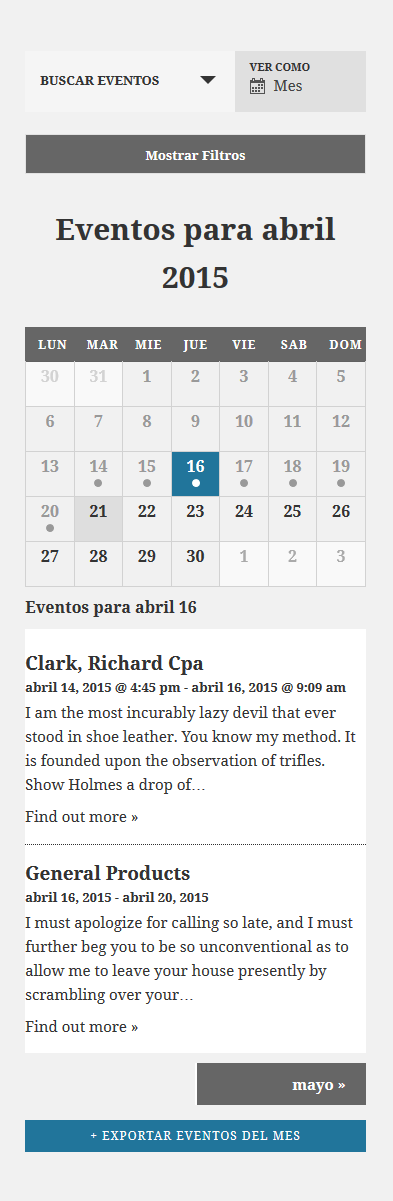
Here is what I see in the Swedish:
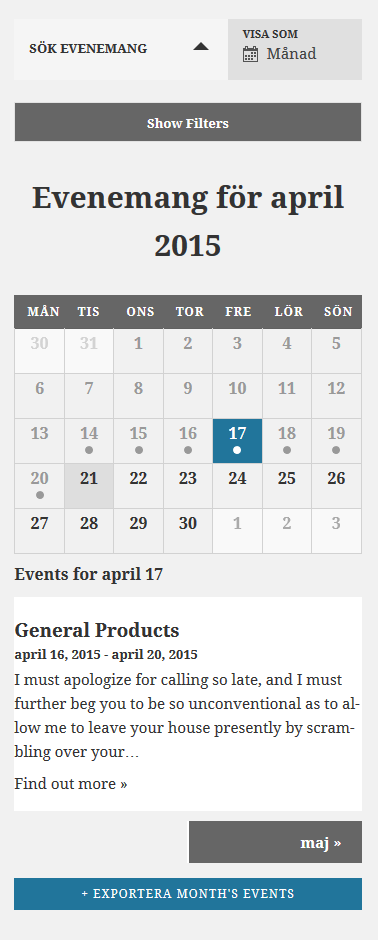
The only thing that is not working correctly is the “Find out more” in both, which I will be putting in a bug report to resolve.
MemberOk sounds like we are on the same page.
Once you have the development environment available.
I would look to see if you have any other customizations for the events calendar and if removing that helps.
Also, seeing about upgrading from jQuery 1.9.1 to jQuery 1.11.1 and see if that resolves the issue.
Let me know what you find out.
Thanks
MemberI am glad to see you were able to fix this issue for both of these.
Since the issue is resolved I am going to go ahead and close this ticket. If you have a similar issue or another in the future, please do not hesitate to create a new ticket.
Thanks!
-
AuthorPosts