

Forum Replies Created
-
AuthorPosts
-
Brian
MemberSounds good I hope you are able to figure it out.
I am going to go ahead and close this ticket. If you have a similar issue or another in the future, please do not hesitate to create a new ticket.
Thanks!
MemberI am not sure what the issue is. You have no confirmed if you cannot type anything into the field.
The ***** are just placeholders.
Start typing the new credit card number in the field and it will work. If not in one browser try another just to see if that is the issue.
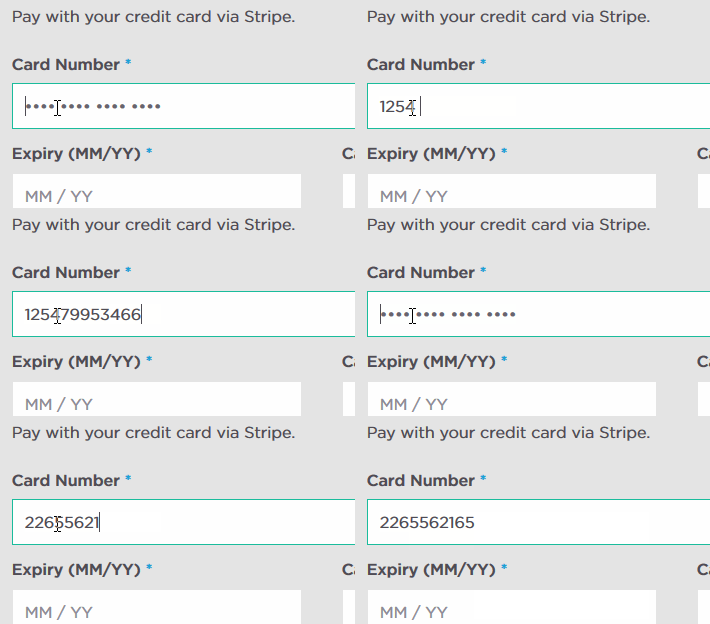
Here is what I see and I am able to type in new numbers:
 Member
Hi,
Thanks for using our plugins. I visited your site and went to this link:
http://neatshows.co.uk/events/
I am seeing more then 6 events there.
Is that where you were having the issue?
Did you try changing this setting:
Events > Settings > General Tab > Number of events to show per page
Let me know.
Thanks
MemberHello,
Thanks for the interest in our plugins. I can help answer your questions.
For the license if you are using it on just one site the Personal License is all you need. It can be used on any site regardless of the content.
The cost is for 1 year of support and updates and we currently offer 30% the full price for the renewal price.
You only need one license key for the site it does not matter how many admins you have.
Let me know if you have any follow up questions.
Thanks
MemberHi,
Thanks for using the Events Calendar.
Here on the pre-sales forum, I’m afraid we do not provide technical support. I would ask that you take any technical support questions across to our wordpress.org forum – our staff scan it periodically and other community members may also be able to help out.
We maybe to help on out WordPress.org with this, but Pro itself would not have a fix either.
Thanks again!
MemberHi thanks for the interest in our plugins
For front end Event Submission we have the Community Events Add On:
https://theeventscalendar.com/product/wordpress-community-events/
There is no option in that plugin for people setup tickets, but in the admin you can use one of our ticketing options to do that:
https://theeventscalendar.com/tickets/
We do not have any ads or advertising features in our plugins. It maybe possible with customization, but that is not something we can support.
All these require the Events Calendar, which is the core version found for free on WordPress.org:
Thanks
MemberHi,
Sorry for the issues you are having. I can help troubleshoot this with you.
First do you have any customizations in your theme and if so does removing them stop this notice?
The customizations would be in here:
yourtheme/tribe-events/
Let me know what you find out and we can go from here.
Thanks
MemberI am glad to see you were able to figure it out!
I am going to go ahead and close this ticket. If you have a similar issue or another in the future, please do not hesitate to create a new ticket.
Thanks!
MemberThat function is actually in your theme and not know to us how you would add the coding or modify it. Your theme developer maybe to help on that, we can answer questions about this from the events side, but unfortunately not on the theme side.
April 21, 2015 at 1:51 pm in reply to: Change "Organizer" Details to "Contact" Details (Just the Word) #957139MemberYep, only moving files in the view directory work. It is not possible in any plugin to just move files and have them work, php does not work that way.
Why don’t you try moving this file to your theme to edit:
the-events-calendar-community-events\views\community\modules\organizer.php
There on line 20 change this:
$organizer_label_singular = tribe_get_organizer_label_singular();
to this:
$organizer_label_singular = 'Contact';April 21, 2015 at 11:48 am in reply to: "There were no results found" to "There were no results found–see next month" #957109MemberHi,
Thanks for using our plugin.
To change that text please add the following to your theme’s function.php:
https://gist.github.com/jesseeproductions/5e4ded1c644580a7ee11
You can change the sentence to anything you would like.
Thanks
MemberHi,
Thanks for using our plugins.
We currently do not have a duplicate events feature on our timeline. We may add it, but not something we are planning on right now.
The duplicator plugin should work as long as it duplicates custom fields, which it mentions it does.
Let me know if you have any follow up questions.
Thanks
April 21, 2015 at 10:49 am in reply to: Conflict Between Facebook Import and “NS Featured Posts” plugins resolved #957095MemberOk great thanks for the heads up.
MemberHi,
Sorry for the late reply and the issues you are having.
I have taken over this thread and can help out.
I visited your site here:
http://www.lesodanse.ca/horaires/
And I see the calendar there.
Is it not working for you or did you change the themes?
Sorry again for the late reply let me know about the issue and I can help out.
Thanks
MemberHi,
Sorry for the late reply on this. I can help answer your questions.
1. Can I have two separate calendars within 1 website? (I have two different type of audience so they need to two individual calendars)
We have only the main event views (month, list, photo, etc) They are all tied to one url and cannot be duplicated.
However, each category gets its own views as well. So you could create two different categories and link to those. This works in the free verison of the Events Calendar.
They would then just show events in that category in the views (month, list, photo, etc).
Filterable by category (type of event and/or location)
This is part of the Filter Bar AddonSearchable by keywords
This is part of the Events Calendar
Searchable by date range
This is part of the Events Calendar
Visitor abiltiy to add event to their calendar (google, Microsoft etc)
Visitor can export to ics and google calendar and this is part of the Events Calendar
Calendar Admin can Add attachments like a PDF file
We do not have the ability for attachments. You can upload and add files through the Visual Editor, but not special feature in our plugins.
Map
We have a Map View in Pro and Single Events have venue maps. In pro single venues have maps.
Color coding by event type
We do not have a feature to do that, but this might work for you:
Ability to batch upload events and attachments for those events. We usually have over 100 seminars offered each month at the various centers. We can batch upload these events from a CSV file into our current Google Calendar, can you system do the same thing?
We have a csv importer, but it does not accept attachments. That is available in the free version of the plugin.
And to explain our plugin each one requires only the free version of the Events Calendar.
I have also mentioned Pro and the Filter Bar those are both seperate add ons and to get the features in each you have to purchase both.
Also we do have a demo site that shows off all our features:
Let me know if you have any follow up questions.
Thanks
-
AuthorPosts