

Forum Replies Created
-
AuthorPosts
-
Brian
MemberHi,
Sorry for the issues I can help out here.
I visited your site using the single event link and it worked for me.
I also was able to see all the main event views and the home page widget worked for me.
Are you seeing it fixed now too?
If not please follow our 404 error guide and see if that helps resolve the issue.
Let me know.
Thanks
MemberHi Again,
Sorry for the bad news, but the CSV importer does not support importing tickets.
If you would like to request that feature please head to our UserVoice Page and add your own or upvote that feature as they will increase the chances of it being added to a future version.
http://tribe.uservoice.com/forums/195723-feature-ideas
Unforutnaly, as the system is built right now it is only possible to create tickets per event in the single event editor.
Let me know if you have any follow up questions.
Thanks
MemberHi Matt,
Thanks for using our plugins. I can try to help out here.
It maybe possible to add the ticket date to those areas, but that is all in WooCommerce and I do not have any information on customizing their product.
It maybe easier to just add it to the title.
Or you could search for customization in WooCommerce to try and add it to these places.
We are limited in helping that, but could try to answer a question or two.
Let me know.
Thanks
MemberHi,
Thanks for the interest in our plugins. I can help out here.
I have answered your questions below:
Generate promotional code options (multiple codes per event registration i.e. 50% discounts, 100% discounts, etc.)
The tickets are products in WooCommerce so any coupon that you make in WooCommerce can work on the tickets.
Multiple tiers & tickets for the same event (i.e. individual registration, teams, and groups)
All tickets are created per event and you can create as many different types as you like, there is no global stock and all ticket stocks are per ticket.
Personal data collection from the team and group registrations – can we add our own fields basically, so if a “group” type of ticket is bought, we can ask for their details.
We do not currently have this as a feature, we are working on it, but I do not have a timeline for its release.
Multiple events that can be registered for
Tickets are per event and someone could add multiple tickets to their cart.
Process payments on line and off line [some option to select to pay by check]
WooCommerce has this feature for you to setup.
Direct page details (Dedicated page per event)
Yes, tickets are created in the single event editor and show on that event page. It is actually the only way to create tickets.
Let me know if you have any follow up questions.
Thanks
MemberHi,
Thanks for trying out our plugins.
I can answer your questions.
Both Pro and Core (Free) can have their event templates edited. I am not sure about the WordPress Editor though as I have always disabled it.
We have this guide to make edits to the templates in your theme and you can edit the core files and do not need Pro:
https://theeventscalendar.com/knowledgebase/themers-guide/
Also, check out these guides for changing different words to something else.
That is about all I can help out on customizations, but let me know if you have any follow up questions.
Thanks
October 12, 2015 at 7:08 am in reply to: Order events in main blog loop by post date (fails after updates) #1013659MemberHi Jim,
Thanks for using our plugins I can help out here.
What version of the Events Calendar are you using?
It Core at 3.12.3 and Pro at 3.12.2.
If not can you please update to those versions and see if that helps.
Let me know and we can go from here.
Thanks
MemberHi,
Sorry for the issues you are having. I can help out here.
It is true that the Billing Details defaults to the United States as we have it set in WooCommerce.
However, look for the Country Field that looks like this:

Changing that to the country you are in will change the states field so you can add yours.
Let me know if you do not see that field.
Thanks
October 12, 2015 at 6:49 am in reply to: Want to change the label and placeholder text at checkout? Check this out! #1013634MemberHi Tommy,
Thanks for sharing this coding you are indeed a Rockstar!
Also, look for a more advanced version of collecting custom information in a future release of our ticketing plugins, hopefully in the next release.
I am going to share this coding with the team so we are aware of it and can suggest it to other people.
Thanks Again.
MemberHi,
Thanks for using the Events Calendar.
Here on the pre-sales forum, I’m afraid we do not provide technical support. I would ask that you take any technical support questions across to our wordpress.org forum – our staff scan it periodically and other community members may also be able to help out.
Having said that we do not have a yellow icon that shows with each event so that might be a theme issue and we would not be able to help out on that.
Here is a demo of our calendar:
I do not see a yellow icon on it, but might be missing something.
Thanks again!
MemberHi,
Thanks for using our plugins.
I am limited in being able to help with customizations, but can try to help you get started.
This does involve changing some coding following our themer’s guide and again I can help get you started, but unable to provide all the coding.
Here is out themer’s guide:
https://theeventscalendar.com/knowledgebase/themers-guide/
Then you want to move and edit this file:
the-events-calendar/src/views/default-template.php
In your theme here:
yourtheme/tribe-events/default-template.php
There you can add the slider coding above this line:
<div id=”tribe-events-pg-template”>
And use the following conditionals to get it to display only on the views you like.
https://gist.github.com/jo-snips/2415009
Cheers!
MemberHi,
Thanks for the interest in Facebook Events.
Usually all I have for screenshots are on this page:
https://theeventscalendar.com/product/facebook-events/
The information imported is the Title, Featured Image (Event Image in Facebook), Content, Venue, and Organizer if available for each event.
On the front end of your site they look like any other event.
I did take screenshots for an example for you.
This is the event in Facebook:
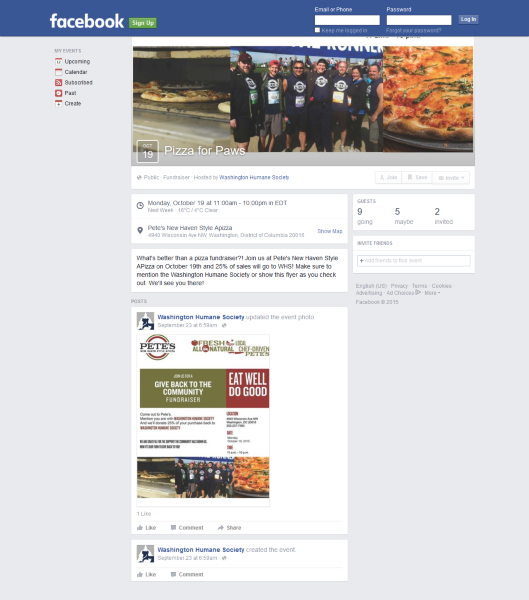
This is the event after importing:
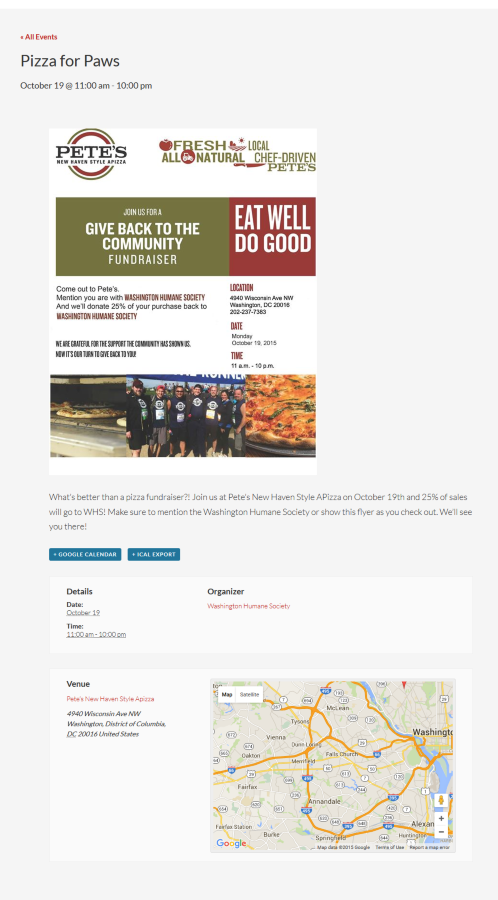
Let me know if you have any follow up questions.
Thanks
MemberHi,
Thanks for using our plugins I can help out here.
When WordPress took over translating the core plugin we had to change the language slugs.
Do you have any custom event templates in your theme here:
yourtheme/tribe-events/
Also, I loaded up the latest version of the plugin and used Hungarian (Magyar) and it translated for me.
So it does not appear to be an outright bug causing this, but a conflict.
Let me know what you find out.
Thanks
MemberHi,
Sorry for the issues with the support tools. Sometimes when a reply is added before we get to it, it gets marked resolved on rare instances.
Anyway, that is a suggestion that I think could help out the plugin.
It is to late to include that as part of 4.0 as the coding is in testing now.
I can write a ticket for us to see about including that in 4.1 though, that is about as much as I can do right now for this.
Although not recommended to edit the plugins in this case you could add the filter yourself for now to get it to work how you would like.
Let me know if you have any follow up questions.
Thanks
October 12, 2015 at 6:08 am in reply to: MultiSite Dev Environment but only one site needs TEC Pro #1013611MemberHi Chris,
Thanks for using our plugins. I can help out.
You are able to use a personal license in multisite and the plugin works without the license key entered.
Can you confirm that Pro is active on the site and activated only through the plugin page of that site and not network activated.
Also, if you active on the main install as a test does the license tab show on that site?
Let me know and we can go from here.
Thanks
MemberHi,
Thanks for using our plugins.
We do not support the REST API so there is no way to access the events custom post type without adding coding to your site to do it.
It is something we are interested in adding support for now that part of the API is going to be included in WordPress 4.4.
I do not have a timeline when that support might happen and it will not be included in our next release as that coding is already finalized and in testing.
Let me know if you have any follow up questions.
Thanks
-
AuthorPosts