

Forum Replies Created
-
AuthorPosts
-
December 14, 2015 at 9:28 am in reply to: The last updates crashed all the api, my app does't return any data anymore #1040957
Brian
MemberSorry if I was unclear I can help answer questions, but limited in doing much beyond that. I do not have the WordPress API running and we have no integration with it so most likely it is 3rd party coding and I cannot troubleshoot that.
We did make changes to the plugin in 4.0, but again we did not do anything to support the API.
If you really need to working and it worked with 3.12.x I would recommended downgrading to that to keep it working at least.
Thanks
December 14, 2015 at 9:26 am in reply to: Jupiter Theme Conflict: Events page not displaying, and menus disabled #1040953MemberWe do not have any experience with that theme so not sure what settings they have that are causing this.
Are you able to contact theme and see what they say about their Archive Settings and how to change them?
MemberIf you think that is something you would like as a feature I encourage you to visit our User Voice Page and either upvote an existing request or make a new request there.
Since this is marked resolved I am going to close this ticket, but if you need anything else related to this topic or another please post a new topic on the forum and we can help you out.
Thanks
MemberHi,
Thanks for using our plugins.
We do not have a feature to add categories to the Venues.
It could be possible with a customization, but that is not something we can support.
This is the WordPress function that does that:
https://codex.wordpress.org/Function_Reference/register_taxonomy
And our venue custom post type is tribe_venue
Cheers
December 14, 2015 at 9:13 am in reply to: List view not displaying all events. Next Events = There were no results found. #1040944MemberHi,
Sorry for the issues you are having. I can help out.
I am not sure about your theme, but Divi does something similar with their archive settings causing this as the Event Views are archives.
This setting there fixes it:
Divi > Theme Options > General Settings > Number of Post displayed on Archive pages
Change that number to 10 or what you have as the number of events to show in our settings.
Can you find something similar in your theme to do that?
Thanks
MemberHi,
Thanks for the interest in our plugins we have a non profit program with the details here:
https://theeventscalendar.com/knowledgebase/do-you-offer-discounts-for-non-profit-organizations/
Cheers
MemberHi,
Sorry for the issues you are having. I can help out here.
What are the ticket settings on an event that are not showing?
These are the settings I am looking for:
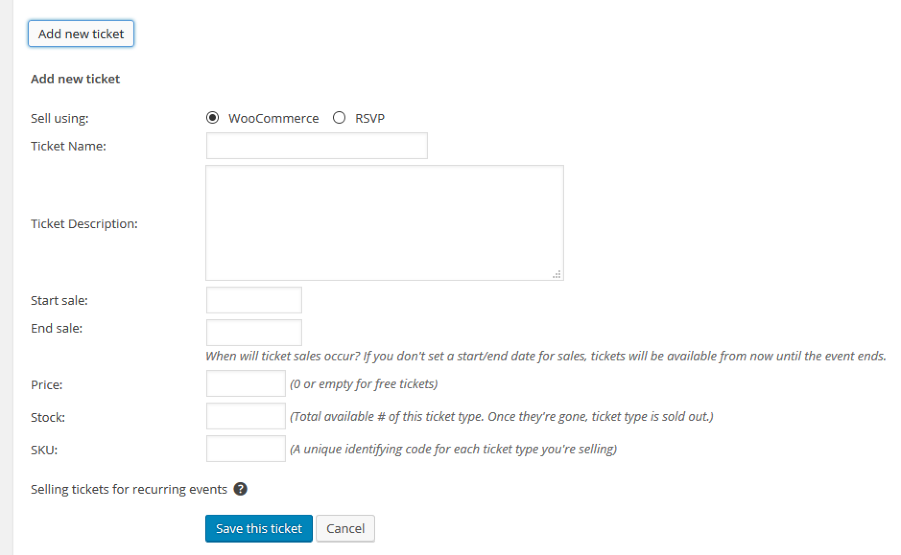
Please provide everything and we can go from here.
Thanks
MemberHi,
Sorry for the confusion, but it is not a feature to drag and drop to reorder the tickets.
That guide you found is all we have for the reorder of tickets for now.
Let me know if you have any follow up questions.
Thanks
MemberHi,
Thanks for using the Events Calendar.
Here on the pre-sales forum, I’m afraid we do not provide technical support. I would ask that you take any technical support questions across to our wordpress.org forum – our staff scan it periodically and other community members may also be able to help out.
Having said that since our Event Views are setup as archives that is most likely the theme using a standard title function and not picking that up. You could hide it with css or use these conditionals to change the title output in your theme:
https://gist.github.com/jesseeproductions/903f5ca75877b713c674
Thanks again!
MemberHi,
Thanks for using the Events Calendar.
Here on the pre-sales forum, I’m afraid we do not provide technical support. I would ask that you take any technical support questions across to our wordpress.org forum – our staff scan it periodically and other community members may also be able to help out.
Having said that you can try our 404 Error Guide and see if that helps:
Thanks again!
MemberHi,
Thanks for using our plugins. I can help out here.
After enabling Split Payments have you filled in the API settings that appear? Please verify that and we can go from here.
Thanks
MemberHi Cindy,
Thanks for the interest in Facebook Events I can help answer your questions.
1. Can the events that come over from FB be set to pending? From a screen shot that shows settings it appears I can.
Yes you can set them to draft, pending, or publish
2. Wish to verify that categories can’t be preset by FB site/events. I.E. Carolyn Myss ( https://www.facebook.com/Caroline-Myss-201192805715/events ) would always have a category of medical intuitive at my site. I saw a posting that makes me think this can’t be done automatically, so I would need to do this after the events are imported in. This is ok as long as the events can be moved to “Pending”.
We do not import any categories from Facebook so you could add them to the Pending Events.
3. Assuming but want to verify that it will not import in events that are already added manually. If I add event ABC manually, does the plugin see that an event by this person on these dates already exists if I have it set to automatically import?
It will detect if manually imported and not try to automatically import.
4. Please verify: Imported events are manually or automatically created as entries in The Events Calendar. I think this means that automatically means it will go into my Pending section and manually means I have to go in and click the ones I want. Guessing this from the screen shots showing ‘Off the Grid”
All events are imported to become Event Calendar Events based on the setting above(draft, pending, etc)
5. For my venues I only list the city/state… not the address. I don’t care if it brings this over since I have removed the Learn more that takes a user to the next page that shows that info, but I want to make sure this is not create an issue.
I do not think it should create a problem.
6. What info does it pick up for the description? All the info that the event organizer has added? Those can be really long from the events I’m adding so I only take what I think is most important. Or does it just grab the info up to the point that it says see more…?
It pulls in the entire description there is no feature to change that.
7. Do you know of a site that is actively using this add on that I can check out?
I do not have any to share. The events would look exactly the same as non Facebook Events on the site.
That process looks good you are doing for the CSV imports.
And check out the New User Primer for a rundown of all the settings as well:
http://theeventscalendar.com/knowledgebase/new-user-primer-facebook-events/
Let me know if you have any follow up questions.
Thanks
MemberHi,
I can help out here.
That sounds like an Enfold Theme issue as the Comments template is run through the theme.
Do you have a comment template in your theme? Do comments work for posts or pages?
Have you tried reaching out to them too?
Let me know.
Thanks
MemberHi,
Thanks for using our plugins. I can help out here.
I visited your site and find that both links work.
I also visited all your pages from the main nav and did not once see the index.php included in the url.
The footer nav included it, but once I went to the page my browser removed it.
It seems to be working correctly based off your WordPress settings. You would have to change to default permalinks to change this I believe. Here:
Admin > Settings > Permalinks
Let me know if you have any follow up questions.
Thanks
December 14, 2015 at 8:10 am in reply to: Filter Bar no search results after "Find-Button" – but correct after page reaload (browser) #1040896MemberHi,
Sorry for the issues here. I can help troubleshoot this with you.
I visited your site, but was unable to see the events page.
Do you have a public link that shows the issue happening?
Let me know.
Thanks
-
AuthorPosts