

Forum Replies Created
-
AuthorPosts
-
Brian
MemberOk so that is our plugin at 3.12, correct?
I tested on my site and see what you mean.
This is for PayPal Payments Standard 2.0, correct?
I have made bug ticket for us to address this. I do not have a timeline for a fix, yet.
Did it work on the previous version still?
MemberHi,
That image shows the License Validation Message, but I do not see the “License Key(s) Updated” message.
Are you seeing this message:
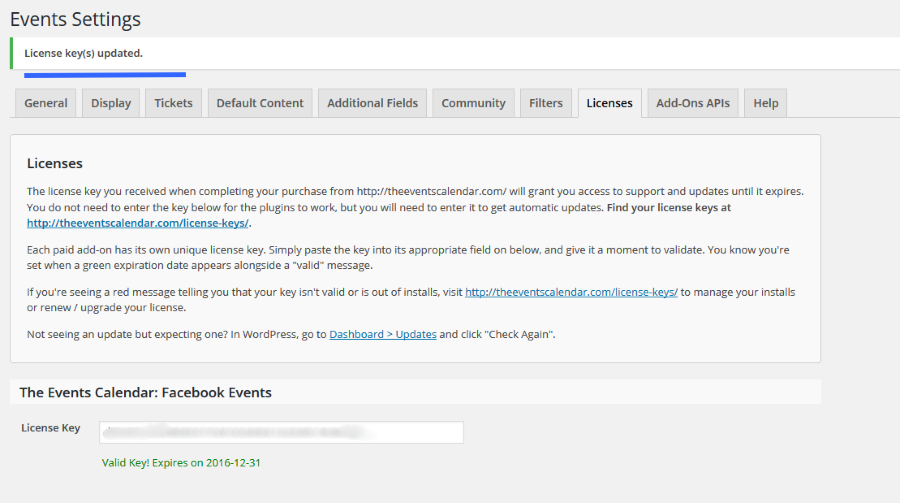
After saving?
MemberHi,
Thanks for the interest in our plugins.
Unfortunately, our plugins only work in WordPress and not able to embed them in another site.
You might be able to get something working with an iframe, but we are not able to help with that.
Let me know if you have any follow up questions.
Thanks
MemberGreat, glad it helps, I am going to go ahead and close this ticket, but if you need help on this or something else please post a new ticket.
Thanks!
MemberHi,
Thanks for pointing that out.
Yeah it looks to be going to TEC and not Event Tickets.
We will get that fixed up.
Thanks for reporting it.
December 15, 2015 at 6:48 am in reply to: After Eventbrite import, is updating a 2-way street? #1041640MemberHi Bennie,
Thanks for using our plugins. I can help out here.
Imported from Eventbrite
Once an event is imported it does not reimport changes from Eventbrite to your install.The tickets will update on the front end, but not title or description.
Exported to Eventbrite
If you create the event in WordPress and then export it to Eventbrite the changes should then go from WordPress to Eventbrite.I tested that way and it worked for me.
For more details on all the settings please look over this guide:
https://theeventscalendar.com/knowledgebase/creating-tickets-and-publishing-to-eventbrite/
Let me know if you have any follow up questions.
Thanks
MemberHi,
Thanks for using the Events Calendar.
Here on the pre-sales forum, I’m afraid we do not provide technical support. I would ask that you take any technical support questions across to our wordpress.org forum – our staff scan it periodically and other community members may also be able to help out.
Thanks again!
MemberHi,
Thanks for using our plugins.
We currently do not have a feature to do a range of dates for the event list shortcode.
If you would like to request that feature please head to our UserVoice Page and add your own or upvote that feature as they will increase the chances of it being added to a future version.
http://tribe.uservoice.com/forums/195723-feature-ideas
There is another 3rd part shortcode plugin you could try out too:
Let me know if you have any follow up questions.
Thanks
MemberHi,
Sorry for the issues you are having. I can help troubleshoot this with you.
Many times the issue is saving before a valid message is shown, so the key saves, but it is not saving that it is valid.
Can you please confirm you are following all these steps:
Visit License Tab
Enter License Key
You get a Green License Valid Message
After you get the message you are then clicking “Save Changes”
Then you get a “License key(s) updated.” message near the top of the page.Also you can can always download the latest version from your account here on theeventscalendar.com and use this guide for manual updates:
Let me know if it is not working after following those steps and we can do some troubleshooting steps next.
Thanks
MemberHi,
Thanks for the interest in Pro.
We do offer upgrade pricing on the licenses:
https://theeventscalendar.com/knowledgebase/upgrading-a-license/
Does that help?
Thanks
MemberHi,
Sorry for the issues here and the delayed reply. I can help out.
I visited the plugin page and only see WPEC 3.11.1 as the latest version.
Do you know where you got 3.2 from? That appears to actually be a very old version and 3.11.1 should be used.
Let me know and we can go from here.
Thanks
MemberHi,
Thanks for using our plugins. I can help out here.
I am taking a deeper look into this, but I do not believe it can be optional right now.
Although there used to be a snippet to disable it, that no longer works.
From my initial research it was added to prevent search engine bots from getting stuck in the month view.
I will let you know what I find out.
Thanks
MemberI am glad to see you were able to figure it out.
I am going to go ahead and close this ticket. If you have a similar issue or another in the future, please do not hesitate to create a new ticket.
Thanks!
MemberHi,
Thanks for using the Events Calendar.
Here on the pre-sales forum, I’m afraid we do not provide technical support. I would ask that you take any technical support questions across to our wordpress.org forum – our staff scan it periodically and other community members may also be able to help out.
Having said that I would look at finding a migration plugin such as this one:
Or other resources to help with changing the domain of a site that is not something we can really help with as that deals with WordPress and not the Events Calendar.
Thanks again!
MemberHi,
The unlimited license should work in this case. And the license is only needed for automatic updates too.
You might see an message saying to get an Multisite License, but that could be ignored.
If you would like to change though please email us with the order numbers and explain the sitution here:
support(at)theeventscalendar.com
Let me know if you have any follow up questions.
Thanks
-
AuthorPosts