
Home › Forums › Calendar Products › Events Calendar PRO › License Key & Update for Eventbrite Tickets
- This topic has 10 replies, 2 voices, and was last updated 10 years, 9 months ago by
Brian.
-
AuthorPosts
-
December 3, 2015 at 9:24 am #1034789
Rosie
ParticipantHello,
I’m having two problems:
1. The license key will not save. I enter the key, hit save and get a success message, but when refreshing the page the field is blank.
2. I’m getting this error message, but the plugin does not show that it needs updating:
The following plugins are out of date: The Events Calendar: Eventbrite Tickets 3.12. All add-ons contain dependencies on The Events Calendar and will not function properly unless paired with the right version. Learn More.
Any suggestions as to what needs to be done?
Thanks
December 3, 2015 at 9:36 am #1034793ParticipantAdditionally, I now see this error message:
There is an update available for The Events Calendar: Eventbrite Tickets but your license key has not been entered. Please go to the Events Calendar Options page to enter your license key.
However, when I click on the link to Events Calendar Options page, I get the following error message:
You do not have sufficient permissions to access this page.
The URL that the above link points to is: http://alquemieperfume.com/wp-admin/edit.php?post_type=tribe_events&page=tribe-events-calendar&tab=licenses
Whereas, if I go follow this path: Events > Settings > License, the URLs are different.
For Settings the URL is this:
http://alquemieperfume.com/wp-admin/edit.php?page=tribe-common&tab=general&post_type=tribe_events
and for License it’s this:
http://alquemieperfume.com/wp-admin/edit.php?page=tribe-common&tab=licenses&post_type=tribe_events
Thank you.
December 3, 2015 at 11:36 am #1034927MemberHi,
I am not sure what is going on with the license tab it could be that it is on 4.0 and Eventbrite tickets is not.
I can help you manually update the plugin to the latest version then we can deal with the license issue.
You can download the latest version from your account here on theeventscalendar.com
And follow these steps for manual updates:
That will get the latest version to 4.0 for that and the free version.
As for the license:
Many times the issue is saving before a valid message is shown, so the key saves, but it is not saving that it is valid.
Can you please confirm you are following all these steps:
Visit License Tab
Enter License Key
You get a Green License Valid Message
After you get the message you are then clicking “Save Changes”
Then you get a “License key(s) updated.” message near the top of the page.Let me know how that all works out.
Thanks
December 3, 2015 at 12:36 pm #1034990ParticipantHi, Brian.
Thanks for letting me know I could download the plugin directly, which I’ve now done and installed.
I can confirm I’ve done all of the above steps. I tried again after the plugin update and got a success message, refreshed the page and the license key was still showing in the box. I then navigated to another area within WP admin, then came back to the settings/license tab, but the key was no longer showing.
I’ve also previously disabled all plugins and reverted to 2014 theme. So really not sure why the key won’t stick.
Any other suggestions?
Thanks, Brian
December 3, 2015 at 4:33 pm #1035150MemberHow strange,
Usually it sticks after that.
The plugins work without the key it is just so much easier to do updates with them.
Could you please try again in a couple days and if still does not work could you please let me know and we can go from there.
If anything pressing comes up that is not related to this let us know right away in a new thread.
Thanks
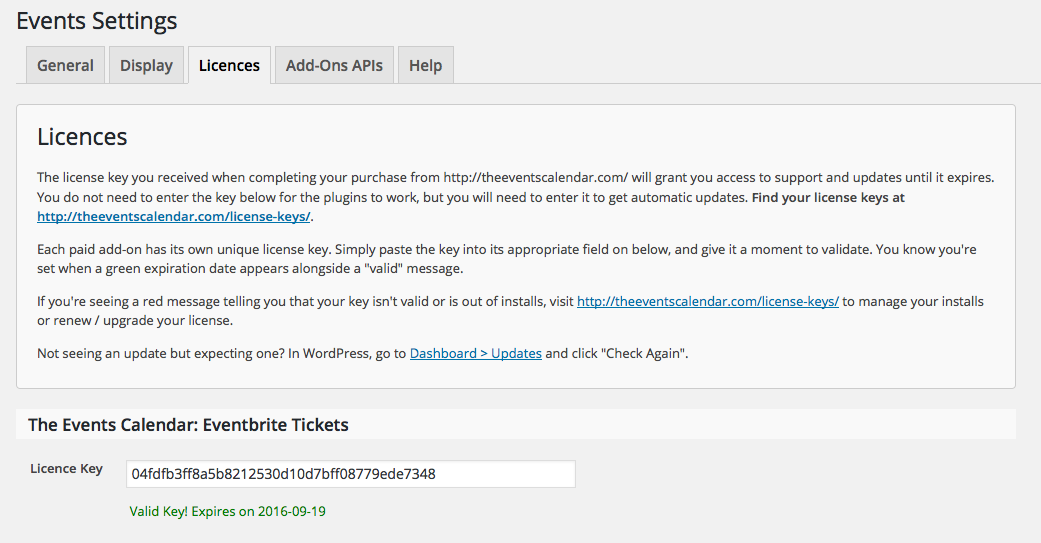
December 5, 2015 at 10:27 am #1036123ParticipantThanks, Brian. I tried again today but still no luck in getting the key to stick. Here’s a screenshot of the success message, after which I navigated back to WP Dashboard before returning the the Licenses tab of the Events Calendar Settings, and lo! the box was empty once more.
Thanks again for your help.
December 6, 2015 at 12:45 pm #1036510MemberAfter you get the message are you then clicking “Save Changes” at the bottom of that page?
December 15, 2015 at 8:47 am #1041736ParticipantYes, I’m clicking Save Changes, then getting the success message in the screenshot I attached in my previous message.
December 15, 2015 at 10:43 am #1041825MemberHi,
That image shows the License Validation Message, but I do not see the “License Key(s) Updated” message.
Are you seeing this message:
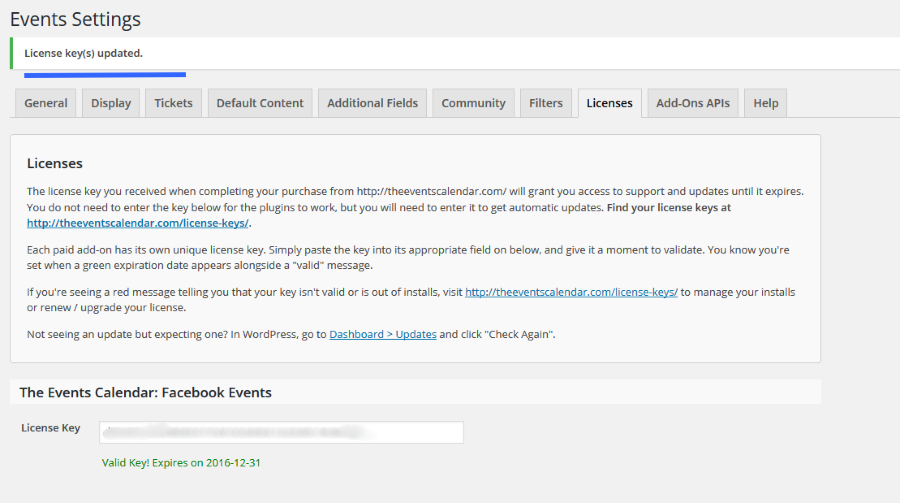
After saving?
December 17, 2015 at 7:49 am #1042938ParticipantAfter re-entering the license key just now and hitting save, I got the valid key message, but not license key updated message, so I hit save a second time and got the latter message. To confirm this worked, I navigated away from the page and then back again and, lo!, the license key was still there. Not great that I had to hit the key twice, but good to know the issue is resolved. Thanks for your help. 🙂
December 17, 2015 at 8:34 am #1042976MemberGreat, glad it helps, I am going to go ahead and close this ticket, but if you need help on this or something else please post a new ticket.
Thanks!
-
AuthorPosts
- The topic ‘License Key & Update for Eventbrite Tickets’ is closed to new replies.