Forum Replies Created
-
AuthorPosts
-
July 10, 2018 at 10:34 am in reply to: Receiving error, Your %plugin name% license key is out of activations. #1571843
Anthony D’Arco
Participant— Please reply above this line —
———————————————————–
## Anthony replied, on Jul 10 @ 12:33pm (CDT):Sky,
I will keep an eye out because we are only doing about 20 imports/day
over the 10 sites (so its just a matter of how many sites I can upload
this to).Thank you,
Anthony
—
Anthony D’Arco
[email protected]———————————————————–
## [email protected] sent a message, on Jul 10 @ 12:08pm (CDT):Sky wrote:
Hi Anthony,
I’m apologize for the confusion. It does state this on the product
page, but I agree this should be stated in a more obvious manner.[1]
It is not documented anywhere, but some of the higher tiers of
“imports per day” also have a higher limit of sites that the license
can be installed on. We are discussing how we can outline the
different plans better. I will follow back up here with more complete
information about this as soon as I hear back.To see how many imports have been used each day, visit the Events
Help page and look in the “Event Aggregator System Status”
section.Hope that helps! Thanks for your patience, and I’ll let you know what
your options are for adding more sites as soon as I can.Sky
Post Link:
Receiving error, Your %plugin name% license key is out of activations.
[2]———–
Please share images through Dropbox or a similar service
when replying by email.You are receiving this email because you subscribed to a
help desk ticket on TheEventsCalendar.com.Please keep the reference number in the subject when replying and
make sure the reply is addressed to
[email protected] [3]Login and visit the topic to unsubscribe from these emails.
Links:
——
[1]
[2]Receiving error, Your %plugin name% license key is out of activations.
[3] mailto:[email protected]July 9, 2018 at 10:25 am in reply to: Receiving error, Your %plugin name% license key is out of activations. #1570859ParticipantSky,
I’m a bit confused by your response. There isn’t really anything on your site detailing the limit you describe:
https://theeventscalendar.com/product/event-aggregator/Furthermore, the license seem to be 100% based on how many imports we do rather than the number of sites its installed on.
That said, I would like the unlimited installs just like I would on any other of your product. Is this possible based on your pricing structure?
Also, is there a place I can see how many imports that I’m actually using? If I have to purchase another license I want to make sure I purchasing one that fits my needs.
I think my point is, your page outlines very clearly that the limit is not based on installs, how could I have possibly known that there was this other limit. It just is confusing and misleading.
Thank you,
AnthonyParticipantBrook,
Thank you for this update. I just looked at the blog post, and I didn’t see anything that clearly addressed the issue here. Was that overlooked, or was this bug actually not fixed?
Thank you,
AnthonyParticipantNo worries, I understand bugs take time. Is there anyway to get updated whenever this is fixed (and I am more than happy to help in any way I can)?
Thank you,
AnthonyParticipantI double checked clearing my caches. That had no effect. I did change the timezone to be -6 UTC and that did not work as well.
Thank you,
AnthonyParticipantGeoff,
That did not have any effect. Sorry.
Thank you,
AnthonyParticipantTrying to see if the issue persists with a default WordPress theme such as Twenty-Fifteen
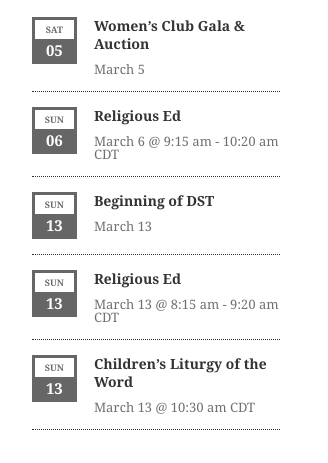
This has been done and the issue is there too. Screenshot attached (Note see Religious Education, it is recurring and appears twice with different time in the screenshot).
http://designbigdreams.com/wp-content/uploads/2016/03/time-shift-NOTE-Religious-Education.pngSending us a screenshot of both your WordPress and the Events Calendar timezone settings
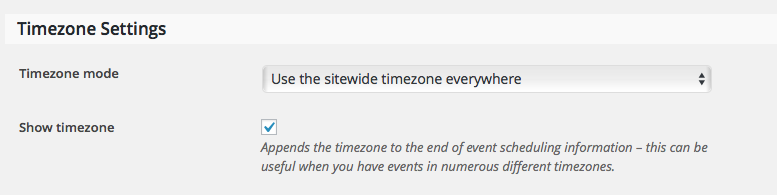
Screenshots attached.
http://designbigdreams.com/wp-content/uploads/2016/03/Tribe-Time-Settings.png
http://designbigdreams.com/wp-content/uploads/2016/03/WordPress-Time-Settings.pngRunning the piece of code my colleague Brook recommended: http://stackoverflow.com/questions/11770730/date-default-timezone-setutc-not-working/20943645#20943645
These are the results: 2016-03-03 14:47:50 UTC 2016-03-03 14:47:50 UTCParticipantYeah, its been a while since I’ve had an issue I couldn’t figure out (so kudos to you). Good to know, and I will keep an eye on the change logs to see if it gets added.
Thank you,
AnthonyParticipantHello Geoff,
That seemed to do that trick, it is displaying properly now.
Thank you,
AnthonyParticipantHello Geoff,
We have disabled all other plugins, we have switched to the 2015 theme, and we have tried the code you suggested as well and unfortunately the problem persists.
Thank you,
AnthonyParticipantHello Geoff,
The Timezone setting for The Events Calendar is correctly set to Chicago.
We are using a template override but have disabled it and it did not fix the issue.
Thank you,
AnthonyParticipantNico,
I apologize for this never ending saga. So, when we tried to to the import using this link:
https://office.schoolrush.com/shareCalendariCal.action?schoolId=10012&token=xixume94
We are now only getting “All Day Events.”
Any insight as to why the non-full day events aren’t importing would be most appreciated.
Thank you,
AnthonyParticipantNico,
Thank you for this, and I am a little concerned that I don’t understand what these actually do, so let me see if I can explain in my own words:
The first function stops the importer from making a “note” that a particular event has been deleted, and will reimport the event regardless of whether or not it has been deleted. This would not work in my case because the “note” of the deleted events have already been made.
The second is an SQL command (not sure if thats the right word), that I would run on my database that actually removes those “notes” that are made by the iCal importer. I would need to do this in my circumstance because the “note” has already been made.
I apologize for my use of the word “note;” I wasn’t sure of a better word.
Let me know if I understood that correctly.
Thank you,
AnthonyParticipantYes you are right, however, this leads me to another problem. How do I tell the system that has already had the import, but is now not showing any results because I deleted those events already?
Ie. I have this working on a local site now, but now I need to get it to work in production, but it won’t import any events that it has previously imported…thoughts?
Thank you,
AnthonyParticipantNico,
Here is the link to the file. The developer updated the UID:
https://office.schoolrush.com/shareCalendariCal.action?schoolId=10015&token=ofovir82
That said, I just tried to import it as a test, and only three things were imported (clearly there are more than three items). Also, many times while trying to upload the file I get a “Your search returned no results. Please adjust your search.” error.
It is worth mentioning. I am doing this on a site that is as default as it gets (ie. the only 2 plugins activated are The Event Calendar and iCal importer and Twenty Fourteen activate).
Let me know if you would like login information to take a look at the instal.
-
AuthorPosts