

Forum Replies Created
-
AuthorPosts
-
Andras
KeymasterHey Diana,
Thanks for using our plugins and for reaching out!
Here on the pre-sales forum, I’m afraid we do not provide technical support. I would ask that you take any technical support questions across to our wordpress.org forum – our staff scan it periodically and other community members may also be able to help out.
If you have purchased a plugin from us, please login and post in the premium forums for that plugin and we can help you out there:
https://theeventscalendar.com/support/forums/
To get you started on your question: ET+ doesn’t have the functionality of adding custom data / text in the email out of the box. However, that can be achieved with a bit of customization. These articles should help you get started:
https://theeventscalendar.com/knowledgebase/themers-guide/
https://theeventscalendar.com/knowledgebase/template-overview/Thanks again and cheers,
AndrasKeymasterHello Carol,
Thanks for reaching out to us and thank you for your question! It made my day. 🙂
We are a company that develops The Events Calendar plugin and its premium add-ons for the WordPress blogging platform. And thus, we are not organizing events or not selling tickets to events of any kind. We simply provide the platform for other people / companies to do that.
And to answer your question:
I’m afraid Priceless will not be around Richmond, VA in the near future. On this website you can find the upcoming locations of their tour:
http://forkingandcountry.com/tourBy the way they were there September 25, 2015. Must have been helluva gig!
I hope this helps! Keep on rockin’!
Cheers,
AndrasKeymasterThis reply is private.
KeymasterSuper cool!
Good luck with your project, Leigh!
If you need anything else related to this topic or another please post a new topic in the forum and we will help you out.
Cheers,
AndrasPS: If you like our plugin, we would be happy to receive a review in the wordpress.org repository. Thanks!
https://wordpress.org/support/view/plugin-reviews/the-events-calendarPS2: We’d be also grateful if you would give us feedback on your satisfaction with support. Just click on one of the classy looking emojis below. 🙂 If you can spare a few words, that’s even better. Doublethanks!
KeymasterHi Fraser,
The above snippet will only remove the ticket booking form. It doesn’t touch the RSVP form, that will remain there.
Let me give you the knowledgebase article where this can be found, it might come handy. It is about moving the 2 forms. You remove the first and then you hook them back in another place. Obviously if you don’t hood them back, they will not appear.
https://theeventscalendar.com/knowledgebase/moving-rsvp-ticket-forms/
Does this help?
Cheers,
AndrasKeymasterHey Leigh,
You are very welcome!
A note on the recurring events: there is a possibility to split a series at a certain point in time. In the admin go to your list of events, hover over the instance of the recurring event where you want to split it, and click on Edit upcoming. See screenshot.
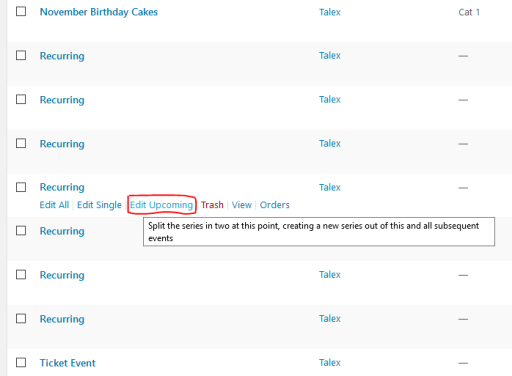
I’m pretty sure the images will not be duplicated in the media library, so either you can leave them, or simply upload them again.
Is there anything I can help you with regarding this topic, or can I close the thread?
Cheers,
AndrasOctober 7, 2016 at 6:43 am in reply to: Hide the events when using the calendar widget shortcode #1173693KeymasterHey Mr. Peri,
Thanks for your kind words! We love hearing when a user likes our plugins and is satisfied with our support. This is why it’s worth doing this. 🙂
Since this is marked resolved I am going to close this ticket, but if you need anything else related to this topic or another please post a new topic in the forum and we will help you out.
Good luck with your project!
Cheers,
AndrasPS: Since you like our plugin so much 😉 we would be happy to receive a review in the wordpress.org repository. Link is below. Thanks!
https://wordpress.org/support/view/plugin-reviews/the-events-calendarPS2: We’d be also grateful if you would give us feedback on your satisfaction with support. Just click on one of the classy looking emojis below. 🙂 If you can spare a few words, that’s even better. Doublethanks!
KeymasterThis reply is private.
October 7, 2016 at 2:29 am in reply to: Photo view feed creates gaps in between events i IPAD #1173658KeymasterHey Pau,
As I wrote earlier, at the moment we don’t have a delivery date set for fixing this glitch. We didn’t yet receive any other reports on this and our hands are currently full with the upcoming major release, which is just around the corner. Once that is done we will look at our current buglist and see what can make it to the next maintenance release.
I’m sorry if this is disappointing and thanks for hanging in there.
Cheers,
AndrasOctober 7, 2016 at 2:24 am in reply to: How do I get the year to show after the month and day on listings? #1173656KeymasterThat would require a template override.
Remove the snippet I shared with you before.
Create a file in your child theme’s directory like wp-content/{your-theme}/tribe-events/pro/photo/single-event.php
and copy this code in that file. (Or download the file and copy it into that directory.)
https://gist.github.com/andrasguseo/2b73216592074ae3a59f428da55aa417
If you need you can add further html elements like < span > around the tribe_get_city() part on line 44 to allow you for some formatting.
This is about as much as I can provide on this. Let me know how that works out.
Cheers,
Andras
October 7, 2016 at 2:03 am in reply to: iCal Importer imports ical recurring all on the same date #1173650KeymasterHey Carla,
Unfortunately the beta testing for the Release Candidate is closed already. Give me some time to check if I can share it with you any other way.
Thanks for hanging in there!
Andras
KeymasterHey Fraser,
Today is both our lucky days. 🙂
So for the course prices I can recommend the following:
Since you have Event Tickets Plus, you can set up a ticket for the classes. Then use this snippet to remove the ticket booking form from the event page:
if ( class_exists( 'Tribe__Tickets_Plus__Commerce__WooCommerce__Main' ) ) {

	// Remove the form from its default location (after the meta).
	remove_action( 'tribe_events_single_event_after_the_meta', array( Tribe__Tickets_Plus__Commerce__WooCommerce__Main::get_instance(), 'front_end_tickets_form' ), 5 );
}
As for sending another email to the reception, this snippet should help you, you just need to customize it with the email address:
https://gist.github.com/cliffordp/4f06f95dbff364242cf54a3b5271b182#file-functions-php
I believe changing the line where you are getting the site admin’s email should do the trick.
Let me know how this works out.
Cheers,
AndrasKeymasterHey Stephanie,
Thanks for reaching out! Let me help you with your question.
From the top of my head I see 2 ways to do this.
1. Overriding your single event template to show a sidebar with the Events List widget.
Here are some knowledgebase articles that can help you started on this route:
https://theeventscalendar.com/knowledgebase/themers-guide/
https://theeventscalendar.com/knowledgebase/template-overview/2. Your theme might allow you use a page template for the events where you can add a widget to the sidebar. Then add the Events List widget to that sidebar.
Let me know if this is useful or I can help with anything else.
Cheers,
AndrasOctober 6, 2016 at 2:25 pm in reply to: Photo view feed creates gaps in between events i IPAD #1173491KeymasterHello Pau,
Thanks for reaching out and sorry for the long waiting. I have checked, indeed a bug ticket has been created, but I don’t see a delivery date yet attached to it.
Let me poke some people, maybe I can find out a bit more. I ask for a bit of patience.
Thanks and cheers,
AndrasOctober 6, 2016 at 2:19 pm in reply to: How to make flat fee to charge per ticket sold instead of each event in an order #1173490KeymasterHey Tac,
Thanks for getting back in touch. I can try to help out here, but we are limited in supporting customizations.
Per our terms and conditions we support features of the plugins. We usually don’t take on these kinds of customization projects ourselves. However, we do have a list of folks who might be able to help out with some development on your site. Hopefully that list will help you find someone to work on your site.
https://theeventscalendar.com/knowledgebase/find-a-customizer/Let me know if you have any other plugin issues I can help you with.Cheers,
Andras -
AuthorPosts