
Home › Forums › Calendar Products › Events Calendar PRO › Best way to clear up old/expired Event images
- This topic has 6 replies, 3 voices, and was last updated 10 years ago by
Leigh.
-
AuthorPosts
-
October 6, 2016 at 12:35 am #1173108
Leigh
ParticipantHello,
I was wondering what the best way to clear up old images. I have a calendar running that will be filling up fast and may end up having several hundred events on. This is fantastic, but what happens is when they expire the image stays in my media and will slowly fill up.
I do have image compression but it would be sweet to be able to delete these images that are no longer used.I can’t see if this happens automagically so assume it doesn’t. Therefore, is there a way to do this ?
I don’t want to get a year down the line and find my media folder is several gigs and slowing the website down.Thanks in advance.
October 6, 2016 at 2:08 pm #1173486Andras
KeymasterHello Leigh,
Thanks for going Pro and welcome to the forums!
Great question!
There is no automagical way unfortunately to remove old images.
Your best bet may be to either search for the images in the media library of WordPress by name or by date, and remove images in bulk there, or browse to your images folder through FTP and delete images in bulk there.
Or if you remove old events from your site, then a plugin like this might be help you.
Let me know if this helps.
Cheers,
AndrasOctober 7, 2016 at 1:03 am #1173638ParticipantHi there,
I think your idea about searching on date will work. Im pretty sure i can work out which ones are still live for repeating events. Better than nothing.
Thanks of the reply.
October 7, 2016 at 6:52 am #1173697KeymasterHey Leigh,
You are very welcome!
A note on the recurring events: there is a possibility to split a series at a certain point in time. In the admin go to your list of events, hover over the instance of the recurring event where you want to split it, and click on Edit upcoming. See screenshot.
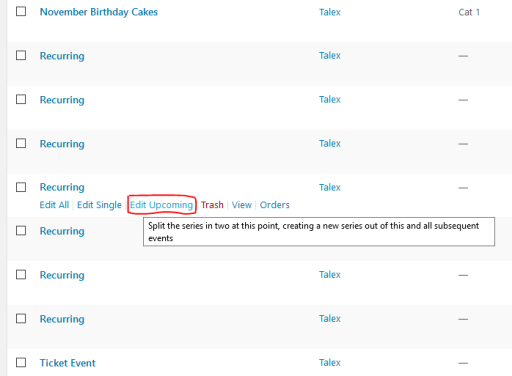
I’m pretty sure the images will not be duplicated in the media library, so either you can leave them, or simply upload them again.
Is there anything I can help you with regarding this topic, or can I close the thread?
Cheers,
AndrasOctober 7, 2016 at 6:55 am #1173698ParticipantThank you
Please close 🙂
October 7, 2016 at 6:58 am #1173700KeymasterSuper cool!
Good luck with your project, Leigh!
If you need anything else related to this topic or another please post a new topic in the forum and we will help you out.
Cheers,
AndrasPS: If you like our plugin, we would be happy to receive a review in the wordpress.org repository. Thanks!
https://wordpress.org/support/view/plugin-reviews/the-events-calendarPS2: We’d be also grateful if you would give us feedback on your satisfaction with support. Just click on one of the classy looking emojis below. 🙂 If you can spare a few words, that’s even better. Doublethanks!
-
AuthorPosts
- The topic ‘Best way to clear up old/expired Event images’ is closed to new replies.