

Forum Replies Created
-
AuthorPosts
-
Nico
MemberHi there!
Just wanted to share with you that maintenance release 4.4.5 of our plugins is out, which includes a fix for this issue ?
If you remove the license for Events Aggregator the imports should stop running. And there’s also an option to do so in ‘Events > Settings > Imports > Event Aggregator Control’.
Find out more about the release → https://theeventscalendar.com/maintenance-release-events-calendar-4-4-5-event-tickets-4-4-5-premium-add-ons/
Best,
NicoMemberHi there!
Just wanted to share with you that maintenance release 4.4.5 of our plugins is out, which includes a fix for this issue 🙂
If you remove the license for Events Aggregator the imports should stop running. And there’s also an option to do so in ‘Events > Settings > Imports > Event Aggregator Control’.
Find out more about the release → https://theeventscalendar.com/maintenance-release-events-calendar-4-4-5-event-tickets-4-4-5-premium-add-ons/
Best,
NicoMarch 23, 2017 at 7:47 pm in reply to: Missing Translation Possibilities for several strings #1259265MemberHi there!
Just wanted to share with you that maintenance release 4.4.5 of our plugins is out, which includes a fix for this issue 🙂
Find out more about the release → https://theeventscalendar.com/maintenance-release-events-calendar-4-4-5-event-tickets-4-4-5-premium-add-ons/
Best,
NicoMarch 23, 2017 at 7:40 pm in reply to: tribe_events_has_unlimited_stock_tickets can never be true #1259261MemberHi there!
Just wanted to share with you that maintenance release 4.4.5 of our plugins is out, which includes the fix you submitted for this issue 🙂
Find out more about the release → https://theeventscalendar.com/maintenance-release-events-calendar-4-4-5-event-tickets-4-4-5-premium-add-ons/
Thanks once again for the PR!
Best,
NicoMemberHi there Mister!
Just wanted to share with you that maintenance release 4.4.5 of our plugins is out, which includes a fix for this issue 🙂
Find out more about the release → https://theeventscalendar.com/maintenance-release-events-calendar-4-4-5-event-tickets-4-4-5-premium-add-ons/
Best,
NicoMemberThis reply is private.
MemberHi there Marcin,
Thanks for reaching out to us and sorry to hear about this issue. Let’s see what’s going on with your calendar!
First thing I would check is if the event is configured to be hidden in event listings. You can check that in the back-end of the site, when you are editing the event:
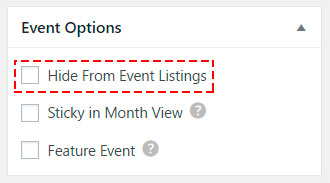
This option hides the event in all list based views but not in grid views (like month view).
If that isn’t the problem then, Can you please follow the steps described in our Testing for conflicts guide? This way we can see if this is a problem in our plugin or a conflict with the theme or other installed plugins.
Also, if you add more events to the calendar does the same thing happen?
Please let me know about this,
Best,
NicoMemberThanks so much for the solution Matt! You did a great job here 🙂
I’ll go ahead and close out this thread, but if you need help with anything else please don’t hesitate to create a new one and we will be happy to assist you.
Best,
NicoMemberHi Daniel,
Thanks for getting in touch with us! I can help you out on this 🙂
First of all let me point out that you were not logged in to the site at the time you posted and that we cannot provide support in the pre-sales forum. Anyway I could verify you have a valid license so just be sure to log in before replying.
Regarding the issue you describe, I know some users use a modified version of the attendee exports list with just name + ticket ID. Maybe that works for you? If that’s the case let me know and I can provide the code to modify the attendees list export. That said I’m not much familiarized with how offline QR scanners work so not sure if there’s anything else needed to make it work.
Please let me know about it and I’ll continue to help,
Best,
NicoMarch 20, 2017 at 2:39 pm in reply to: Failing to import from another Events Calendar iCal feed #1256898MemberThis reply is private.
March 20, 2017 at 2:20 pm in reply to: Filter Bar Location has Duplicate Autocomplete Entries #1256886MemberThis reply is private.
MemberThis reply is private.
MemberThanks for chiming in Neil!
When Colin shares the code, I’ll do my best to help you guys out 🙂
Cheers,
NicoMemberThanks for following up Christopher!
Let’s recap a bit! Events are not rendered by page.php file by default. You can switch this setting in ‘WP-Admin > Events > Settings > Display > Events Template’ by selecting ‘Default Page Template’.
In my page.php I use global $post to get the id of the current page ($page_id = $post -> ID), but this doesn’t work for events.
If the above is correctly set then it should work. Are you using this for single event views?
Please let me know about it,
Best,
NicoMemberHi there Colin,
Thanks for getting in touch with us! Can you please share the custom code you are using to publish the event to Facebook?
Also, please note that custom development request like this one are outside of support scope of the forums. That said if this is an easy change I can help you out!
Please let me know about it,
Best,
Nico -
AuthorPosts