

Forum Replies Created
-
AuthorPosts
-
George
ParticipantHi Sara,
That item in the red circle is not displaying correctly because of theme issues on your site; can you link to the page where this is happening on your site? I’ll take a closer look and try to recommend a solution.
Thank you!
GeorgeParticipantNo problem, Mark. Best of luck with your project. While this thread will now be closed, feel free to open a new thread any time if other questions/issues ever arise.
Thanks!
GeorgeParticipantHey Stephaneperrin,
Thank you for doing all of this testing. There does indeed seem to be a bug, or several, on your site, but I cannot recreate the behavior you describe.
Our developers are working on itemizing a specific bug to work on and fix, though at this time that investigation is still in progress. I do not have an ETA on when that will be fixed 🙁 (Although it will hopefully only be in the next few weeks!)
You end your last post with “Thanks for your time anyway.”—with this, do you want to close this thread and move on with your site, and just wait for future plugin updates to see if they help with these issues? If not, is there anything else I can try to help with here?
I’m sorry about the lack of progress thus far.
Sincerely,
GeorgeParticipantHey Raphael,
I’m sorry to bear that news that, at this time, there are no such discounts 🙁 We have some products bundles, but otherwise there are no multi-purchase discounts. You can find our available bundles here → https://theeventscalendar.com/bundles/
Sincerely,
GeorgeParticipantThanks for sharing this, @stephen!
There’s nothing here that stands out as outright problematic…however, there are some 31 plugins on your site. This is generally fine, but since I cannot recreate the behavior you are facing on your site, I am wondering if there’s a theme or plugin code conflict here.
There are some troubleshooting steps I can recommend, but before going there, can you address the following few questions specifically:
1. When did this behavior start happening, to the best of your memory? Has this been the situation since you first installed The Events Calendar and Events Calendar Pro on your site? Or has it only been happening the last month or so, for example? If recently, then can you remember some of the last few recent changes you made on your site right before the issues started arising? Were things fine and then, for example, you installed a few new plugins and started noticing the odd behavior?
2. How long does the license key remain in place, specifically? Does it always stay for the same amount of time?
3. Are there any specific actions that seem to “wipe” the license from your installation? Do you save the license and then, for example, adjust settings somewhere else on your site and then notice the license key is gone?
In closing, I would like to clarify two points of my own:
1. Your license is still absolutely valid and this bug behavior does not reflect on your license-holder status. You indeed have support and update access for a whole year and despite the option-saving issues on your site, you still have full support access and such 🙂 I just didn’t want you to think that if the license key was unsaved, it would affect your support access or anything!
2. Along similar lines, I wanted to clarify the license key does not affect plugin functionality in any way. 100% of all plugin features are still fully enabled and functional even if you never enter a license key. The key simply signs up your domain name for automatic updates and support.
I just wanted to mention these last two points as, hopefully, a bit of a consolation about the nature of this issue. There is still an issue, of course, and one we are eager to help fix. But in the meantime, your calendar should work fine and your support access is still fully intact 🙂
Let me know what you think in regards to the questions 1–3 above, and we can keep investigating from there.
Thank you!
GeorgeFebruary 25, 2016 at 5:27 pm in reply to: 'View Calendar' link does not work in top WP edit bar #1082289ParticipantHey Diane,
Can you share a link to the page where these two links are visible?
I’ll take a look and see what’s going on.
Thank you!
GeorgeFebruary 25, 2016 at 5:24 pm in reply to: Cross browser editing issues + venue information display issues with spacing. #1082288ParticipantAlso, there’s one thing I forgot to ask here—can you share your “System Information” with us on this thread? It may be helpful to figure out the browser-related display problems.
Here’s how to share “System Information” → https://theeventscalendar.com/knowledgebase/sharing-sys-info/
You can post that in a “Private Reply” if you’d prefer to keep that information visible to only yourself and our support team 🙂
Thanks!
GeorgeFebruary 25, 2016 at 5:23 pm in reply to: Cross browser editing issues + venue information display issues with spacing. #1082287ParticipantSorry to hear about these issues, @millspublishing!
In regards to the address spacing issues, I would recommend adding the following CSS to the bottom of your theme’s style.css file and seeing if it improves the display of things:
.tribe-address span.tribe-locality {

    margin-right: 0;

}
.tribe-address span {
margin-right: 0.4em;
}
Next, when you describe issues with “entering events”, can you clarify if you mean entering events in the wp-admin of your site? Or on the Community Events submission page? Or both?
Thank you!
GeorgeParticipantHi Liz,
Thanks for reaching out!
What you describe here is unfortunately not a feature of our plugins themselves at this time.
However, if your tickets are sold through WooCommerce—even if they’re “free”, but still require the user going through a checkout process to obtain them—then you can set up email notifications for each WooCommerce order.
You can learn about these WooCommerce email settings here → https://docs.woothemes.com/document/configuring-woocommerce-settings/
Each email won’t have all of the same information as you see in the Attendees List—there will be no “security code”, for example—but much of the information like the person’s name and email address should be listed in the email.
I hope this helps!
GeorgeParticipantHey Mark,
Thanks for reaching out. Just before I address some of your other questions, I want to be clear that our plugins alone do not provide this functionality you described:
BUT, we want to require registration before allowing people to purchase tickets for event.
In future, when users return, their contact info is saved and they can purchase tickets again quickly.You mentioned that WooCommerce itself might handle this functionality, and that may be the case, but I’m just saying that our plugins themselves do not provide that functionality. I would recommend contacting the WooCommerce support team for advice on that specific feature.
Now, onto the rest of your questions.
To be clear, our add-on called “WooCommerce Tickets” is no longer an active plugin. Event Tickets Plus replaces this and other tickets add-ons we have made previously.
So Event Tickets Plus is definitely the best bet here. Please note that you need to install and activate BOTH Event Tickets and Event Tickets Plus on your site, you cannot just activate Event Tickets Plus. Event Tickets is free and available here: http://wordpress.org/plugins/event-tickets
And will the Events Cal ticketing addon work out of the box with WooCommerce?
Event Tickets and Event Tickets Plus will indeed work fine with WooCommerce out of the box.
I hope this information helps!
Thanks,
GeorgeParticipantHey @Vivianne,
I’m glad to hear that Josh’s advice was helpful! When it comes to further customizations with the actual HTML of the ticketing forms, this is something you will have to take the reins on completely on your own. We cannot help with code-level customizations like that 🙁
However, we do have a resource that should prove quite helpful in terms of learning how to make the type of tweak you are talking about—it’s our official “Themer’s Guide,” which you can find here → https://theeventscalendar.com/knowledgebase/themers-guide/
You can find ticket form views in the src/views folder of Event Tickets for the RSVP forms, and in Event Tickets Plus for the premium/paid tickets forms.
Best of luck with your customizing! 🙂
— George
ParticipantHi @stephen,
This indeed sounds like a bug. Sorry to hear about this!
We don’t have any other reports of this sort of behavior at this time, and I cannot recreate that behavior on my own testing site, so I’m wondering if you start by sharing your “System Information” with us?
Here’s how to share that information → https://theeventscalendar.com/knowledgebase/sharing-sys-info/
That’ll help us investigate what might be causing this problem.
Thank you!
GeorgeParticipantSure thing, Joe. I’ve removed the Events Calendar Pro license from your account and, in its place, have added a Personal License for Event Tickets Plus.
This license for Event Tickets Plus will not expire until February 26, 2017, after which date you would have to renew the license to continue receiving support and updates and such.
Head over to http://theeventscalendar.com/my-account/license-keys to view your license key, and http://theeventscalendar.com/my-account/downloads to access plugin files any time. 🙂
— George
February 25, 2016 at 4:30 pm in reply to: Can I have users fill out a contact form that will create an event #1082265ParticipantHey Cory,
Thanks for reaching out!
It sounds like our “Community Events” add-on is perfect for your needs here; it adds a “submission form” for events where folks can, well, submit events 🙂
You can learn about this add-on here → https://theeventscalendar.com/product/wordpress-community-events/
In terms of event approval and such, there is an option within the Community Events settings that sets the “status” of events upon submission. So, for example, you can set the default status to “Pending Review” so that, when an event is submitted through this form, it does not publish right away. Then you or other site administrators can view the various submissions and selectively “Publish” the good ones, and delete any bad ones.
I hope this helps! Let me know if you have further questions about the plugin, or if there’s anything else I can try to help with.
Thanks,
GeorgeParticipantHey Sara,
The calendar there is generated by The Events Calendar.
However, there is some extra filtering on that calendar, which I’ve highlighted in the following screenshot:
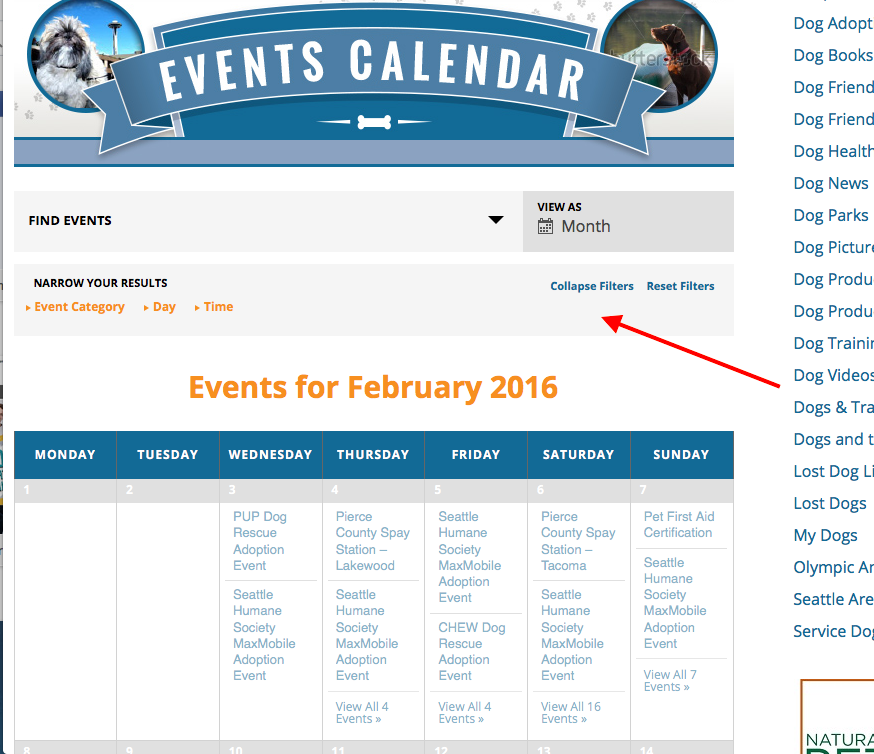
The gray box being pointed to in that screenshot is a set of extra filters for the calendar that can only be generated with our premium “Tribe Filter Bar” add-on. This does not require the Events Calendar Pro add-on.
You can learn about Filter Bar here, if interested → https://theeventscalendar.com/product/wordpress-events-filterbar/
I hope this helps! 🙂
— George
-
AuthorPosts