

Forum Replies Created
-
AuthorPosts
-
June 6, 2016 at 7:37 am in reply to: Is it possible to require specific names for each ticket? #1122969
Geoff
MemberHello Adam,
You bet, that is definitely possible. In fact, each custom field created for tickets has the option to make it required before adding the ticket to the cart.
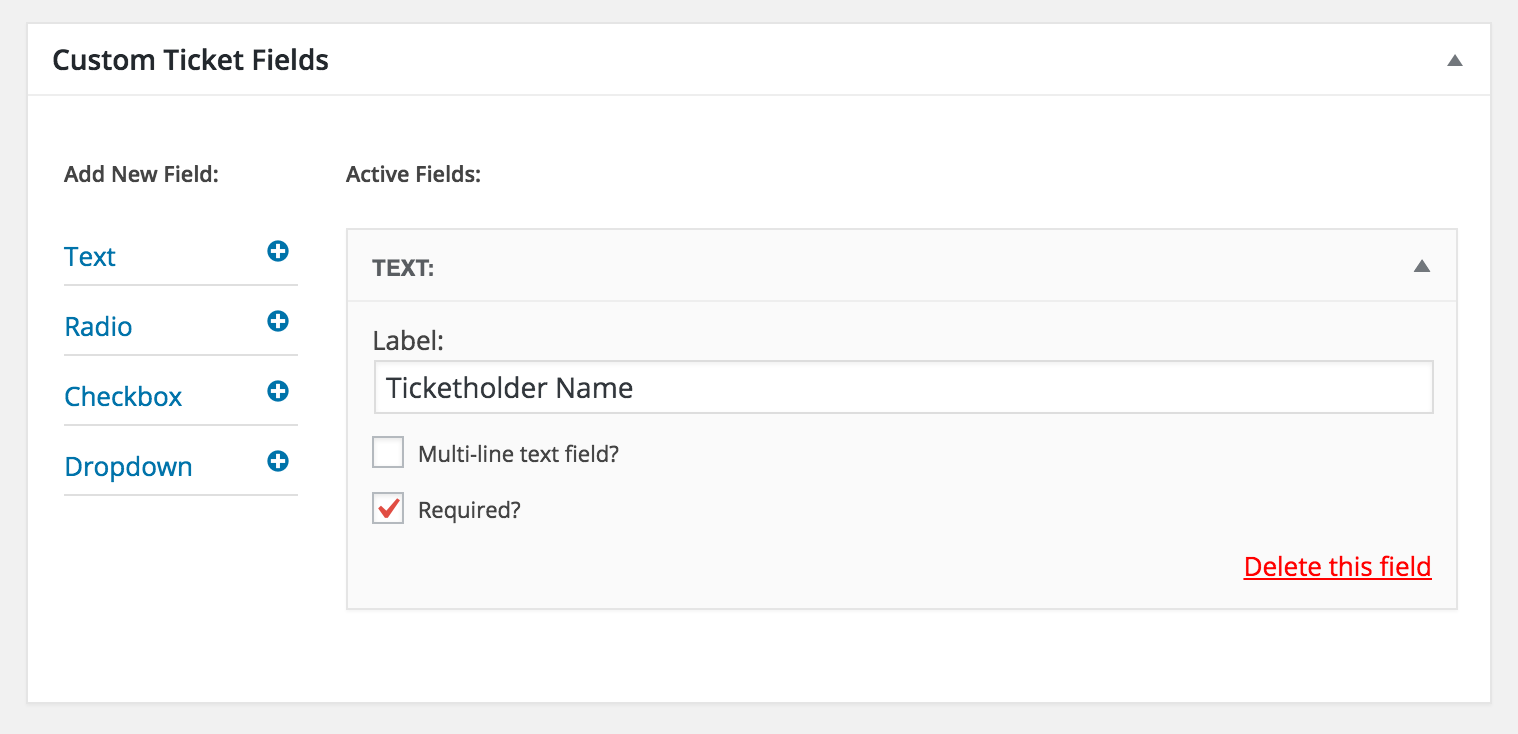
Will this work for you? Please let me know. 🙂
Cheers!
GeoffMemberHey @philmacaulay,
So sorry for the trouble! We are indeed aware of this and have a ticket open for it in our system and I have added this thread to it so we can follow up with you when a fix has been released. While I’m unable to pin a specific date for when it will be fixed, I do see this is a top priority ticket and, as such, our plan is to have it out in our very next maintenance release after 4.2 comes out (which is targeted for this week).
I’ll move this thread to Pending Fix in the meantime and we’ll follow-up with you when we have more information.
Thanks so much for the heads up and for your patience while we work on this.
Geoff
MemberHey Stephen!
I do think that is possible. However, I do want to note that we are fairly limited in how much we can support custom development questions like this. At the very least, I’d be happy to at least point you in the right direction, if I can.
Are you talking about the tooltip popup effect in Month View? If so, there is a template for that and you can customize it by using a template override. We have more information on template overrides in our Themer’s Guide:
https://theeventscalendar.com/knowledgebase/themers-guide/
The template you are looking for is called tooltip.php and it located here:
/wp-content/plugins/the-events-calendar/src/views/month/tooltip.php
Will this help you get started? Please let me know. 🙂
Cheers,
GeoffMemberHey Gabi,
I see my last answer was marked as the correct answer. I’ll go ahead and close this thread but please feel free to open a new one if any other questions pop up and we’d be happy to help. 🙂
Cheers,
GeoffMemberHey Kataroek,
I see my last answer was marked as the correct answer. I’ll go ahead and close this thread but please feel free to open a new one if any other questions pop up and we’d be happy to help. 🙂
Cheers,
GeoffMemberHey Rudi,
I see my last answer was marked as the correct answer. I’ll go ahead and close this thread but please feel free to open a new one if any other questions pop up and we’d be happy to help. 🙂
Cheers,
GeoffMemberHi Marian!
Events Calendar PRO does indeed come with a Week View. You can enable it by heading to Events > Settings > Display, selecting the Week View option, then saving your settings (screenshot).
Does this help answer your question? Please let me know. 🙂
Cheers!
GeoffMemberAwesome, so glad to hear all is working! Thanks for following up to let me know.
I’ll go ahead and close this thread but please feel free to open a new one if any other questions pop up and we’d be happy to help. 🙂
Cheers!
GeoffMemberHey Steven, thanks for reaching out!
I’m not seeing either Event Tickets or Event Tickets Plus installed on your site and both of them are required to create tickets and set up additional information for them. Do you have them installed but perhaps not activated?
If you do, will you please head to Events > Settings > Help, copy the System Information at the bottom of the screen, and paste it here for me as a private reply? That will help me check your settings for any clues if those plugins are installed.
Thanks so much!
GeoffMemberHey Moses and thanks for getting in touch!
Great question. We do indeed have a thorough amount of documentation on how to make the move from WooCommerce Tickets to Event Ticket Plus. Please check out the step-by-step instructions here:
https://theeventscalendar.com/knowledgebase/moving-to-event-tickets-plus/
Will this help you get started? Please let me know. 🙂
Cheers,
GeoffMemberHey there, @dagrafics!
Glad to hear you’re considering renewing your licenses — that would be awesome!
There is still no option to include the event date in the ticket email. However, there is a way to do it with some custom development. In fact, here is an example we provided to another customer where we were able to do exactly that with a template override of the email template:
https://gist.github.com/ggwicz/7bc31d7497ac1c7d8e6afb2e3bd8295c
Does this help answer your question? Please let me know. 🙂
Cheers,
GeoffMemberHey Eric,
Great question! You can upgrade your license any time by logging into your account here on this site and heading to the My Licenses section — that will display an upgrade link next to your license, which will bump it up to the level you would like.
Check out this post for much more information (including step-by-step instructions) for upgrading a license.
Does this help answer your question? Please let me know and thanks for using the plugins!
Geoff
MemberHi Lola,
That sounds like a conflict with the theme or another installed plugin rather than a limitation. I would suggest testing for conflicts (following these steps) and hitting us up in the WordPress.org forum with more detail about your system information if that still pops up in a default WordPress installation so we can check it out.
Thanks for reaching out!
Geoff
MemberHey Bruce,
The demo uses a custom theme, but the styles are pretty standard out of the box for what comes in The Events Calendar by default.
That said, we do have tutorials available for customizing and styling the calendar:
https://theeventscalendar.com/knowledgebase-category/customizing-views/
In particular, you might be interested in this post, which outlines how to use the WordPress Customizer to style calendar pages, including colors.
Cheers!
GeoffMemberHey Tom, I see my last reply was marked as the correct answer. I’ll go ahead and close this thread but please feel free to open a new one if any other questions pop up and we’d be happy to help. 🙂
Cheers!
Geoff -
AuthorPosts