

Forum Replies Created
-
AuthorPosts
-
Courtney
MemberSure thing Devon. Our non-profit organizer will be on the lookout for your application.
Thanks
Courtney 🙂MemberHey Kyle
It looks like you are using the Enfold theme, which is rather customized from our default look on WP Shindig Demo Site https://wpshindig.com/events/list.
You can check in with Enfold to see if they have an easy way to modify the look of that page.
I do like how they’ve integrated with our plugin, but I also know in cases like this you want to have a more standard look.
So sorry for any run around.
Thanks
Courtney 🙂MemberHey Jin
On your home page I tested out the code and could see the background as black and text as white.
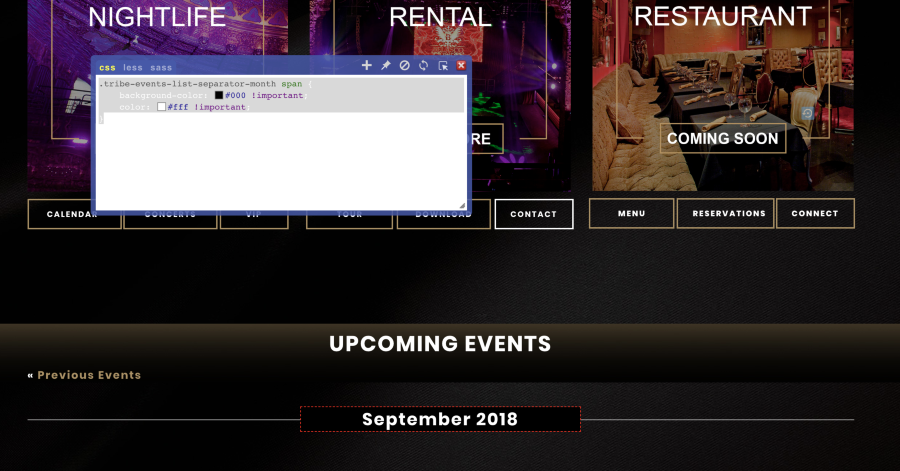
Here’s the complete code tested on the front of your site:
.tribe-events-list-separator-month span {
    background-color: #000 !important;
    color: #fff !important;
}
.tribe-events-loop .tribe-events-event-meta {
    background-color: #000 !important;
    Background: #000 !important;
    color: #fff !important;
    border: 0 !important;
}
You can test out removing the !important tag as well as matching up the precise colors.
Thanks
Courtney 🙂MemberGreat to hear Ross. I’ll close out this thread for now but do let us know if you bump into any other issues.
Thanks
Courtney 🙂September 6, 2018 at 2:21 pm in reply to: Events that end after 12 midnight also appear on the next day’s calendar. #1615732MemberSo sorry to ask for this… but can you share a link to an upcoming event several days from now that goes past midnight and ends on the next day?
Thanks
Courtney 🙂MemberNo worries Tom. Glad you were able to get this fixed up. I wasn’t sure if you had an account with us, so we’re a bit limited in helping otherwise.
Do let us know if you have any other questions.
Thanks
Courtney 🙂MemberHey Gareth
Head to Yoast > Search Appearance > Content Types > Settings for Events archive (near the bottom) to specify a meta description, etc. for the /events page.
You can add some custom code to your child theme’s functions.php file or use the My Custom Functions plugin to set the OG:Image for the /Events page if you’d like. See https://theeventscalendar.com/support/forums/topic/ogimage-for-archive-page/#post-1331563 for the solution another user discovered.
I’d recommend using the default image in Yoast as a fallback option.
Yoast > Social > Facebook
Please let me know if this gets it working for you.
Thanks
Courtney 🙂MemberHey Amber
That is odd. So sorry about that. Glad you go t it working. I’ll close out this thread for now but do let us know if you run into any issues in the future.
Thanks
Courtney 🙂September 6, 2018 at 12:49 pm in reply to: Does the checkout/cart integrate with WooCommerce? #1615612MemberHey Lauren
Event Tickets Plus does in fact require that you install WooCommerce or Easy Digital Downloads. Read more about each option’s features and payment gateways.
You’ll still need Event Tickets installed as well.
Is there anything else I can help you with?
Thanks
Courtney 🙂September 6, 2018 at 12:48 pm in reply to: How do i add coupons for my customers in Events tickets plus? #1615608MemberHi Kris
If you’ve installed and activated Event Tickets, Event Tickets Plus, and WooCommerce, it should be rather set up.
You’ll want to refer to Woo’s own guides on how to configure the payment processing, etc. https://docs.woocommerce.com/documentation/plugins/woocommerce/getting-started/
Then you can create a coupon inside WooCommerce. See https://docs.woocommerce.com/document/coupon-management/ for that.
When guests check out on your site, they will be presented with a location to add their coupon before submitting payment to you.
Let me know if this helps.
Thanks
Courtney 🙂MemberHey Karen
You can definitely customize that setting. My teammate has answered just how to do that at https://theeventscalendar.com/support/forums/topic/image-size-limit/#post-1112895. Take a look and let us know how it goes.
Thanks
Courtney 🙂MemberHey Robert
Thank you for that update. I’m glad you’ve got it working now. I’ll close out this thread for now, but do let us know if you run into any future support needs.
Thanks
Courtney 🙂MemberHey Rob
Thanks for that update. I’m glad you found the solution. Do let us know if you have any further support needs during your migration.
Thanks
Courtney 🙂MemberHey Christopher
Thanks so much for getting in touch! I’m afraid that we’re not equipped to provide technical support for current plugin users here in our pre-sales forum.
A quick look at the screenshot has me wondering if you have any upcoming events in the next month.
We’d be more than happy to assist you at one of the following locations:
• If you’re using one or more of our free plugins such as The Events Calendar and Event Tickets, you can request assistance on the WordPress.org support forum for the affected product.
• If you’re a current license holder for one of our premium offerings, please log in to your account and submit a post to the appropriate forum for the affected product. Please include your System Info https://theeventscalendar.com/knowledgebase/sharing-sys-info/ so we can better help you.If you can, please take the time to confirm in your post that you’ve run through our Testing for Conflicts steps prior to contacting us–this will save us a step and help us to get your issue resolved that much quicker! 🙂
Thanks again, and we’ll see you in the forums!
CourtneyMemberHey Mike
We offer recurring events, which would be events that occur as part of a series, as part of Events Calendar Pro.
https://theeventscalendar.com/knowledgebase/pro-recurring-events/ has more details about how this works.
If you’d like to just use one event as a template to create other events, check out https://wordpress.org/plugins/duplicate-tec-event/. This is a 3rd party plugin that we do not officially support or maintain. However, it will work with The Events Calendar and is free to check out.
Is there anything else I can help you with?
Thanks
Courtney 🙂 -
AuthorPosts