Forum Replies Created
-
AuthorPosts
-
Brook
ParticipantHowdy Li!
If you’re talking about Event Tickets Plus then the checkout process and beyond is not actually handled by our plugin, it’s handled by the Ecommerce store you have setup. Do you know which one you’re using, perhaps WooCommerce? Technically what you’re looking for is help modifying the third party checkout process and so we won’t be the true experts on that, but if you let me know what you’re using I bet I can get your some more detailed instructions for swapping things around.
Cheers!
– Brook
ParticipantThat is interesting Michael, I like how you’re building your own state selector using the existing tools! Cool idea.
I have some custom fields setup as well. But the filtering is working great for me whether I’m in category view or now. Would you mind sharing a link to the problem on your site? Perhaps that will shed a bit more light on what’s going on here.
- Brook
April 12, 2016 at 8:34 pm in reply to: The Google Maps API daily query limit has been reached #1101732ParticipantYeah we use a wide variety of calls, and to my knowledge you will have to add your key to each. When I researched this in the past it was going to be anything but easy, and involve direct edits to our files in a number of places so you wouldn’t be able to update the plugin. As I said we’re in the process of switching to the new Gmaps API. We’re actually probably going to skip keys altogether and just move all of the queries clientside.
I can’t see the example you linked. I likely need to be logged into get past the Website under development page. I’m not quite sure what the problem is here but perhaps it pertains to the above, it will be a different area you will need to attach your key and adjust the API settings?
- Brook
ParticipantHmm, that is certainly strange. Just to be sure, when you go to that page is this area just missing? Can you take a screenshot of what you’re seeing?

I wonder if perhaps your host has disabled sending email? It could explain the missing section. Would you mind also sharing you system information and letting me know who your webhost is?
Make sure to use the ‘Set as private reply’ checkbox to protect your private information from the public. You can find the system info by going to WP Admin > Events > Settings, clicking on the “Help” tab, and scrolling down to the ‘System Information’ box. (Or by going to [yoursite]/wp-admin/edit.php?post_type=tribe_events&page=tribe-events-calendar&tab=help) That will give me a lot of extra information to help diagnose the problem.
- Brook
ParticipantHowdy Lee,
I am sorry for the delay. I was away this weekend and not available to continue the topic. But I am here now and will be until Friday.
That’s interesting your contact form is sending. It might not actually be using WP to send though. Since that plugin was giving you issues lets try a simpler test that involves no plugins, just a little bit of leg work:
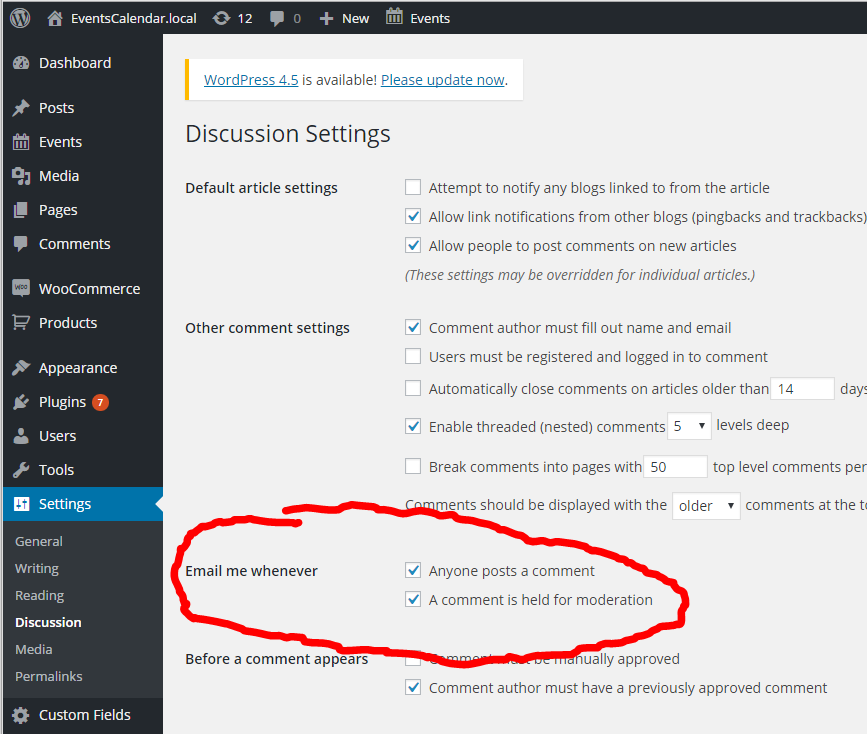
- Go to WP-Admin > Settings > Discussion and check the box “Email me whenever… Anyone posts a comment”
- Now logged into your site as a subscriber try posting a comment. Do you get an email?
Cheers!
– Brook
ParticipantHowdy Allan,
Thanks for trying that out.
I have done all the things but still not working can you please let me know whats the problem.
I have purchased “Pro” virsion but still having problem why?
https://theeventscalendar.com/knowledgebase/testing-for-conflicts/?source=tri.be&q=/support/documentation/testing-for-conflicts/#dl_test-for-conflictI am sorry to hear this. That was the easiest way to diagnose this problem. But if you followed it to the letter and it did not work, we will have to move on to some advanced troubleshooting techniques.
One thing we kn0w for sure is that you should not have continued to see that JavaScript error during the conflict text, but the fact that you did seems to indicate your site is broken in some fundamental way. Perhaps WordPress itself is corrupted.
The next step is:
- Create a new WordPress install on your server. Does your server allow you to create a new subdomain? If so you might install it there.
- Install the The Events Calendar plugins.
- Text this new blank site to see if it has the same issue. If it doesn’t try installing a copy of your theme and activating it.
- Test again. If there’s still no issue try importing a copy of your live database. Make sure to change the site URL in your wp-config. Does the problem exhibit itself?
By Step 4 the problem should have either come up or gone away. let me know what happens. Would you mind sharing a link to this test website as well so I can run some test of my own?
2)Past events should be listed in most recent at the top of the page then moving further past the current date as the page descends from top to bottom. right now its showing link below link
It sounds like you might be interested in this tutorial.
3) June should follow May instead of April for upcoming events, it appears dummy event has been listed below.
That issue should go away during the above test I outlined. It’s likely related to the other problem.
Does that all make sense? Will that work for you? Please let me know.
Cheers!
– Brook
ParticipantHowdy again,
Thanks for sharing your settings. I was not able to reproduce this in my tests. Would you mind trying the conflict test as I outlined above? I think it’s become necessary at this point:
This guide walks you through how to test for a conflict, and then identify what is conflicting.
Was that able to identify a conflict? If so I can hopefully use that to find a solution. Cheers!
– Brook
April 11, 2016 at 11:02 pm in reply to: Show past events if upcoming there are no upcoming events on homepage #1101182ParticipantThat’s good to know Anna. I appreciate the feedback. You should definitely vote on the official feature request as well: https://tribe.uservoice.com/forums/195723-feature-ideas/suggestions/13392369-list-view-show-past-events-if-none-are-upcoming
Cheers!
– Brook
ParticipantYou are welcome sir. It has been my pleasure assisting.
- Brook
ParticipantExcellent news! It was truly my pleasure to assist. I am sad this was such a pain for you, but hopefully going forward things will be problem free. Please let us know if you ever need anything else.
Until then!
– Brook
ParticipantThanks for your reply. What will work for me is the ability to display an event with an RSVP and a ticket price. Is this possible? For example, if you could enter the ticket price with every ticket, then that would solve the problem as well.
You’re welcome! That is certainly possible. Simply add an RSVP and a ticket to an existing event. Let’s say you’re highest ticket price is $45. The cost field will automatically say “Free – $45” on the front end. Does that answer your question?
Hi. i have a similar situation. Why does a number appear in between the Title and Description with no currency unithttp://screencast.com/t/HOC8i9yfg.
Howdy Jonathan! I’m not quite sure why that is. Your layout is certainly quite different from the stock one. Did you design the theme or a third party? It would seem there is a theme override in place, perhaps the theme override is causing this? Would you mind continuing this conversation in a new topic though? Your issue is not Identical to Sebastian so I don’t want to distract from his. If you open a new topic you will have our full attention. Cheers!
– Brook
ParticipantHowdy Corey,
You’re welcome!
That is possible for sure. You might be interest in WooCommerce’ Dynamic Pricing plugin, which allows you to craft pricing rules for any product including tickets. You could set a minimum purchase amount, even better you can set a discount if you purchase a certain number of tickets. That way people could still purchase just one if they wanted, but it comes at a premium.
Or if you wanted all tickets for every event to have a minimum purchase amount a theme override would be the easiest way (Themer’s Guide ) You would override public_html/wp-content/plugins/event-tickets-plus/src/views/wootickets/tickets.php. On line ~63 you will see the “min_value”. Change this from 0 to whatever you need.
Is that what you’re looking for?
PS. If you don’t mind, would you open up a new topic if you have more questions unrelated to the original? One of our forum rules is only one “issue” per topic. This helps make it easier to manage, and more importantly makes it far easier for people to search out topic relevant to them
Cheers!
– Brook
April 8, 2016 at 7:15 am in reply to: The Google Maps API daily query limit has been reached #1100026ParticipantHowdy Yan,
Great question.Thanks for sharing everything you’ve tried.
Google Maps is in the process of switching up how things are limited. Currently it is by IP, and thus you share your limit with every other site on your server. On shared servers this is basically a death sentence, if a single site on your server gets a bunch of views, or if all of them do, then others can use up your quota. This isn’t a bug in the plugin, isn’t your fault, Google’s, or anyones. It’s just the nature of shared servers. To fix this you should look into switching servers or at least IPs. The only sure fire way to make sure other folks aren’t using your limit is to get a server with a dedicated IP. You will need to either talk to your current host about doing this, or look at a new host.
Does that all make sense? Will that work for you? Please let me know.
Cheers!
– Brook
April 8, 2016 at 7:06 am in reply to: Browsing to the events calendar page then also shows the blog menu item as activ #1100024ParticipantHowdy James,
I would love to help you with this.
If you add the following CSS to one of your themes CSS files, it should correct it:
body.post-type-archive-tribe_events #menu-item-3255 a {
background: #fff;
color: #336600 !important;
}
As for why this is happening, your theme must have a small bug. I have seen this from time to time. Instead of checking if the current page is the blog archive, it just checks if it is an archive page. So any archive page from any post type, including custom ones like Events, will cause it to highlight the blog page. The fix is just to be a bit more specific in what pages should trigger the highlight. You might report this to the theme author.
Does that all make sense? Will that work for you? Please let me know.
Cheers!
– Brook
ParticipantWow! That is a lot of duplicate events. I am actually happy there are so many duplicates though, that is the best possible outcome in that the solution doesn’t require a more powerful server or anything.
That’s a great idea to run a SQL query for this, I’m glad you’re comfortable with that. We have never had to delete so many recurrences for an event before, but I knew our plugin couldn’t be the only one to face so many duplicate posts. I found an excellent article from someone facing a similar problem, and below I have adapted query code to fit your circumstance. I do recommend reading the article yourself before running this, as it includes some helpful tips like making you backup your database before running any delete queries like this.
First step will be to get the “post_parent” ID for this series of events. In your WP Admin try to edit the entire Series of events once again. This will take you to a URL like example.com/wp-admin/post.php?post=140&action=edit . Grab the post ID from this URL, in this case it’s 140.
As the article says it’s first a good idea to preview the posts you are going to delete before deleting them. Swap out the X at the bottom for the post ID you just grabbed, in the case above we would make the bottom line WHERE a.post_parent = 140 . Now run the query. The results should be many thousands of posts all with the same title, your recurring event. If so, procede.
SELECT *
FROM wp_posts a
LEFT JOIN wp_term_relationships b ON ( a.ID = b.object_id )
LEFT JOIN wp_postmeta c ON ( a.ID = c.post_id )
LEFT JOIN wp_term_taxonomy d ON ( d.term_taxonomy_id = b.term_taxonomy_id )
LEFT JOIN wp_terms e ON ( e.term_id = d.term_id )
WHERE a.post_parent = x
Now we are going to delete those results. Again swap out the X for your ID, then run this query:
delete a,b,c,d
FROM wp_posts a
LEFT JOIN wp_term_relationships b ON ( a.ID = b.object_id )
LEFT JOIN wp_postmeta c ON ( a.ID = c.post_id )
LEFT JOIN wp_term_taxonomy d ON ( d.term_taxonomy_id = b.term_taxonomy_id )
LEFT JOIN wp_terms e ON ( e.term_id = d.term_id )
WHERE a.post_parent = x
And there you have it, the fastest way to delete all recurrence of an event. This query will actually probably execute in a few seconds on your server, usually it’s quite fast. With all of those delete we only have one final step, go to your WP Admin and find the original event once again. There will be no recurrences, only the original event of the series. If I were you I would click Trash series on this event, then I would empty my trash. Now you can recreate the event.
I don’t know if we entered something incorrectly or if this is an event bug. I don’t see anything on this event that would be able to produce this many records.
I don’t know what caused this either, very puzzling. It could be some currently unknown bug that happened, it could be a conflict or some accidental setting that was input. That’s the reason why I recommended Trashing the remaining event above, just in case there is something corrupted in it deleting and starting over is safest.
With the above done your site will hopefully be running faster than ever, and best of all free from errors. As ever if I can help along the way or if you have questions please let me know. I am stoked we have nearly fixed this!
- Brook
-
AuthorPosts