

Forum Replies Created
-
AuthorPosts
-
April 14, 2016 at 8:23 am in reply to: .ics File Does Not Work from Google .ics URL or Local .ics File Upload #1102476
Brook
ParticipantHowdy Marnie,
Thanks for reaching out about this. I am sad to say that is actually a bug we believe to be introduced in our latest version. I am sorry this is causing you difficulties. The good news is we are working on a fix, and it looks like it will be ready in our very next version which is due out in a couple of weeks. Until then any recurring event you import will only show the first occurrence of it.
It this something you need fixed right now. If so I can walk you through downgrading to a past version that won’t have this issue. Or if you can wait a couple of weeks the problem will basically fix itself.
Cheers!
– Brook
ParticipantThis reply is private.
ParticipantHowdy fxi,
The latest release did indeed cause a regression on this bug. 🙁 To be honest, in response to that bug and a few others with iCal we ended up forming a special committee to look into and address these issues going forward. It’s an extraordinary thing for us, usually we don’t have nearly this many bugs in a plugin and we especially don’t have back to back regressions. One of the things the committee decided was that our next release, 4.1.3, should be focused on the iCal importer. We have a number of fixes on the way and also a couple small features that should help folks. That release is due out about the end of April.
Until then if I were you I would downgrade your plugin to the prior release, as it did not have this issue.
Does that sound like a plan?
- Brook
ParticipantThat is most puzzling, I have tried to reproduce that issue a variety of ways but haven’t been able. Would you mind sharing your full your system information and pasting it here? Make sure to use the ‘Set as private reply’ checkbox to protect your private information from the public. You can find the system info by going to WP Admin > Events > Settings, clicking on the “Help” tab, and scrolling down to the ‘System Information’ box. (Or by going to [yoursite]/wp-admin/edit.php?post_type=tribe_events&page=tribe-events-calendar&tab=help) That will give me a lot of extra information to help diagnose the problem.
- Brook
ParticipantThank you for clarifying. In light of that I have another question or two for you. Is the calendar already hidden from the public, and you just want to prominently note events which are private and shouldn’t be shared? Or, are hoping to both mark them visually for people who can see them, and hide them?
Two calendars would work. You could also use a third party membership plugin. We have had pretty good success with Members. It allows you to specify which posts are visible to selected user roles.
Does that all make sense? Will that work for you? Please let me know.
Cheers!
– Brook
ParticipantHowdy Brandon,
I must apologize, I had not given that snippet I shared a whirl before sharing it. I just tried it myself and it was not working amazing for me. I am wondering if that is the problem here.
I have a different snippet that does the same thing, and I wrote this one myself! Just tested it again, on your iCal feed, and it seems to be working great. Do you feel comfortable running SQL queries, perhaps from PHPMyAdmin? If so:
https://gist.github.com/elimn/2375dcd3e5ee4bcbf1ed86f5cbdb4620
If that doesn’t work for you let me know and we’ll find an alternative. I just got some great news about this, likely in v4.1.2 of our iCal importer we will release a fancy button you can click to do all this for you. Until then, what do you think of trying the above?
Cheers!
– Brook
ParticipantThis reply is private.
April 13, 2016 at 6:45 am in reply to: The Google Maps API daily query limit has been reached #1101895ParticipantThanks for getting back! Happy this is working now.
- Brook
ParticipantHowdy Robert!
Thanks for taking the time to report this. That is definitely not a known bug. We have been testing with 4.5 release candidates for weeks, and so far no one else updating has seen your issue that we’re aware of. 4.5 is running great alongside The Events Calendar in my installs as well. It’s likely something went wrong with the update, or perhaps there is a deeper issue here like another plugin that got updated at the same time?
Would you mind logging in so I can verify your support access? Or, if you don’t have/want a license (which includes a year of support) you should checkout the volunteer community on WordPress.org: The Events Calendar. It’s not the same level of support, but it’s free! We even check those forums once each week and help to the extent we can.
Cheers!
– Brook
ParticipantHowdy Sofia,
That is definitely possible. By default the Filter Bar will appear on both of those pages/categories. You can see it in action here:
- http://wpshindig.com/events/category/tech-meetups/
- http://wpshindig.com/events/category/tech-events/
Notice how the same Filter Bar appears above both pages. Of course that example shows the Horizontal Filter Bar, but even if you plan to use the default Vertical one the same bar will appear on both pages.
Does that answer your question?
Cheers!
– Brook
ParticipantHowdy Brian,
I would love to help you with this.
I appreciate you’re sharing a screenshot, but I’m not actually able to view it. I get a Zoinks! image not found error. Would you be able to actually just share a link to your site where the problem is happening?
Have you tried creating a new test recurring event and seeing if it has the same problem? I’m suspicious this recurrence might have gotten corrupted somehow.
Cheers!
– Brook
ParticipantHowdy Li,
Do you have a screenshot of what you’re seeing? And also what email client is this? Email clients are like browsers, each one will see something different.
Thanks!
- Brook
ParticipantHowdy Veruska,
I would love to help you with this.
Did you select Missouri in the state/province drop down?
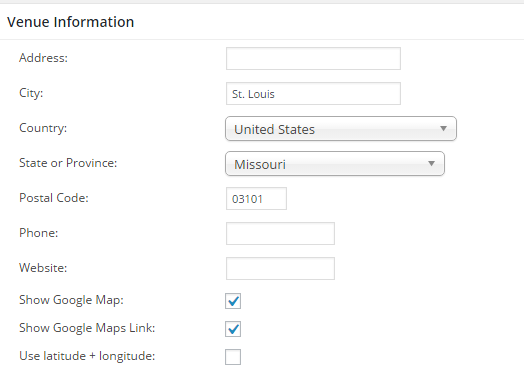
When I select it in the drop down like the above it shows properly on the front end. To see that screen go to WP-Admin > Events > Venues, click Edit under the First Championship and you’ll see the above settings area. Do you have the same settings I do?
Cheers!
– Brook
ParticipantHowdy Simon,
That is definitely odd. I don’t see upgrading to the pro version changing this problem any, you will likely continue to see it. It looks like it’s probably related to all of the JavaScript errors happening on that page. You might start by trying a standard conflict test to narrow down the issue: This guide walks you through how to test for a conflict, and then identify what is conflicting.
While upgrading to Pro won’t be a cure in itself, if you do want more detailed support with this you might be interested in purchasing a license as that comes with a year of support. It provides access to our premium support forums here which we check many times daily. Or, if you don’t want a license you should checkout the volunteer community on WordPress.org: The Events Calendar. It’s not the same level of support, but it’s free! We even check those forums once each week and help to the extent we can.
Cheers!
– Brook
ParticipantHowdy Joseph,
It sounds like you might be interested in altering the visibility setting of those events. When you edit the event, right next to the big Update buttong is the little visibility setting.
Here’s a nice tutorial on it including some screenshots. If you set it to visibility:private, do you think that would do what you want?
Cheers!
– Brook
-
AuthorPosts