Forum Replies Created
-
AuthorPosts
-
Brook
ParticipantHowdy Kathy,
I would love to help you with this. That would be what our plugin calls a “recurring event”, or an event that spans multiple sessions(such as 5 times per week). That feature is exclusive to Events Calendar Pro . To set one up get a license to Events Calendar Pro, install it, then edit your event and setup it up to recur every week day but not on weekends.
Does that sound like what you’re looking for?
Cheers!
– Brook
ParticipantHowdy Kelly,
I would love to help you with this. This will definitely take a programmer to build. I’ll outline what needs to happen so that you or your programmer can build it. It will probably take ~2 hours of coding and testing to make this happen.
First you will want to query all of the organizers. The easiest way to do this would probably just be a WP_Query . Look for the ‘tribe_organizer’ post type. There will be two meta keys you will be interested in: ‘_VenueLat’ and ‘_VenueLng’ . Once you have the values of those two keys you should have everything you need to put a pin on a Google Map. It sounds like you might already have a Google Map setup on the page, if so pass it those pins via the Gmaps API. If you don’t already have one then you will want to set one up per the Gmaps documentation.
Does that all make sense? Will that work for you? Please let me know.
Cheers!
– Brook
ParticipantHowdy David,
I would love to help you with this.
I want to clarify something first. When someone clicks on a day do you want it to:
- Take them to the Day view? Example. This will work great if you have multiple events per day.
- Take them to one of the events on that day. If this is what you want what happens when you have multiple events on a given day?
Depending on what you need I can give you or your programmer the instructions needed to build this feature. It will likely require 2 hours of time or less to actually build and test. Just let me know what you wanted.
Cheers!
– Brook
ParticipantHowdy David,
I would love to help you with this.
I want to clarify something first. When someone clicks on a day do you want it to:
- Take them to the Day view? Example. This will work great if you have multiple events per day.
- Take them to one of the events on that day. If this is what you want what happens when you have multiple events on a given day?
Depending on what you need I can give you or your programmer the instructions needed to build this feature. It will likely require 2 hours of time or less to actually build and test. Just let me know what you wanted.
Cheers!
– Brook
April 25, 2016 at 4:56 pm in reply to: Community events submitting changing field date format #1106895ParticipantHowdy Nick,
This should be very easy to do. That obeys the sitewide datepicker setting. So go to WP-Admin > Events > Settings > Display and scroll down to “Datepicker Date Format”. Select the format you want and hit Save.
Does that do what you wanted?
Cheers!
– Brook
ParticipantHowdy Fox!
I would love to help you with this.
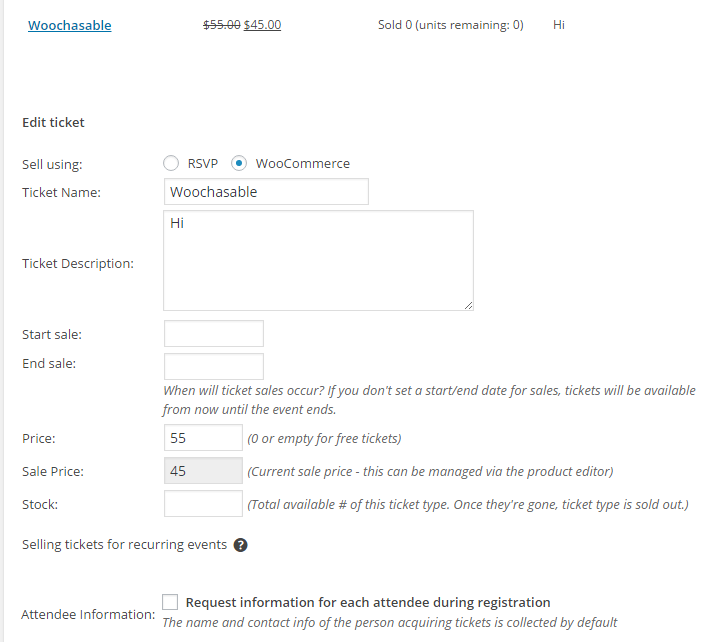
This is indeed something that shouldd be fixed int he lastest versions of our plugins. Have you updated yet? Here is what you should be seeing:

You will note there are two fields, one showing the sale price and the editable one shows the full price. Now this applies to anything with a WooCommerce sale set. It is possible that the WP Memberships doesn’t use Woo sales and won’t be compatible, but I kind of doubt that is this case. If that were you would think it would not show the sale price up above in your screenshot, but it does.
So that leads me to wonder, are you on the latest versions of the plugins? If so, would you mind grabbing your system information and pasting it here? Make sure to use the ‘Set as private reply’ checkbox to protect your private information from the public. You can find the system info by going to WP Admin > Events > Settings, clicking on the “Help” tab, and scrolling down to the ‘System Information’ box. (Or by going to [yoursite]/wp-admin/edit.php?post_type=tribe_events&page=tribe-events-calendar&tab=help) That will give me a lot of extra information to help diagnose the problem.
Cheers!
– Brook
April 22, 2016 at 2:56 pm in reply to: 'Tribe__Events__Pro__Mini_Calendar' & Tribe/Recurrence/Meta.php #1106133ParticipantHowdy Chara,
I would love to help you with this. I will walk you through whats going on and your options to fix it.
First, as you probably already are familiar with the server is overburdened. Something within WordPress, probably a plugin, is taking up more resources than your server has available. Your server is configured to just give up on loading a page after a set amount of time, and once it gives up it mentions the last thing it was loading in the error message. In this case the last thing was the Tribe Mini Cal widget. But, that does not necessarily mean the Tribe Mini Cal widget is slowing your site down, it is quite likely that something loading before the widget took up most of the time that you server allows for a page to load.
There are a few options to fix this:
- Reconfigure your server to allow more resources. You should ask your web host how to increase PHP’s “max_execution_time” to something like 300 (seconds). Then try logging into WP Admin. It might take literally minutes for the page to load, but sometimes a plugin just needs to run a script once. So once the page finally loads, each page load after this will be fast again!
- Disable plugins. If you can not get the WP Admin to load by following the above, then try renaming your /wp-content/plugins/ folder to /wp-content/plugins-bak/ . Now visit the WP Admin area. You will notice that all plugins are deactivated and it shows none are available. After visiting this page just once, rename the folder back to just “plugins” and the plugins will be available for activation again. For now, try activating them one-by-one and seeing if your site gets noticeable slowed after activating one of them. If it does, make a note of what plugin that is and let me know, I might be able to help you fix it or find a faster alternative.
- Switch to a faster server. This is a last resort option but sometimes necessary. Sometimes your website gets enough posts or requires so many plugins that the cheaper servers can no longer handle it. You will need to consider faster ones that are typically a bit more expensive.
Does that all make sense? Does following those steps and reporting back sound like a plan?
Cheers!
– Brook
ParticipantHowdy Helena,
I have to be honest, we have found this a bit puzzling. The setting “Show only the first instance of each recurring event (only affects list-style views).” should never hide events from the backend, with or without that snippet. In my tests it is not hiding events from the backend WP Admin, and asking around the team no one has ever seen it do that either. You see we purposefully never hide recurrences from the Edit Events list, because if we did it would make it incredible difficult to edit an individual recurrence and add information to it that does not apply to the rest of the series.
But clearly you are seeing something different. If you go back in and disable or remove that snippet I shared, are you seeing it hide events from the WP Admin again? If so, to be honest that “feature” appears to actually be a bug of some kind and I am not at all certain why it is manifesting on your system. I am afraid that tampering with this at all could inadvertently fix the bug, and you evidently don’t want that.
What a strange situation! Let me know if you have any questions along the way.
- Brook
ParticipantHowdy again,
I am happy we made progress. Do you know what your web developer did? It seems like it might be related.
My last comment was actually primarily focused on the tickets emails. Ever debugging instruction in there would be applicable to those emails. Did you try the conflict test? Would you be willing to share a copy of your database?
Cheers!
– Brook
ParticipantHowdy Caldia,
I see you don’t have a multisite license. I am sorry upgrading is a pain right now for multisites without the full license, but we are definitely working to fix that with an updated version of the plugin.
In the mean time the best way to upgrade would be to delete the old plugin and install the new. You don’t even need to use a file manager if you don’t want, simply go to WP Admin > Plugins, hit deactivate, then delete. Now install the latest version. The reason you are having that fatal error is because you haven’t delete the old one, so the two running side by side are conflicting. Could you try deleting the events-calendar-pro.old folder? That should cause the error to go away. Does it?
Cheers!
– Brook
ParticipantHowdy Eric,
I would love to help you with this. That’s a great question, we could certainly make the guide a little more specific here.
No, it is not possible to override the admin-views folder. We are however considering making this possible, at the very least we would like to make all admin-views that are used in Community Events plugin overridable, if not all of them in general.
However, it is possible to add your settings to the filter ‘tribe_general_settings_tab_fields’. You’ll note at the very end of tribe-options-general.php it runs this filter, and passes the $generalTabFields array. So you can add your items to that array via the filter.
You can also use the WP script enqueue/dequeue system to override and JavaScript, including ours. Those two links elaborate quite a bit on the topic.
Does that answer your question? Are you able to do your customization now?
Cheers!
– Brook
ParticipantOh I see. I am sorry I mistook your wanting them all on one page to mean no pagination. Well then simply prefilling the datepicker is all you will need.
https://gist.github.com/elimn/d034dfddb9be206d9cc1
That snippet actually does change the default date for you. Again, just set it to something in the past, before any events, and it will show all events from that date forward (with pagination). Pro is not required, although if you do need support for it you still might want a license so you can get the support from us. Of if you’re patient checkout WordPress.org: The Events Calendar for some free volunteer support.
Does that answer your question?
Cheers!
– Brook
ParticipantOoops. I just updated that file to make it backwards compatible with older versions of PHP. Can you try replacing the current one with this updated script?
https://gist.github.com/elimn/532aa266f1a74463509b
Did that work?
- Brook
April 21, 2016 at 2:53 pm in reply to: .ics File Does Not Work from Google .ics URL or Local .ics File Upload #1105679ParticipantAwesome! I am so happy to hear that they could alter it.
Let me know if I can help with the anomalies. The import/export is not a feature we test every release, unlike most of our other features. As such sometimes anomalies can be the fault of our plugin and we’re just not aware of them yet, but sometimes they are also just the nature of the WP Tools.
Cheers!
– Brook
ParticipantYou are welcome Joseph! This topic will autoclose after 2 weeks of inactivity, but I’ll definitely leave it open until then. If you need further assistance at any point don’t hesitate to reach out, even if it’s in a new topic. Cheers!
– Brook
-
AuthorPosts