

Forum Replies Created
-
AuthorPosts
-
Brook
ParticipantOh no worries, that happens to everyone. I nearly provided a screenshot in my initial reply because I know how hard it can be to visualize which screen someone else is describing.
Do let me know if this gives you anymore trouble.
- Brook
ParticipantThank you for getting back!
Basically what appears to be happening is that when you update our plugin via WordPress in some scenarios you can run into MAX_PATH issues on Windows. WordPress creates a temporary directory when updating and puts all of the plugin files in it. But this can give you some crazy long file paths like this:
D:\Sites\eventscalendar.local\public_html\wp-content\upgrade\theeventscalendar.compu_request_pluginevents-communityversion4.2pu_get_download1pue_active_version4.1-xjMZdA\the-events-calendar-community-events\vendor\tribe-common-libraries\tribe-common-libraries.class.php
That is over 260 characters, and thus will fail in some situations. Technically Windows can support longer paths, but there are plenty of scenarios where it does not.
What we are planning to do is investigating shortening the temp dir’s name ( theeventscalendar.compu_request_pluginevents-communityversion4.2pu_get_download1pue_active_version4.1-xjMZdA ) as that is ridiculously long and it seems to be something we have a measure of control over. Once we have that shortened and a new update available for download, likely all you will have to do is hit update in WordPress only this time it will work.
Until then the solution I have been using is:
- Go to WP Admin > Plugins
- Deactivate the plugin which has an update available
- Delete the plugin
- Manually install the latest version view the Add New button
That solution has worked well enough for me thus far. Is it working for you?
I apologize for the inconvenience and for it taking us so long to get to the bottom of this. This has been one of the hardest to isolate bugs we’ve seen, especially because it only impacted a small subset of Windows users.
Cheers!
– Brook
ParticipantHowdy Alan,
I just reopened this topic because I believe it may be related to an issue I just discovered. Are you on a Windows server perchance? Are you able to “manually update” the plugins by deactivating them, deleting, then installing the latest version of the plugin ? If so I believe I just discovered the cause of this.
- Brook
June 16, 2016 at 9:54 am in reply to: How to make flat fee to charge per ticket sold instead of each event in an order #1128004ParticipantI did! I am sorry my vacation ended up impacting your topic though. Typically when one of us is absent the others will take over and respond, but in this case it seems your topic fell through the cracks.
I will definitely get back to you as soon as I can. Ordinarily we would not be able to investigate and possibly build a complicated snippet like this as part of our support, but we are making an exception here. Due to that it takes a little more time than usual. I hope to get back to you with good news, it is possible that I will not be able to get this completed in the budget I have been given but I will do my best. If it’s not complete, then we will have to wait for this feature to be included as part of Community Tickets in a future update.
Thanks again for bringing this to our attention and your patience while we work on it. I’ll be in tough by Friday if not before. Cheers!
– Brook
June 16, 2016 at 9:49 am in reply to: Automatically post new TEC events to a Facebook Page as posts (not as events) #1127997ParticipantYou are very welcome A K. If you have not done so already you might wish to share this idea on UserVoice (feature suggestion page for The Events Calendar) . I could see it being a popular idea, in which case we would be very interested in building it.
Cheers!
– Brook
ParticipantAhh I understand now. Yes that is a bug, there should still be an option to show/hide the map and link when editing an event. We became aware of this bug a couple of days back and are working to schedule a fix into our roadmap. No ETA just yet, but it is definitely something we want to fix.
There are two workarounds available now:
- Downgrade to a past version that did not have this bug. Tutorial: Downgrading a plugin
- Create a new event with the same details, when creating an event those boxes will still appear so you can still select whether to show them. Once you are sure you have copied over all of the details to the new event, delete the one you wanted to edit.
Does that all make sense? Will that work for you? Please let me know.
Cheers!
– Brook
ParticipantThanks for giving that a whirl. I am going to leave this open for a couple of weeks just in case any more duplicates happen upon reimport, then I can assist you further. Depending on which event you deleted, the original or the new one, I could see some of them reimporting. If you do get some duplicates again check this box to see when an event was published on:
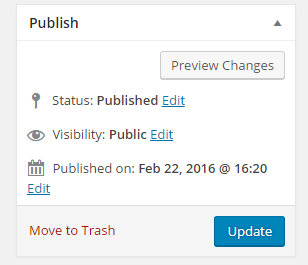
The published date there should be of some help.
Sorry for the hassle Veruska. Thanks for getting back. Let me know if this does give you further problems, I definitely want to make sure it’s stopped.
Cheers!
– Brook
ParticipantHowdy Flamen,
I am sorry to here this is giving you trouble. I would love to help you with this.
We should probably test if a “conflict” is happening, and if so narrow it down so we can find a fix for it. This guide walks you through how to test for a conflict, and then identify what is conflicting. What is the result of that? Is it possible your theme?
Cheers!
– Brook
ParticipantHowdy Again Veruska!
I am happy you documented the error you saw a few days back. Good news on that front, it is a one-time error that fixes itself. You should never see it again and it did no harm while it was visible. It was just a fluke a few of our users saw when updating.
The duplicate events though are definitely an issue. This likely stems from us fixing some Timezone issues in the latest iCal importer. Event imported in previous versions did not always have the right timezone which sometimes caused the times to be off internally. The newest version corrects that, but since it has no way of knowing which events from before were proper it will sometimes create a duplicate. My advice would be to delete the original, the one that has the improper timezone, and then you should be all set. You can tell which one was created first by the publish date of the event, which can be viewed when editing it. I am very sorry for the inconvenience 🙁 . Hopefully this does not impact too many of your events.
As always if you have any questions or want some clarification please let me know. Cheers!
– Brook
June 15, 2016 at 11:04 pm in reply to: Automatically post new TEC events to a Facebook Page as posts (not as events) #1127733ParticipantHowdy A K,
That’s a cool idea. We do not have any plugin or feature currently that does that. I have not actually seen it requested before. That does seem possible via Facebook’s API, but it would require a lot of developing to get from here to there. You might be able to find a third party plugin that can post any WP Post to Facebook, but even then it will likely require some customization to include the event dates and such.
Does that all make sense? Does that answer your questions? Please let me know.
Cheers!
– Brook
ParticipantHowdy Simon,
I would love to help you with this.
I am happy you reached out again, I just wish I had more specifics to give you. An ETA is not yet possible for this. This particular issue has only been requested by one user (you) and unfortunately we have many hundreds of requests that multiple users are interested in. To be up front, this means your request is a naturally lower priority than many others and thus is not yet scheduled.
I truly wish I had better news for you on that front, but hopefully you can appreciate my desire to be transparent on where we are at. Please let me know if you have any follow questions about this. Cheers!
– Brook
ParticipantHowdy Arnie,
It looks like you might have succeeded since posting! The image I am seeing on the link you shared does not appear to be cropped at all. That is excellent!
Is everything working h ow you wanted now? Is there anything I can still help you with here?
Cheers!
– Brook
ParticipantHowdy Trask,
I would love to help you with this. Thanks for sharing the troubleshooting steps you’ve tried thus far.
When you say this is reported by lots of users, do you mean lots of users on your site or are you seeing similar problems here on the forums? I just reviewed our bug reports and there basically are no currently known issues with Google Maps, but that’s not to say some won’t be logged soon.
What exactly are the issues you are having with Google Maps? Are there any pages you can link me to where I can see the issue for myself?
Thanks for taking the time to reach out about this, I am happy to help further. The more I know about your specific site the better. Cheers!
– Brook
ParticipantHowdy Trask,
I would love to help you with this. Thanks for sharing the troubleshooting steps you’ve tried thus far.
When you say this is reported by lots of users, do you mean lots of users on your site or are you seeing similar problems here on the forums? I just reviewed our bug reports and there basically are no currently known issues with Google Maps, but that’s not to say some won’t be logged soon.
What exactly are the issues you are having with Google Maps? Are there any pages you can link me to where I can see the issue for myself?
Thanks for taking the time to reach out about this, I am happy to help further. The more I know about your specific site the better. Cheers!
– Brook
ParticipantHowdy groeteke,
That certainly sounds off. Thanks for detailing everything you’ve tried thus far. Would you mind sharing a link to the venue in question? When you say it works while viewed in a separate browser window what do you mean? Do you mean opening the same URL in anew windows, perhaps the Incognito mode, makes it work properly?
Cheers!
– Brook
-
AuthorPosts