

Forum Replies Created
-
AuthorPosts
-
Brook
ParticipantHowdy James!
That’s a cool idea. It certainly seems possible to create. You could give each venue it’s own unique CSS class, something like “.venue-venuenamehere” and then assign it a color via CSS. You would likely just need to create a theme override for any views that you have enabled on your calendar, such as List, Month, etc.
There would be a work around to make this happen without the need to write one line of code. You could try out the community addon, Events Category Colors. If you created a category for each venue, and then assigned all events in the venue to that category, then you could colorize everything with great ease!
Did that all make sense, or can I elaborate any? Would one of those solutions works?
Cheers!
– Brook
ParticipantHello Ruud,
That can absolutely happen. Every event can have a “Venue”, which is the location where the event happens. Having multiple venues or theaters is very easy. Furthermore each event can have an “Organizer”, which is the person or people who are putting the event on. That could be your artist. You can further categorize events into categories. An example category might be “Musicals” or “Drama”.
Someone viewing your site could easily look at all events happening within a specific Venue/Theater. Or all events from an organizer, or all events within a category.
Look at our showcase for some example of sites using venues/organizers and categories. I only know of one Theater, this one.
Does that answer your question? Can I answer any further questions? Cheers!
– Brook
ParticipantGood question Henrik. I was using old terminology. It is not called the “Edit Single” button, which can be found in WP Admin > Events > Edit Events. Hover over a recurring event in the list for “Edit Single” to appear, like this:
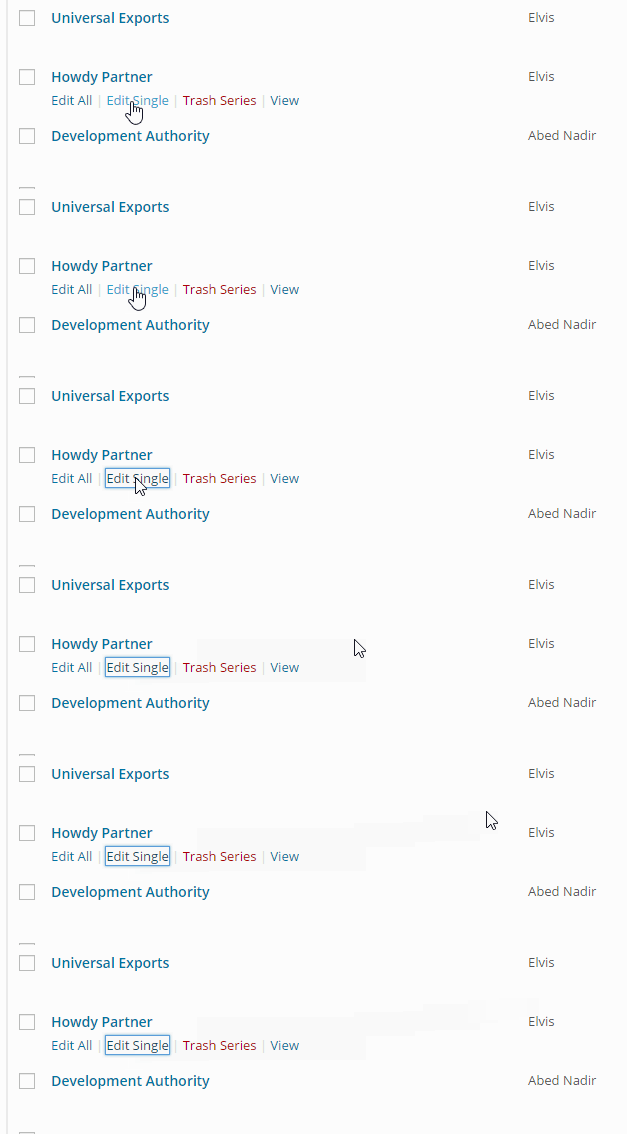
Does that make sense? Does the above tutorial now work for you once you use the Edit Single button?
Cheers!
– Brook
March 18, 2015 at 7:04 am in reply to: After the update the "Adding Post Thumbnails to the Events List Widget" not work #949090ParticipantThis topic is getting archived. If anyone has a similar issue and needs assistance, please open a new topic. We would be happy to assist.
Cheers!
– Brook
March 15, 2015 at 8:27 am in reply to: Facebook Auto-Importing multiple copies of events, venues & Organizers #948409ParticipantThat is what I have been focusing on too Bernhard. It has been a difficult thing to test though, because I have been traveling this past week and so I am testing on my laptop, a laptop that I am not able to keep constantly on. This interferes with WP_Cron, which is what activates the process to auto import… Basically it just slows down testing dramatically. I will no longer have this problem on Tuesday, once I am back with a permanently online server I can test on. But, I would like to find a resolution before then if at all possible. One thing that would really help, is if anyone else experiencing this problem is able to to post their System Information. This can be found by visiting Events > Settings > Help, and scrolling down to the System Information box. Copy/paste everything there into a private reply here, so that it is not visible to the public. If you are not able to do this I completely understand, but if you can it would be much appreciated. I will keep testing and isolating regardless, but with extra information will come a faster fix.
Cheers!
– Brook
March 13, 2015 at 4:46 pm in reply to: Facebook Auto-Importing multiple copies of events, venues & Organizers #948276ParticipantHowdy Tracey,
Thanks for reporting in. Could you post a private reply containing your system information? That would be an enormous help. No solutions yet. Unfortunately this has been a long investigation, but I feel like we are getting really close. Your system information could be the exact ticket we need to isolate and fix.
– Brook
March 11, 2015 at 8:42 pm in reply to: Facebook Auto-Importing multiple copies of events, venues & Organizers #947793ParticipantI will retest that one specifically. Thanks for reporting back on that, that probably helped narrow down the problem. I will have to do the test late tomorrow as I am out most of the day. Ordinarily we pass our threads to a fellow staff member for the day if we are gone, but in this case since it requires back story and a while to get setup for testing I can not do that. I will let you know what happens tomorrow night. Until then, cheers!
– Brook
March 11, 2015 at 2:21 pm in reply to: Eventbrite iframe for buying tickets disappears before event begins #947736ParticipantI have no problem leaving this open for a spell 600lines. That sounds good. We do usually try to close open topics after 2 weeks if no response happens. But I will try and keep it open longer if possible.
Cheers!
– Brook
ParticipantThanks for marking the answer! I will archive this now.
– Brook
ParticipantThanks for marking the answer! I will archive this now.
– Brook
ParticipantHaha, excellent. Happy developing!
– Brook
ParticipantOh nice! I must have completely misunderstood what you wanted to do, other wise I would have told you what to change. I am glad you knew what to change though and my snippet helped. Cheers!
– Brook
ParticipantHowdy Henrik,
That is unfortunately a bug. 🙁 We definitely want to fix it, but it was discovered rather recently. In the mean time it can be worked around by clicking “break this event from series”. Then you can delete the series. The slug for your even will change though. If you want to keep the original slug you will have to remove that series permanently (empty trash), then you can edit the single event and change the slug.
Does that make sense? I apologize for the inconvenience of the bug. Hopefully the workaround will help. Does it? Please let me know if you have any further questions, or if I can help you more with this. Thanks Henrik!
– Brook
ParticipantHowdy Jerome,
I once wrote a very similar snippet to that: http://pastebin.com/J0XzSxTz
These snippets are very tricky to write, because it is not very snippetable. Ultimately a much better solution is to write a custom template for WooCommerce, since all of those emails are generated by WooCommerce. Woo makes this pretty easy, even in the Woo > Settings > Email panels they list all of the emails they send, and show you where to find the template files for each. From there you can override it with extra data like in the snippet.
I realize that this is just an overview of what to do. Unfortunately this customization is going to be a bit involved, and require a fair bit of code that will need to be written.
Does that answer your question? Do you have any followups? Please let me know.
Cheers!
– Brook
ParticipantHowdy Neill,
That’s an interesting question. To answer I think it will help to show you some examples of how a recurring event appears on the front end. Here is a recurring event example. This particular event happens ever 3rd Wednesday of each month. Here is the recurrence that happens on March 18th:
http://wpshindig.com/event/wordpress-santa-cruz-meetup/2015-03-18/
It looks and behaves like any other event, but there is essentially a duplicate of it every third Wednesday of every month as you can see here:
http://wpshindig.com/event/wordpress-santa-cruz-meetup/all/
Does that answer your question? You asked if it creates duplicates. It definitely does. Pre 3.0, especially pre 3.3, it behaved a little bit differently but it still essentially had duplicates.
The only caveat is that there is a setting which limits how long to keep recurring events for. If you want to keep a historical archive you might need to disable this feature. By default it only keeps recurrences for 24 months before it deletes them.
Let me know if that helps paint a clear picture. Cheers!
– Brook
-
AuthorPosts