Forum Replies Created
-
AuthorPosts
-
Barry
MemberAh, I see. When you opened this thread you noted that you had tried deactivating all other plugins (except those by Modern Tribe) and switching to a default, unmodified theme – did that resolve this? If so, were you able to isolate the problem to a conflict either with your theme or with a particular plugin?
MemberExcellent 🙂
MemberHi Derek,
So you would probably find it easiest to locate: events-calendar-pro/views/widgets/list-widget.php
And override it by placing a copy here: {your-theme}/tribe-events/widgets/list-widget.php
You could then add the description with a bit of code like this (you might insert it on a new line just after the closing } brace on line 38, going by the original template code):
<div class="description"> <?php the_content() ?> </div>if I change it here, will it then display the description of the event in every instance of the widget?
Yes. So you have a few options if that isn’t desirable:
* You could build a new widget to do what you want here – not as difficult as it may sound, you could save yourself a lot of work by building on top of and inheriting much of the existing widget code – though you would need a good grasp of PHP and WordPress development to do this
* You could test to see if the widget is set to display just one event and display the description only in those cases, by changing the_content() to something like if (1 == $widget_args[‘limit’]) the_content() (with reference to the above outlined change).
Does that help at all?
MemberHi jahnu: so I’m a little confused – previously you had suggested everything was functional (even if not visually a close fit) when using the default events template … is that no longer the case/was that inaccurate, or is the problem taking the default template and making it integrate in a visually attractive way with the rest of your theme?
Thanks!
MemberHi rhomedia, just to add that I see what you mean now and the code to hide the entire ticket form probably isn’t suitable. So, in your case, essentially you could instead get close to what you want by overriding and customizing wootickets/tickets.php (please see the Themer’s Guide for details).
For instance, within the code used to loop through the available tickets (lines 13-77, within the default version of the template) you could perform an additional check, perhaps against the presence or value of some post meta data attached to each ticket product, and decide to show or hide the ticket on that basis.
The actual implementation is something we’d need to leave to you, however 🙂
MemberHi desertreview – definitely feel free to monitor this thread, but to receive support for your own problem (which sounds quite different from that reported by hubraleigh) please create a new thread of your own. Thanks!
MemberThanks for checking that 🙂
So the issue that you initially reported (where you made an event recur each day for 3/4 days, but it did not show in week view etc) is not something I can replicate, even if I use Twenty Thirteen.
Based on your last reply, where you mention the title missing in the Twenty Thirteen theme, I’m a little unclear as to whether we still have the original problem or if we’re now discussing something else:
A) If that initial issue is indeed still a problem (when you test without other plugins and only a default theme in place) can you confirm so. If it is not, were you able to isolate the cause of the problem?
B) If we’re now discussing a quite different problem – although the thread you referenced would seem to have been a problem specific to that user rather than a general problem – can you please create a new thread, and describe where the title is missing exactly (I could easily be missing this, but it seemed to be present everywhere I looked).
Thanks!
MemberExcellent – glad you’re able to move forward on this one 🙂
Since it sounds like everyone’s good here I’ll close this thread – of course please don’t hesitate to create new threads of your own if anything else crops up.
Thanks!
MemberWe’re aware that NextGEN and our own plugin do not currently mesh well (nor do I believe our plugin is alone in experiencing conflicts with NextGEN as of their recent 2.0 release). At this time there isn’t too much we can do about this.
So, if you’re happy to move away from NextGEN and that solves your problem that’s great. If you do need further help on this or any other issue, though, please do create new threads rather than jumping into ones created by other people – doing so not only helps us to help you in the quickest possible fashion but also enables us to focus on helping the original poster with minimal confusion.
Thanks!
@skatch: how are you getting on here? Were you able to run through the previously outlined troubleshooting steps?MemberHi impact100, your theme defines the following rule (note the text- indent property):
.home-top-right h4,.eventsAdvancedListWidget h4{

	width:346px;

	height:44px;

	text-indent:-99999px;

}
That’s basically shifting the event title way out of the visible dimensions of the page. I’m unsure exactly why it would do that (and it clearly relates to the events widget, perhaps it is a tweak you made in relation to the last iteration of our plugin?) … but would it be possible for you to amend that and remove the text-indent property?
MemberNo problem at all, glad it worked for you 🙂
MemberHi Shellanddawson, great question!
You could either create new user accounts with sufficient permissions to login and create them directly in the event editor or, if you’d prefer to limit their access to the admin environment, you could use a plugin such as Community Events.
Does that help?
MemberI took a quick look and could only see this widget on your /events-cal/ page, where it seems to work just fine. Is there some other URL where I can see this problem/have you since resolved the issue?
Thanks!
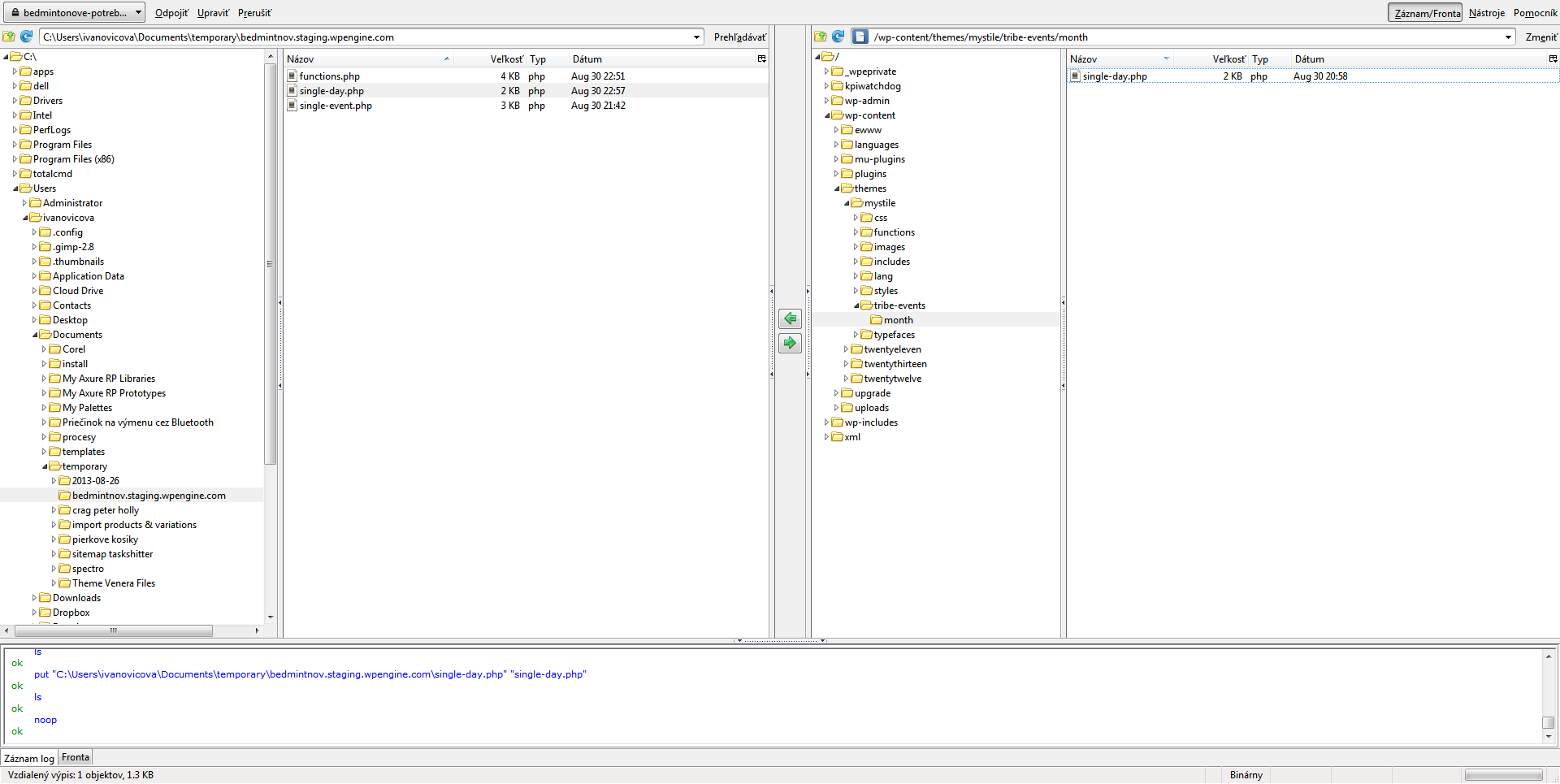
MemberOk, I created new file single-day.php with the code you listed above. And uploaded it to the right folder as you can see here http://easycaptures.com/fs/uploaded/742/4265235221.png
Great – and looking at http://www.bedmintonove-potreby.sk/udalosti/month/ it seems to be working successfully (’empty’ days are given a nofollow relationship attribute, which will tell search engines not to index them).
Is this fix going to tell Google WT not to index also subpages such as http://www.bedmintonove-potreby.sk/udalosti/1948-06-26/page/2/?
No. This was in relation to a different part of the webmaster crawl error problems. For the above issue we would need to determine where it is getting these links from – right now I’m not clear on that.
What is still quiet strange is, that when I am here http://www.bedmintonove-potreby.sk/udalosti/week/2013-09/ I can see this http://awesomescreenshot.com/0011nykh47 as soon as I copy the link and pase it to another browser I face the Error 404 – Page not found!
Week view requests need to have a date that includes the day (ie 2013-09-02), not just the year and month (2013-09). Can you tell me where you are getting that link from?
Is there any chance to change Meta Titles for these pages /SEO by Yoast does not have this option
Please create new threads for new topics! However, we’re unlikely to be able to help with a customization such as this one, as it relates to a third party plugin.
Thanks!
MemberHi Katrina – can you confirm which link you mean, exactly? Is it the iCal Import Month’s Events link that normally displays on month view, for example?
-
AuthorPosts