

Forum Replies Created
-
AuthorPosts
-
Nico
MemberThanks for following up David!
You can change the featured events color in ‘WP-Admin > Appearance > Customize > The Events Calendar > Global Theme’.
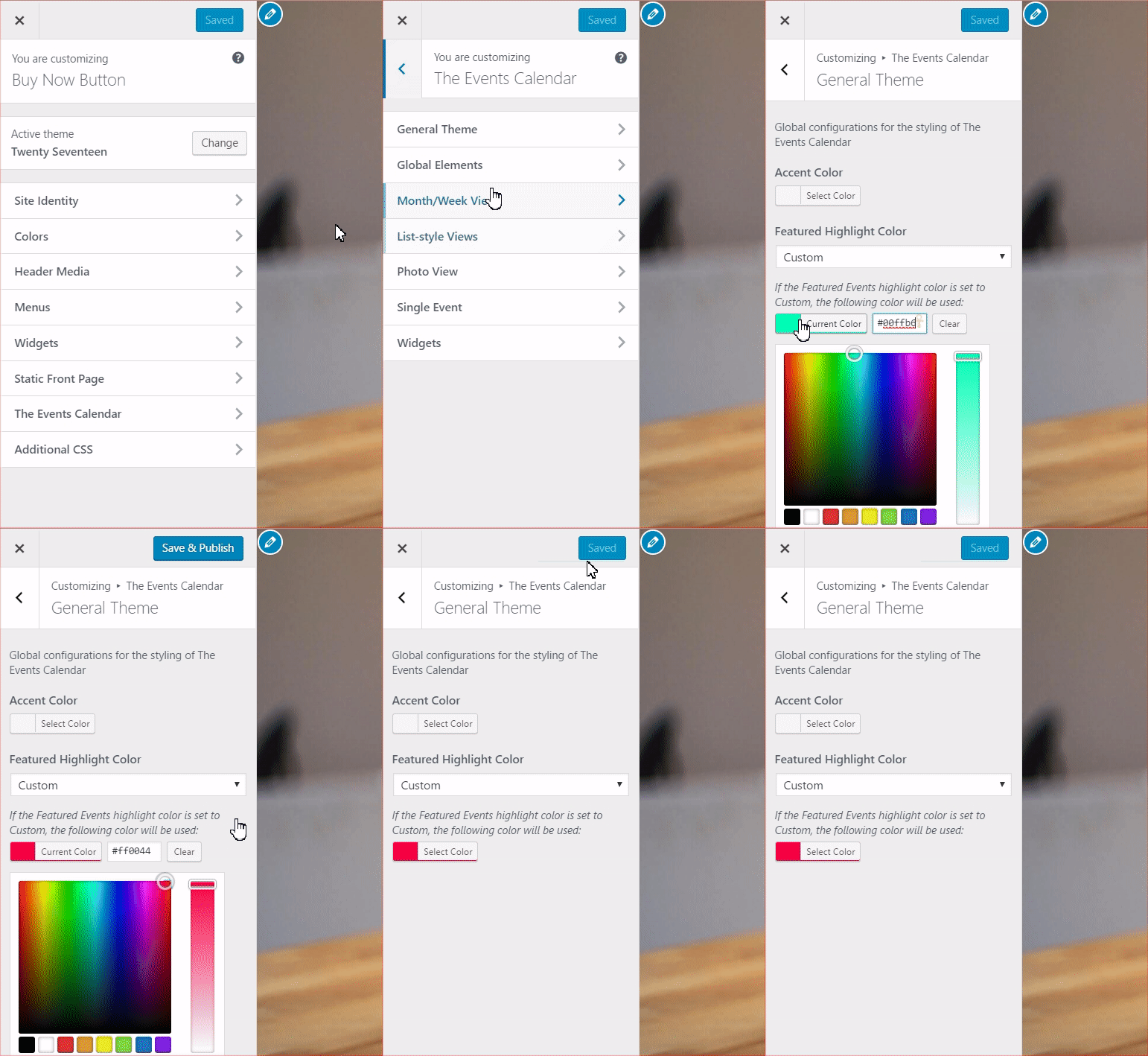
Please let me know if there’s anything else I can help you with,
Best,
NicoMemberHi there Leander,
Thanks for getting in touch with us and for your interest in Event Aggregator 🙂
You don’t need to have Events Calendar PRO installed to use Event Aggregator. Be sure to check the New User Primer: Event Aggregator article for more details.
Please let me know if you have any other doubts,
Best,
NicoMemberHi there Jodi,
Thanks for reaching out to us and for the heads-up on the resolution of the issue 🙂
I’ll go ahead and close out this thread, but if you need help with anything else please don’t hesitate to create a new one and we will be happy to assist you.
Best,
NicoMemberHi there Freddy,
Thanks for your interest in our products 🙂
Can you please let me know about what changes are you looking forward to implement?
Best,
NicoMemberHi there Matthew,
Thanks for your interest in our products!
We do have a Nonprofit Partnership program that allows approved organizations to use Events Calendar PRO for free, as well as providing discounts on our other plugins. You can read our Nonprofit Program Knowledgebase article to get all the details. On that page you’ll find a link to our application form with further instructions.
Thanks and we look forward to hearing from you!
Best,
NicoMemberHi Jonathan,
Thanks for reaching out to us and for the heads-up on the resolution of the issue 🙂
I’ll go ahead and close out this thread, but if you need help with anything else please don’t hesitate to create a new one and we will be happy to assist you.
Best,
NicoJune 12, 2017 at 6:00 am in reply to: Switched from temp/working site to permanent site-License won't transfer #1296592MemberHi there Art,
Thanks for reaching out to us and for the heads-up on the resolution of the issue 🙂
I’ll go ahead and close out this thread, but if you need help with anything else please don’t hesitate to create a new one and we will be happy to assist you.
Best,
NicoJune 9, 2017 at 8:35 am in reply to: Unable to use just purchased Events Calendar PRO plugin #1295751MemberYou are welcome Raj, glad to be of service 🙂
I’ll go ahead and close out this thread, but if you need help with anything else please don’t hesitate to create a new one and we will be happy to assist you.
Best,
NicoMemberDe nada Carlos! La realidad es que no podemos dar soporte en el foro de pre-venta. Te comente las opciones para informarte que no era necesario comprar el producto para realizar esos cambios pero no podemos ayudar mas alla de eso en este foro.
No he conseguido solucionar lo del cambio de texto. Lo he probado en el functions.php, tanto del Avada como del Avada Child y no me ha funcionado. Aquí está la página donde quiero cambiarlo: http://jetmanagement.es/evento/andres-suarez-madrid-2/
Si tiene un child theme deberia ir en el archivo functions.php del child theme. Vas a tener que ajustar el codigo del snippet para los cambios que queres implementar. Tambien podes probar con el plugin Say What? otra forma de hacerlo.
Por otro lado, el tema de los eventos. No me salen más páginas. Tengo que poner mostrar todos los eventos. Si no lo pongo así, solo me salen el número de eventos a mostrar que he puesto. http://jetmanagement.es/agenda/
El link que compartis no es una vista de nuestro plugin. Podes ver lo que te comentaba aca: http://jetmanagement.es/eventos/lista/
Saludos,
NicoMemberThanks for following up David!
That screenshot helps for sure… Is the event you are showing marked as ‘featured’? Do you have a link to the test site you can send me in a private reply?
Best,
NicoMemberYou are welcome Rachel 🙂
I’ll go ahead and close out this thread, but if you need help with anything else please don’t hesitate to create a new one and we will be happy to assist you.
Best,
NicoMemberThanks for the feedback folks! It’s indeed valid and it’s def related to this improvement being just a small part of re-thinking this functionality for Community Tickets users.
1. Other users with the same user rights level also get the ‘succes’ page. So owners of different events could check-in guests for events they are not the owner of.
This is partially true, it’s just working as it did before. The checkin process check if the current user is logged in and can edit posts, if that’s true then it tries to do check-in the ticket.
2. Scanning the QR-code consecutive times results continuous ‘succes’ page. This means you can enter the event multipel times with the same ticket.
Basically landing in the ‘success’ page means the user had the rights to check in users, and doesn’t inform about the result of the check-in (Was the user checked in already?).
Let me see if I have some time in the upcoming days to extend the snippet to account for this stuff and inform about the result of the check-in.
Best,
NicoJune 8, 2017 at 5:08 pm in reply to: Troubleshooting slow calendar: Other category events in source #1295504MemberThanks for following up Ted, and for proving the extra details on this!
I could verify your findings and this looks like a bug indeed. The json+ld output (structured data) for ‘category month view’ is indeed the same that for default ‘month view’ without any category applied.
I went ahead and created a new bug report for this, to which I attached your thread. This means we will be back to you when this is fixed and released.
For now I’ll take a look at the code (probably tomorrow) and see if there’s a temporary fix I can provide!
Thanks once again,
Best,
NicoMemberHey Christophe,
Thanks for reaching out to us and for the heads-up on the resolution of the issue 🙂
I’ll go ahead and close out this thread, but if you need help with anything else please don’t hesitate to create a new one and we will be happy to assist you.
Best,
NicoMemberThanks for following up Anders! Sorry to hear about the issue setting this up…
Basically you’ll need to install and activate Event Tickets to use Event Tickets Plus. The later is an add-on of the free plugin, this means both should run together.
Please review these guides to get started:
– New User Primer: Event Tickets & Event Tickets Plus
– New User Primer: The Events Calendar and Events Calendar PRO (if you plan on having events in the site)Regarding the license key issue, you probably input a license key in the ‘Event Aggregator’ (another add-on) incorrectly. Clear out the licenses entered in that field and save changes.
Please let me know if the above help,
Best,
Nico -
AuthorPosts