Forum Replies Created
-
AuthorPosts
-
Geoff
MemberDefinitely keep me posted!
Yeah, and linking the default product template wouldn’t be too much of a lift. 🙂
Geoff
MemberHey Sergio,
Sorry for the trouble here with the map! That is certainly no good.
I see you tried switching to a default WordPress theme and deactivating other plugins — thanks for doing that!
I wasn’t able to see any obvious conflicts that would cause the map to not work and I haven’t seen any other reports of this recently.
In some cases, this can come down to hosting or something in the site’s configuration, so the next thing I would like to try here is creating a fresh test site — this will avoid any disruption to your live site and ensure that we’ve effectively got a “clean canvas” to work with.
- Please install a fresh copy of WordPress in a subdirectory (if you have a CPanel-type hosting account there will probably be a one-click install script to make this really easy)
- Don’t install anything except The Events Calendar and Events Calendar PRO
- Please also stick to a default theme, like Twenty Sixteen — again, there’s no need to install anything else just yet!
- Create a few events so we have some test data to work with
- Can you replicate the same problem?
If you find you can replicate the problem under these conditions it would be awesome if you could stop and let me know so I can take a look while the site is still running under default conditions.
Thanks for your help!
GeoffMemberHey Phil and welcome to the forums!
That’s a great idea, but I’m afraid not currently possible in the current set-up.
I’d be interested in knowing exactly what you have in mind since the Facebook import itself is already its own tab in the Event Import options. If you’re willing to share more detail, it would be awesome if you could open a new thread in our feature request forum so we can get a clearer idea over there and allow other folks to vote on that as well.
Sorry I don’t have a solid solution for you but does this at least help answer your question? Please let me know.
Thanks,
GeoffMemberGlad that worked but sorry the ticket data doesn’t copy over. That kind of makes sense, though, since tickets themselves would need to be copied and then duplicated in WooCommerce as well — sort of like duplicating a duplicate.
Let us know if any other questions come up and we’d be happy to help!
Cheers,
GeoffMemberI’m not entirely sure if it would work, but I wonder if the Variable Product extension for WooCommerce might help for something like this. If it does, then you could theoretically create one ticket with many variations.
And, instead of using our ticket form to add the ticket to the cart, you could link to the built-in product page for that ticket in WooCommerce, which would have the UI you need for guests to select their ticket option.
Just a guess, but might be worth looking into!
Geoff
MemberThanks Keri!
It looks like Enfold has a CSS class that adds 175px of padding to the top of the page:
.html_header_top.html_header_sticky #top #wrap_all #main {
padding-top: 175px;
}
You should be able to override that with something like this:
.tribe-theme-parent-enfold #top #wrap_all #main {
padding-top: 0 !important;
}You may need to play around with that a bit to get it just right, but should at least give you an idea of how to remove that extra space.
Then, showing that hidden content will take some more CSS. This seemed to do the trick when I tested it in the browser:
#tribe-events {
margin-top: 45px;
}

tribe-events-before-html {
height: 85px;
}
Again, you may need to play with that to get it just right, but should get you started.
Cheers!
GeoffMemberSure thing!
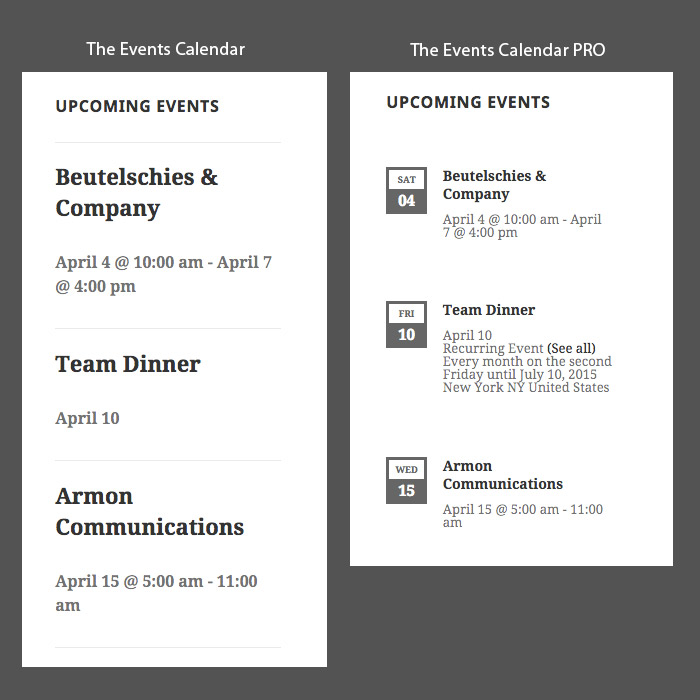
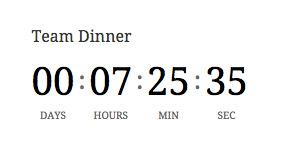
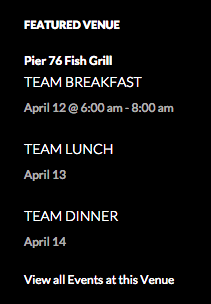
There are five widgets in all and I’ve linked a screenshot of each one below:
Does this help give you an idea the shortcodes? Let me know if there’s anything else you’re curious about and i’d be happy to help. 🙂
Cheers,
GeoffMemberHey Daniel,
Awesome, so glad that helped!
You can change the size of the image in the same way you edited the ticket template, but applied to the single-event.php template located here instead:
/wp-content/plugins/the-events-calendar/src/views/single-event.php
Change the image thumbnail from “full” to something smaller, like “medium” or “thumbnail” so that the image doesn’t take up the full width of the page, then you will need to use some CSS to align the image to the left of the text. This will depend on how you want to style it, so I won’t have a perfect answer for you here, but something like this:
.single-tribe_events .tribe-events-event-image {
float: left;
}
I’ll go ahead and close this thread since the first question you asked was covered, but please do feel free to let us know if any other questions pop up and we’d be happy to help as best we can. 🙂
Cheers!
GeoffMemberHey Steven, I see my last reply was marked as the correct answer — I’ll go ahead and close this thread but please do let us know if any other questions pop up and we’d be happy to help. 🙂
Cheers,
GeoffMemberHey Keri!
Sorry, no, I did not receive the link you sent. Would you be willing to share it again in a private reply? I’d certainly be happy to help from there.
Thanks!
GeoffMemberHi Sabine, great question!
The Events Calendar doesn’t include a duplicate feature right out of the box. However, there are several other plugins available that will do that and work with events. I believe Post Duplicator is one of those plugins.
Does this help answer your question? Please let me know.
Cheers!
GeoffMemberHello @Ondrej,
Great question!
It is certainly possible to create as many tickets as your would like for any given event. So, yes, you could totally create a ticket for each seat with quantity 1 and then sell them as seats.
The dropdown is something that would take some custom development, though, You could override the ticket form template (more on template overrides in our Themer’s Guide) and then change the markup in the template so that tickets are created in a dropdown rather than a table format.
Does that sounds like what you’re looking for? Please let me know. 🙂
Cheers!
GeoffMemberMy pleasure! Thanks for the kind words and for following up. 🙂
Have a great weekend!
Geoff
April 22, 2016 at 4:27 pm in reply to: Custom Fields with Pro Calendar and Community Events #1106165MemberHey DD and thanks for reaching out!
Great questions — let’s tackle them one at a time.
1. With the community events module if you have added custom fields to your events calendar will the front end form support these or will this have to be custom coded?
The custom fields from Events Calendar PRO will indeed be automatically available on the Community Events submission form. No coding needed!
2. When you add custom fields to your event how does that work with the google of ical export feature; will the custom fields make it into the information in the ical export (i.e. the description field)
I’m afraid that custom fields will not work with events that imported via iCal. The reason being that the ICS formatting used by iCal does not have those same fields and so it’s not really possible for us to match custom fields from one format to another.
Does this help answer your questions? Please let me know and I’d be happy to answer any other questions you might have as best I can. 🙂
Cheers!
GeoffMemberHey Kitty, thanks for contacting us!
It sounds like the following plugins will be a solid fit for you:
- The Events Calendar (free)
- Event Tickets (free)
- Event Tickets Plus
The Events Calendar will provide the general calendar functionality you need: create and manage events in a calendar format.
Event Tickets sets up the ability to accept RSVPs for events and is required for Event Ticket Plus, which will allow you to actually create and sell tickets directly in the event editor.
Event Tickets Plus integrates with WooCommerce, so any ticket you create for an event will automatically be registered as a Product in WooCommerce. Once a guest selects a ticket, it gets added to the WooCommerce cart, allowing them to checkout via WooCommerce from there.
And, of course, Event Tickets Plus allows you to create any number of tickets for as many types as you would like per event. You can even set the start and end sale dates for the tickets, which comes in super handy for things like early registration pricing. 🙂
Does this help answer your questions? Please let me know.
Cheers!
Geoff -
AuthorPosts