

Forum Replies Created
-
AuthorPosts
-
Geoff
MemberHey Brandon,
Good question! The Events Calendar includes it’s own layout right out of the box, but there is indeed a setting that allows you to use one of your theme’s page templates instead.
A good way to check whether the layout and styling will work for you is to try the free plugin: https://wordpress.org/plugins/the-events-calendar/
It’s also worth noting that any and all of the calendar’s CSS styles can be customized. So, for example, if you would prefer to use a Bootstrap class on a calendar component, then you could definitely override any of the calendar’s templates and make those changes from there. Much more on this is outlined in our Themer’s Guide.
Does this help answer your question? Please let me know. 🙂
Cheers!
GeoffAugust 10, 2016 at 2:06 pm in reply to: Events Calendar Pro and Community Events – display & submit event questions #1150208MemberRight on, thanks for following up! Did you have any other questions about purchasing Community Events or Events Calendar PRO? Please let me know and I’d be happy to help.
Cheers,
GeoffMemberHi Mat,
So sorry, I could have been much more clear!
The tickets themselves do not have categories. Rather, you are able to call the tickets whatever you’d like. For example, if you have a surf contest with two types of tickets, you could create the following:
- Ticket 1: Junior (50 quantity)
- Ticket 2: Senior (50 quantity)
In other words, there is no need to categorize tickets since you are able to create any number of ticket options for each event, name them what you want, and set the quantities for them individually.
Does this help clarify things a bit?
Cheers!
GeoffMemberHey Chris, I see my last reply was marked as the correct answer. I’ll go ahead and close this thread but please feel free to let us know if any other questions pop up and we’d be happy to help. 🙂
Cheers!
GeoffMemberHey Ivan,
Absolutely! You can add that code to the template file. Here’s how to do that:
- Make a copy of the single-event.php template. It’s located at /wp-content/plugins/the-events-calendar/src/views/single-event.php.
- Make a new folder in your theme directory called tribe-events
- Drop your copied single-event.php file in that folder.
Now that the template is in your theme, you can change it to suit your needs. In this case, place the advertisement code where you would like it to appear and that will be reflected in the template.
Does this help answer your question? Please let me know. 🙂
Cheers!
GeoffMemberHey Lee,
That’s a great question, but I’m afraid that The Events Calendar (or Events Calendar PRO) will not import an image from an iCal feed using iCal Importer. The reason is that iCal feeds contain a lot of information, but images are not one of them, so the plugin would have no way of recognizing an existing image.
You can, however, add an image to an event once it has been imported.
Does this help answer your question? Please let me know. 🙂
Cheers!
GeoffMemberHey Karen,
Great question! I tried playing around with some settings, but there is nothing that will automatically recognize the first weekday of the month in a succinct way when creating recurring events.
The way I was able to do it was using the Date recurrence option and choosing a specific date to recur:
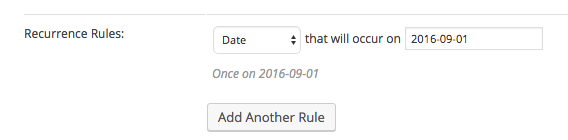
And, once you set that, you can click the Add Another Rule button to create another Date condition and so on and so forth until you have the recurrences you need.
I know that’s a bit more manual than you are probably hoping for — in fact, I think this would be a great idea to add to our feature request forum if you have a chance. Although I haven’t seen this request come up before, I can see how it would be super useful.
Cheers,
GeoffMemberHey Chris,
Thanks for reaching out! There are no coupons at the moment–though we did just wrap up a promotion the other week.
We do promotions every now and then, so definitely keep up with our blog or Twitter and we’ll let you know when the next round comes out.
Cheers!
GeoffMemberHowdy Nick, thanks for getting in touch!
That’s a really cool implementation of The Events Calendar. 🙂
It looks like those extra features are coming from a separate service called Flowh: https://flowh.com/
I’m actually unfamiliar with Flowh as a service, but it looks like it pretty easy to use and, once you sign up, has widgets available that you can place in the calendar template just like the site you shared.
Sorry I don’t have more of a concrete answer, but does this help? Please let me know.
Cheers!
GeoffMemberHey Trey, thanks for following up!
This is actually a support forum for The Events Calendar. If you’re looking for help with WD Calendar, then I would recommend reaching out to those folks. Although I’m unfamiliar with WP Calendar, it looks like this is the support forum you might be looking for:
https://wordpress.org/support/plugin/event-calendar-wd
Cheers!
GeoffMemberAwesome, that’s great to hear Leela! So glad that did the trick and I appreciate you following up to let me know.
Cheers and we’ll see you in the support forums next time around — have a great day. 🙂
Geoff
MemberHey Robert,
I think you should be able to remove that with the following CSS in your child theme style.css file or using the Simple Custom CSS plugin:
.single-tribe_events .tribe-events-before-html {
display: none;
}
Here’s a screenshot of how that looks when used.
Also, just a heads up that we use this Pre-Sales forum to help answer questions about purchasing our premium plugins. If you have any other technical support questions, please do log into this site and post those in our support forums if you have a license for one of our products.
Cheers!
GeoffMemberHi Trey and thanks for getting in touch!
Juts to confirm, are you using The Events Calendar or plan on using it? I only ask because it sounds like you might be using another plugin instead.
If you are planning to use both plugins together, then one idea you might consider is using our iCal Importer add-on. That will allow you to fetch events from one source and import them into The Events Calendar so that all your events are displayed together in a single calendar.
Cheers!
GeoffMemberHey Sevim, I see my last reply was marked as the correct answer. I’ll go ahead and close this thread but please feel free to let us know if any other questions pop up and we’d be happy to help. 🙂
Cheers and have a great day!
GeoffMemberHey Pritam, I see my last reply was marked as the correct answer. I’ll go ahead and close this thread but please feel free to let us know if any other questions pop up and we’d be happy to help. 🙂
Cheers and have a great day!
Geoff -
AuthorPosts