

Forum Replies Created
-
AuthorPosts
-
Brook
ParticipantHowdy Alan,
Absolutely they work together. Here is our tutorial for setting up WPML to be The Events Calendar compatible.
Does that clarify things for you?
Cheers!
– Brook
ParticipantHowdy Hilary,
I would love to help you with this.
If I am looking for a particular course in my country should I list all the events from everywhere in one long list or country specific?
Have you checked out the Filter Bar ? It sounds like it might help you here. It allows your users to narrow down which events they are interested, which is particularly useful if you have a lot of events available.
If I am looking for a course in the USA and I am in the USA should we have the world map to chose from first?
The Pro plugin does have the Map View, which shows a map with pins for each event matching the search results. The user can even type in their location and see all events within 200 miles of that location. This is further refineable using the Filter Bar, which allows them to set the radius of their search area.
Does that answer your questions?
Cheers!
– Brook
ParticipantHowdy Michael,
I would love to help you with this.
This is actually a pretty complex problem. In our own tests we have found this to be highly difficult, which si why we do not yet have a shortcode to do this for you. When loading the template parts you will not get any of the CSS or JavaScript necessary to power the view. Further there are issues with paging back and forth, switching views, and so forth. The CSS and JavaScript also has issues even if you manage to get it loaded. Basically, it’s not super doable just yet, but in the near future would like to make this as easy as embedding a shortcode and simultaneously fix the things that are making this difficult from the code side.
Until then, what about a workaround? What if you used an HTTP redirect to forward users from the home page to /events/, and then customized the /events/ page via the usual means to make it look how you need. Would that work?
- Brook
ParticipantHowdy John,
Thanks for detailing what’s going on here, that was very thorough and helpful.
I am think you could replace this:
tribe_get_upcoming_link()with this:
add_query_arg(
array( 'tribe_venues[]' => get_query_var('tribe_venues') ),
tribe_get_upcoming_link()
);
I haven’t tested that yet, but the principle is certainly sound. Does that work for you?
Cheers!
– Brook
ParticipantHowdy Lee!
I would love to help you with this.
We actually have added a feature request for this. Please be sure to vote on it if this is something you’d like to see us build.
This is certainly possible to build now as a customization though, if you’re so inclined. First you should setup a PHP script on your site, perhaps call it events-near-me.php. Now when a user hits this page you should geocode their IP address using whatever geocoding service you prefer. Now that you have a long/lat and location name for the user you should HTTP redirect them to the maps page (example.com/events/map/. But fill in three query variables for them:
example.com/events/map/?tribe-bar-geoloc-lat=[INSERT LATITURE HERE]&tribe-bar-geoloc-lng=[INSERT LATITURE HERE]&tribe-bar-geoloc=[INSERT NAME OF LOCATION/CITY HERE]And there you go! Now you can link to this page, and it will automatically return events near the user.
You can do something similar a widget if you’re so inclined, but it will be a lot more involved. You will need to alter the WP Query for the widget to include the location of the user. This would be a pretty advanced PHP script compared to the above.
Does that all make sense? Will that work for you? Please let me know.
Cheers!
– Brook
ParticipantHowdy Graham,
If you want to insert a widget listing your events then you should checkout the widgets within The Events Calendar. Events Calendar Pro Event includes a “mini calendar” widget that might work great in your third column.
If however you are trying to insert the full views from the calendar into this page, then you will want to checkout our Themer’s Guide. This will basically walk you through creating an inner template for the calendar, that will fit inside your page template. To assign your page template checkout WP-Admin > Events > Settings > Display, and then the Template selector dropdown.
If you need further help would you mind logging in so I can verify your support access? Or, if you don’t have/want a license (which includes a year of support) you should checkout the volunteer community on WordPress.org: The Events Calendar. It’s not the same level of support, but it’s free! We even check those forums once each week and help to the extent we can.
Cheers!
– Brook
ParticipantHowdy Beeny!
Good question. That is not a pro specific feature, indeed it’s part of the free plugin as you noticed. If it’s not working for you though then you will likely need some support to get it working. Sometimes this happens when a theme has modified the main blog loop, themes devs will sometimes assume that the only thing it will show will be the one post_type and so they accidentally prevent other post types like ours. You might be able to get assistance from your theme dev, on WordPress.org, or if you do get a license we would be happy to assist you as best we can here. 🙂
Does that all make sense? Will that work for you? Please let me know.
Cheers!
– Brook
March 29, 2016 at 4:03 am in reply to: Event Cost not showing up when adding or editing an event #1095295ParticipantHowdy Dermot!
Good question. There is a clash, sort of. Event Tickets purposefully hide that field in favor of its tickets fields. But, if you don’t own Plus then that certainly be limiting. Thus, hiding of the field can easily be undone by following this tutorial.
Does that all make sense? Will that work for you? Please let me know.
Cheers!
– Brook
March 29, 2016 at 3:58 am in reply to: solution for »show only future events with custom query« #1095293ParticipantAwesome! Thank you for sharing this Marion. I will be sure to point it out to future users looking for a similar customization. Really appreciate your contribution!
- Brook
ParticipantHowdy Joel,
Thanks for reaching out about this, and sharing the similar issue. That is very interesting two people are experiencing this. Can you clarify one thing? When you create this event are you assigning it a venue? Is it an existing one or a new venue to your WP site?
Would you be okay with me logging into your site, and trying to create a test event myself for sometime in 2017 (just so hopefully no one sees it) ? If so, could you create a new admin for your site with a random password, and share the username/password here? If you check the box “set as private reply” only we will be able to see it. Once we’re done debugging you can delete the account. Would that work? No problems if not.
Cheers!
– Brook
March 28, 2016 at 11:53 pm in reply to: Events Page Search Bar Not Showing Location Search and View type #1095254ParticipantHowdy Jadu,
I would love to help you with this.
Based on your description it could be any number things, possible a theme conflict. I would definitely like to dive in more. Could you share a link to your website, or event better your full system information? You can find the system info by going to WP Admin > Events > Settings, clicking on the “Help” tab, and scrolling down to the ‘System Information’ box. (Or by going to [yoursite]/wp-admin/edit.php?post_type=tribe_events&page=tribe-events-calendar&tab=help) If you can grab a copy of your system information and paste it here that will give me a lot of extra information to help diagnose the problem. Make sure to use the ‘Set as private reply’ checkbox to protect your private information from the public.
Also if you have a few extra minutes one common WP diagnostic test that might prove especially helpful is to do a “conflict test”. This guide walks you through how to test for a conflict, and then identify what is conflicting.
I look forward to diving in further here. Cheers!
– Brook
ParticipantHowdy again dmlws,
You are basically correct, the only way to truly display the calendar on the homepage would be to hack something together, not an easy task at all. This is because our plugin is relies heavily on WordPress’ API, and is thus just WP Custom Post Type Archive page. WP very specifically makes these pages not the home page, when they are the home page WP starts breaking.
However, a lot of our customers simply forward their homepage to the events via a HTTP 302 redirect. So when a user visits the home page, the server responds with the /events/ page and you’re all set. This has worked for most folks, it’s what our demo site does.
We are also working on making full calendar views embeddable via shortcode. Once this feature is available you would be able to embed the full calendar in another page, including the home one.
Does that all make sense? Can I explain anything in more detail here?
Cheers!
– Brook
ParticipantHowdy dmlws,
I would love to help you with this.
If I were you I would use this code:
 <?php
// Event Website
$website = tribe_get_event_website_url();
if ( ! empty( $website ) ) : ?>
<a href="<?php echo $website; ?>">BUY TICKETS NOW</a>
<?php endif ?>
And I would insert it into /the-events-calendar/src/views/list/single-event.php via a theme override (Themer’s Guide). About line 50 is probably the right spot, it really depends on where you want it. But Line 50 would be pretty prominent.
Does that all make sense? Did that work for you? Please let me know.
Cheers!
– Brook
March 28, 2016 at 11:37 pm in reply to: URGENT – Event Community Form – Hide/Disable fields #1095250ParticipantHowdy Cesar,
I would love to help you with this.
However, I still wonder how to set WooCommerce ticket as default for all ticket submits(I’m not interesting in RSVP)?
In order to alter this you will need to create a theme override. If you have not created on of those yet then checkout our Themer’s Guide for a step-by-step on this process. With that knowledge in hand create an override for this file: /the-events-calendar-community-tickets/src/views/community-tickets/modules/tickets.php On line 55 you will see the following:
Tribe__Tickets__Tickets_Handler::instance()->do_meta_box( $event );This line outputs the entire ticket sales area. We are going to want to replace it with our own custom ticket area. The first step to doing this is to to delete that line add the following, taken from that do_meta_box function:
$startMinuteOptions = Tribe__View_Helpers::getMinuteOptions( null );
$endMinuteOptions = Tribe__View_Helpers::getMinuteOptions( null );
$startHourOptions = Tribe__View_Helpers::getHourOptions( null, true );
$endHourOptions = Tribe__View_Helpers::getHourOptions( null, false );
$startMeridianOptions = Tribe__View_Helpers::getMeridianOptions( null, true );
$endMeridianOptions = Tribe__View_Helpers::getMeridianOptions( null );

$show_global_stock = Tribe__Tickets__Tickets::global_stock_available();
$tickets = Tribe__Tickets__Tickets::get_event_tickets( $event->ID );
$global_stock = new Tribe__Tickets__Global_Stock( $event->ID );
Now you will want to copy/paste everything inside of this file: public_html/wp-content/plugins/event-tickets/src/admin-views/meta-box.php just below the above code. Now you have full control over the tickers area! You can modify it to your hearts content including changing the default.
On line 130 of the above file you will see the following code:
 <?php
$checked = true;
foreach ( $modules as $class => $module ) {
?>
<input <?php checked( $checked ); ?> type="radio" name="ticket_provider" id="ticket_provider"
value="<?php echo esc_attr( $class ); ?>"
class="ticket_field">
<span><?php echo esc_html( $module ); ?></span>
<?php
$checked = false;
}
This is what outputs the ticket options, and chooses the default. If you wanted it to select Woo by default then swap it out for this code:
 <?php
foreach ( $modules as $class => $module ) {
$checked = $module === 'WooCommerce';
?>
<input <?php checked( $checked ); ?> type="radio" name="ticket_provider" id="ticket_provider"
value="<?php echo esc_attr( $class ); ?>"
class="ticket_field">
<span><?php echo esc_html( $module ); ?></span>
<?php
}
?>
Does that all make sense? Will that work for you? Please let me know.
Cheers!
– Brook
ParticipantHowdy Matthew,
I’m happy to do that. Here is one from Chrome:
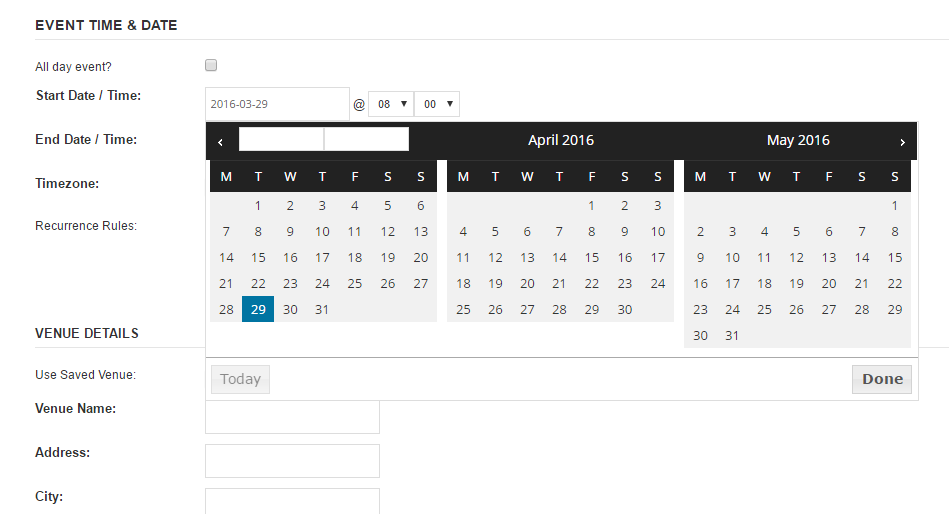
And here’s Firefox:
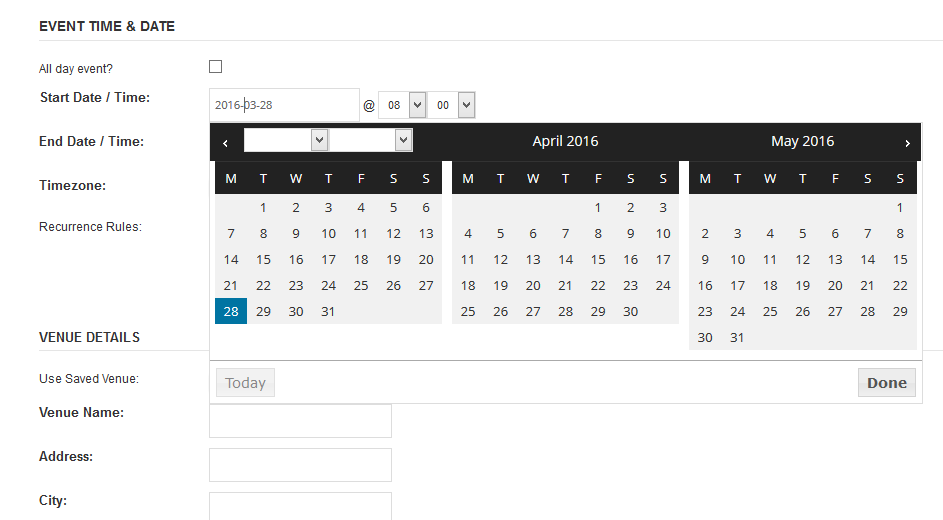
When there is a discrepancy like this sometimes it stems from having different fonts on our systems. For instance tou might have a font named “Open Sans” on our system that is different than the one mine loaded (the one on my computer was loaded dynamically from Google Fonts). If your Open Sans is wider than the one specified on Google then it can cause rendering issues like this.
I’m working a bit blind here since I can’t see the problem. But this code might help improve things:
.ui-datepicker-multi .ui-datepicker-group table.ui-datepicker-calendar {
width: 90%;
margin: 0;
}
Did that make things a little better, maybe eliminate the issue?
- Brook
-
AuthorPosts