

Forum Replies Created
-
AuthorPosts
-
Brook
ParticipantHowdy Barry,
That is definitely possible using JavaScript. Here’s is a stackoverflow response elaborating a bit. You could implement this on the community edit.php page using a theme override. Our Themer’s Guide walks you through that in more detail. Does this sound like a good solution?
Cheers!
– Brook
ParticipantHello Sarah,
It sounds like you would like some sort of resource manager beyond just a calendar. Unfortunately our plugin is just a calendar. It is very extensible, you could definitely add a feature like that if you or someone on staff knows web development/PHP. But, out of the box it does not sound like it would work quite like you expect.
Does that all make sense? Will that work for you? Please let us know.
Cheers!
– Brook
ParticipantHowdy Alexandru,
That is not a built in feature of WooCommerce. However, you could achieve something like that by using the store credit addon. They purchase some credit, and it allows them to choose from one of your many events. Does that seem like a good solution?
– Brook
ParticipantAhh. Thanks for getting back Brandon. That’s understandable. I’ll wait to hear more from you if you discover some specifics. Cheers!
– Brook
ParticipantHowdy Sharon,
I am sorry I forgot to get back to you. I did test it out. For me the address was the same in all places. It showed Whakamarama Rd in the little map on the event page. It showed the same place and road in When I clicked the Google Map link. And it showed the proper address on my ticket.
Are you still seeing an issue here? What happens if you fill out more information for the venue? The province and postal code for instance? Perhaps that will correct it on your site? I know it is working on mine without this info, but Google Maps does regionalize their results. So it is possible that since you are in a different country it will give you different result than I. Changing the inputs could fix this.
Does that help? I wish there was more that could be done. All of that processing is done by Google Maps. And on occasion there is an actual bug with their results, but its unfortuantely something we have no control over and can’t fix. 🙁
Cheers!
– Brook
ParticipantVery Cool! That could be very useful for folks in the mean time. Thank you for sharing Rob.
Since it has now been a couple of weeks since Marcelo has responded this topic is due for archiving. I don’t wish to keep spamming his inbox. If anyone else wishes to join the beta please let us know. You can open a new topic or shoot us an email (support at this websites URL). We are also looking into making the process even easier with a signup form.
Cheers!
– Brook
ParticipantExcellent! That is great news.
@Stephan Yes they will be lost. When WordPress updates a plugin it deletes the existing plugin folder, and then unzips the file it just downloaded to replace it. All changes made to plugins and themes are lost when you update them in WordPress. However, WordPress also provides “hooks and filters” to make it easy to modify things. Most people create a Child Theme and put any modifications in there. You can even create a theme override as per our Themer’s Guide. If you need any help with this please open a new topic and hit us up with questions. We’d love to help.
Since this issue is now resolved I am going to archive the topic. Thank you all for your patience and assistance in figuring this out. Cheers!
– Brook
ParticipantAha! That makes sense. That seems the likely source of the problem. Thank you so much Christoph for taking the time to share that.
In Community Events 3.11 we fixed a bug that had existed for a while. The last part of the URL for Community pages was not translating properly. So, in 3.10 running Spanish the the Community Add Event and My Events URLs were:
- example.com/eventos/communidad/add/
- example.com/eventos/communidad/list/
But as of 3.11 and newer the final portion now translates:
- example.com/eventos/communidad/ahregar/
- example.com/eventos/communidad/lista/
In my case, and the case of my colleagues, we have all been using the automatically generated link to the Community Events link which points to the new URL. But, I bet everyone here was using a link they had manually added and it goes to the old URL.
The solution should be very easy. Update the Community Events plugin to 3.11. Grab the new URL by going to you WP Admin Bar, and clicking the Community: Submit Event link. Then use that URL to replace the old URL.
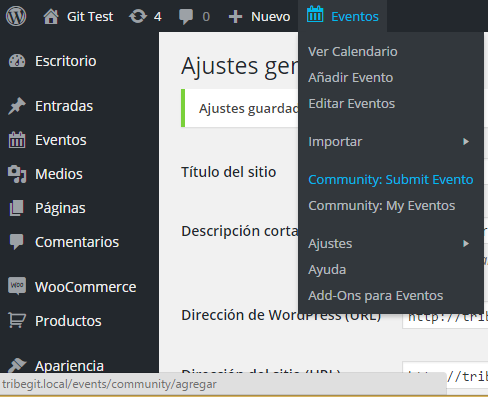
Most of you have probably added this URL to your menu, by going to WP Admin > Appearance > Menus, and adding an item to submit an event. If you edit that menu item, you can input the new update URL. No more 404s!
I am truly sorry none of us thought of this before hand. Our entire team was likely using PHP to automatically generate the current version of the URL. Thus no one would have noticed a problem. This did not occur to me until Christoph kindly pointed out that it had changed.
Does that solution fix things for everyone? Thanks again, Christoph!
– Brook
ParticipantSure thing Rob and TH. I just added you both.
Cheers!
– Brook
ParticipantHowdy agian,
You are very welcome. I am glad that pointed you in the right direction. I wish it was something we could do in out plugin. But, it looks like some changed have to be made at the theme level in order to tell Facebook to use a different image.
Please let us know if you need anything else. Cheers!
– Brook
ParticipantThat is interesting Gonzalo. It brings renewed scrutiny to this being an issue with language switching in WP.
I have definitely tried switching WordPress to a different Language as that has been a common pattern thus far. With Spanish I don’t get a 404 in any of the following scenarios:
- Going to: Community > Submit Event and clicking Submit
- Going to: Community > My Events
- Browsing the Calendar, or the WP Admin and adding/updating/deleting events.
I noted many people had customized slugs. For example instead of the URL being “example.com/events/community/add” folks had changed it to something like “example.com/eventos/communidad/agregar/”. So I have tested extensively with custom slugs as well. Everyone here updated from a past version before experiencing an error, so I have tried that as well. That’s just for staters, there are many many different things I have tried and nothing reproduces the problem.
At this point I am at a loss as to the cause. I am worried that the issue simply can not be reproduced on my systems. So I am going to try roping in someone else in a thoroughly different environment and see if they can do some extensive testing as well.
– Brook
ParticipantYou’re welcome! Thanks for marking it resolved.
– Brook
August 4, 2015 at 6:10 pm in reply to: iCal does not (re)import events which have been deleted by mistake in wordpress #993286ParticipantExcellent! I am happy to hear that worked.
– Brook
ParticipantThat sounds like a very reasonable estimate. 🙂
– Brook
ParticipantThank you for clarifying. I understand now. I thought you were talking about our Facebook Importer at first.
Facebook tried to intelligently choose which image it thinks is the most interesting. But it seems to not be doing so well on your site. It looks like it is possible to override its choice by adding a few extra tags. Checkout this answer on Stackoverflow.
Out plugin just uses the default thumbnail for a post and retrieves it via the usual get_the_post_thumbnail() function. According to a different Stack Overflow answer it looks like JetPack, ACF, and Yoast all work with those function to automatically generate those extra tags when you have the right settings enabled.
I hope that helps. I am not really a Facebook expert, but that is the best information I could find on Google.
Cheers!
– Brook
-
AuthorPosts