

Forum Replies Created
-
AuthorPosts
-
March 9, 2016 at 8:14 am in reply to: How can I place a number of pages on the Next and Previous links? #1086658
Brian
MemberOk so essentially you used this as the coding:
<?php $args = array(

	'base'               => '%_%',

	'format'             => '?tribe_paged=%#%'

); ?>

<?php echo paginate_links( $args ); ?>
Thanks for sharing!
MemberHi,
Thanks for the link.
It looks like the address is not displaying correctly.
Do you have any custom templates in your theme in this directory:
your-theme/tribe-events/
?
March 9, 2016 at 6:36 am in reply to: Change colour of font that indicates date in footer widget #1086634MemberHi,
Thanks for using the Events Calendar.
Here on the pre-sales forum, I’m afraid we do not provide support. I would ask that you take any technical support questions across to our wordpress.org forum – our staff scan it periodically and other community members may also be able to help out.
Thanks again!
MemberHi,
Thanks for using the Events Calendar.
Here on the pre-sales forum, I’m afraid we do not provide technical support. I would ask that you take any technical support questions across to our wordpress.org forum – our staff scan it periodically and other community members may also be able to help out.
We did not change anything on the Month View to remove that so it might be a caching conflict, please post in the WordPress.org forum to get help there.
Thanks again!
MemberHi,
Thanks for using our plugins. I can answer your question.
Currently there is no feature to click on a day in the next month as you describe and move to that month.
We only have the Next and Previous Month Links to do that.
It might be possible on a customization, but that is beyond the support we can provide for the most part.
If you think that is something you would like as a feature I encourage you to visit our User Voice Page and either upvote an existing request or make a new request there.
MemberI am glad to see you were able to figure it out.
I am going to go ahead and close this ticket. If you have a similar issue or another in the future, please do not hesitate to create a new ticket.
Thanks!
MemberHi,
Thanks for the interest in our plugins. I can answer your questions.
Yes Pro is currently $89.00 for one year of updates and support.
After the year the plugin still works you no longer have access to updates and support.
Renewal is yearly and is 30% off the current price to renew.
Let me know if you have any follow up questions.
Thanks
March 9, 2016 at 6:13 am in reply to: PROBLEMA AL INSTALAR THE EVENTS CALENDAR EN PLANTILLA ENOKI #1086612MemberHi,
Sorry for the Delay.
Nico our Spanish speaker will be getting back to you when he can to give you a better response.
But to answer your questions. Bundles are not changeable although we do take feedback on making a new bundle in the future.
Also, we do not have any information if our plugins are compatible with Enoki if you are seeing errors in the Free version then they would be there with Pro too and we are limited in being able to help resolve those per our terms and conditions.
Cheers
March 9, 2016 at 6:09 am in reply to: The Events Calendar 4.0.7 / WooThemes Canvas conflict #1086610MemberI am glad to see you were able to figure it out.
I am going to go ahead and close this ticket. If you have a similar issue or another in the future, please do not hesitate to create a new ticket.
Thanks!
MemberHi,
Thanks for using our plugins. I can help out here.
We have this guide to changing the ticket order to something else:
Or you could go into the ticket products and change the publish date in the publish box to order them another way too.
Let me know and I can try to help out from here, but limited in supporting customizations.
Thanks
MemberHi,
Sorry for the issues you are having. I can help troubleshoot this with you.
Do you have a link to an event that does not show tickets?
Also, what is the ticket settings for the ticket not showing for one of the events here:
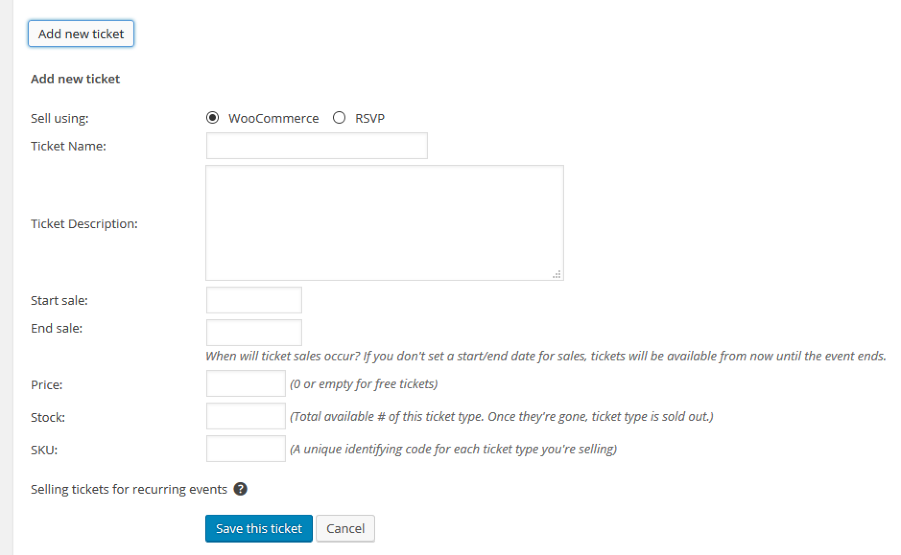
Also, sorry for the late reply we will be back to normal schedule again.
Let me know know about this and we can go from here.
Thanks
MemberHi,
Thanks for the interest in our plugins. I can answer your questions.
Our plugins are for WordPress only and not compatible with Wix.
You would have to setup a WordPress site to use them.
Thanks
MemberHi,
Thanks for using our plugins. I can help out here.
Sorry for the late reply as well.
Can you please provide a link to where this is happening in a private reply.
Then we can work to resolve it from there.
Thanks
MemberHi,
Thanks for using our plugins. I can help out here.
I have changed your license to Event Tickets Plus.
Let me know if you do not see it.
Thanks
MemberHi Please email us at support(at)theeventscalendar.com and we can help out there.
-
AuthorPosts