

Forum Replies Created
-
AuthorPosts
-
Brian
MemberThanks for the offer, but we are unable to access any client sites.
I visited your site and see an add to cart button and was able to add a ticket.
Here is what I see:
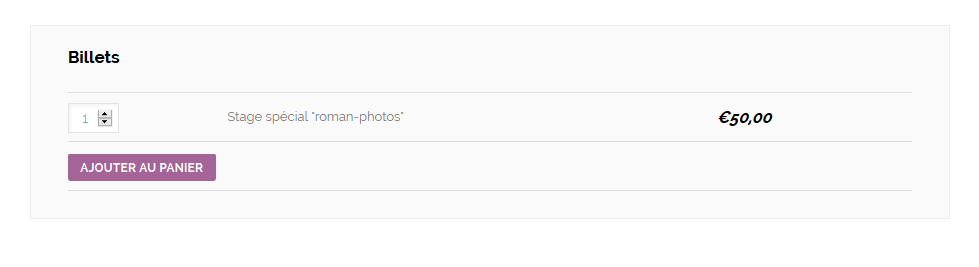
Are you not seeing that?
MemberThere is no conflict between the Events Calendar and WooCommerce that cuases this.
Your time format settings are causing the issue.
Please change to one of the default options and see which one enables you to save the time or keep the field blank.
Thanks
MemberHi,
Sorry for the issues you are having. I can help resolve this with you.
Are you able to see all the events in the series in the admin? There should be one event for each event in the series in the admin event list.
If not did you create a recurring event from a published event or was this a new event?
If you create a new event with recurrence of only a couple weeks does that work?
Let me know and we can go from here.
Thanks
MemberHi,
Thanks for using our plugins, I can help troubleshoot this issue with you.
I visited your site on Chrome and Firefox and was able to see the Photo View the first time in each.
But, I am seeing an error from your theme that maybe causing the issue:
no such method ‘reLayout’ for isotope instance
http://www.galleryopenings.com.au/wp-content/themes/HighendWP/scripts/scripts.js
Line 5Are you able to contact the theme developer and see if they can help with this?
I am not sure how the theme is built so I am unclear on the fix for this.
I am also getting this error on some pages, which could be related to this issue:
TypeError: twttr is undefined
http://www.galleryopenings.com.au/wp-content/plugins/duracelltomi-google-tag-manager/js/gtm4wp-social-tracker.js
Line 63Let me know what you find out and we can go from here.
Thanks
MemberOk that is strange, leaving both the Start and End Sale date should remain blank.
What are your time format settings in WordPress Settings > General > Time Format Are they set to a 24 hour clock?
Also, I just visited your site and see the tickets are showing, what did you change to get it working?
MemberThanks for adding your feature requests to Uservoice.
I am going to close this ticket, but if you need anything else please post a new topic on the forum and we can help you out.
Thanks
March 31, 2015 at 7:12 am in reply to: [tribe_mini_calendar] Shortcode Makes Brooklyn Parallax Site End #952202MemberThis reply is private.
March 30, 2015 at 3:17 pm in reply to: Importing Events from FB "Tickets Available" Section on FB Not Being Imported #952033MemberOk, I looked at the object Facebook returns with the event information and it does not include the ticket information.
If it was found in the description it would be imported, but not in its own field.
We are using an older version of the API and will be using one of the newer versions starting with the next release of the importer in hopefully a month’s time and that might include it then.
For now that field is not accessible by the Facebook Importer.
MemberOk thanks for the information.
If you remove the start and end sale date does the ticket box then show?
You can leave those fields blank.
Let me know.
Thanks
March 30, 2015 at 2:17 pm in reply to: Importing Events from FB "Tickets Available" Section on FB Not Being Imported #952019MemberHi,
Thanks for using Facebook Events. I can help out here.
I am not sure if that information is included when we get the information from Facebook via their API.
Do you have an event you can send as an example and I can take a look?
Thanks
MemberHi,
Thanks for the interest in our plugins.
We do not have a feature to charge for event postings. It could be possible with a customization, but that is beyond the support we can provide.
Also, Community Events is the only plugin that adds Front End Event Submissions, Pro does not have that feature. You do not need to purchase Pro to use Community Events as all our plugins only require The Events Calendar on WordPress.org.
Sharing
We do not include share buttons on the events, but you can add your own plugin to show share buttons on a single event. As the for information that is included when sharing you could change that with a plugin such as WordPress SEO to what you would like.Let me know if you have any follow up questions.
Thanks
MemberHi,
Thanks for the interest in the Beta for the Ticketing plugins.
We do not have a date this will be available. I hope sometime next month, but cannot give out an exact date.
In the mean time you could try a plugin like WooCommerce Advanced Product Quantities
You could use that to limit ticket purchases to 1 per order and collect information that way.
Thanks
MemberHi,
Sorry for the issues you are having. I can help out with this.
I use Genesis myself and not having this issue on my sites.
What are the settings for the ticket you have created for an event that is not showing?
Please let me know the following:
Ticket Name:
Ticket Description:
Price:
Start sale:
End sale:
Stock:
SKU:Let me know and we can go from here.
Thanks
MemberGreat, glad it helps, I am going to go ahead and close this ticket, but if you need help on this or something else please post a new ticket.
Thanks!
MemberSince there is has not been any activity on this thread for over 2 weeks so I am now closing it. Feel free to start a new thread if you have further issues. Thanks! 🙂
-
AuthorPosts