

Forum Replies Created
-
AuthorPosts
-
June 7, 2015 at 11:09 am in reply to: X-theme + ECP integration issues (no title/breadcrumbs) #967675
Brian
MemberAlso, I would try changing the Event Template using this setting as that might help in this case:
Head to this page:
Events > Settings > Display Tab
Then change this setting:
Events Template to Default Page Template
That might enable the breadcrumbs to work better.
MemberGreat glad it helps.
I am going to close this ticket, but if you need anything else related to this topic or another please post a new topic on the forum and we can help you out.
Thanks
June 7, 2015 at 11:08 am in reply to: Week View, event not carry over to next day if ends late #967673MemberGreat Glad it helps.
Also when we release 3.10 soon we refactored the week view and have a new filter to specify what times to show in week view. So if you only want to show events from 8am to 8pm or any other time, you are able to do that.
Please read up on that here:
https://theeventscalendar.com/week-view-refactor/
Since this is marked resolved I am going to close this ticket, but if you need anything else related to this topic or another please post a new topic on the forum and we can help you out.
Thanks
MemberGreat glad it helps.
I am going to close this ticket, but if you need anything else related to this topic or another please post a new topic on the forum and we can help you out.
Thanks
June 7, 2015 at 6:22 am in reply to: X-theme + ECP integration issues (no title/breadcrumbs) #967657Membermaybe you can work with the developer of X-theme as now he states it is an ECP issue since even Yoast breadcrumbs cannot bring it up. Can I give them your email?
I appreciate the offer, but we have a process to go through to make modifications to our plugins. Right now we do not support this and it is considered 3rd party conflict and to resolve it is a customization, which we cannot support.
If you would like us to add this as a feature I encourage you to visit our User Voice Page and either upvote an existing request or make a new request there.
Also, I tested on a Genesis site of mine and got get_the_title() to work and show the title for a breadcrumb.
So it is unclear why it does not work in your theme, but it does work in others.
Unfortunately, this is again not something we are able to resolve, it could be something we look to resolve in the future, but I do not have a timeline when that might happen.
MemberI am glad to see you were able to figure it out. 🙂
I am going to go ahead and close this ticket. If you have a similar issue or another in the future, please do not hesitate to create a new ticket.
Thanks!
MemberOk thanks for the info. We rely on the community for translation’s and I know that has been updated for the next version so it could already be fixed.
Also, once 3.10 comes out please let us know about the All Day Field issue once translated and we can help get that resolved.
Since this is marked resolved I am going to close this ticket, but once the new release comes out please bring up these issues or anything else and we can work with you to resolve them.
Thanks
MemberHi,
It is on the Single Event Editor for each event in the admin.
To get there.
Go to Events > Event List > Click on a title of of an Eventbrite Event imported to edit.
It looks like this in the the single event:
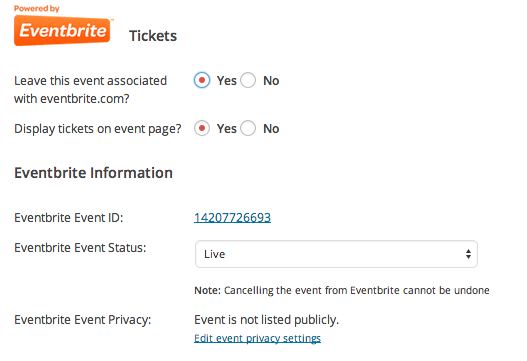
I would also look through the New User Primer for Eventbrite Tickets:
As it gives a good overview of where all the settings are and how to use them.
Let me know how that works out.
Cheers.
MemberHi,
I can help troubleshoot them.
Can you please confirm you are using Eventbrite Tickets 3.9.6 and that you have followed the configuration steps outlined here:
https://theeventscalendar.com/knowledgebase/configuring-eb-tickets/
Then can you go to an event that is suppose to show the tickets box and confirm this setting in the admin for that event is set to yes:
Display tickets on event page?
Even if it is set to yes can you please set it to no, then update, and then set back to yes and update again and see if it shows.
Let me know what you find out and we can go from there.
Thanks
June 5, 2015 at 2:17 pm in reply to: License was applied to dev environment – not production #967551MemberHello,
I can help out.
Can you please remove your license keys from your account on TheEventsCalendar.com and then reactivating them on your site?
To do that, login to your account and go to My Account > License Keys
Click “Disconnect now” next to all the urls and go to your site and add those license keys back.
Let me know how that works out for you.
Thanks
MemberHi,
Thanks for the interest in our plugins.
I can help out here.
blockquote>1) As you are able to import events from Facebook, are you able to import ical feeds? This is the same format.
With the Facebook Importer you can import any public Facebook Event or from a Facebook Page that has events. We do not have an iCal importer right now although we should be releasing one in the next couple of months if it goes by plan.2) When you import a Facebook feed can you assign/ select a category, event orgnaiser or tag for the Facebook page that you are importing the events from?
Currently, there is no feature to set a category, organizer, or tag for an imported Facebook event as it is imported, if you think that is something you would like as a feature I encourage you to visit our User Voice Page and either upvote an existing request or make a new request there.
Cheers
MemberHi,
Thanks for using our plugins.
I can help out here.
We are about to release 3.10 in the next couple of weeks and that includes a refactored Week View.
So I would not want to give you any way to fix the issues now as it would not apply in the next release.
Do you think you can wait and repost once you see the new version?
Let me know.
Thanks
MemberHi,
Thanks for the interest in our plugins.
I can answer your question.
Does The Events Calendar Pro offer a feature where I can have a custom template page layout for a specific event category?
We do not directly provide a means to change templates. However it is possible by using conditionals and our themer’s guide to modify any template depending on the category it is in.
Our themer’s guide is found here:
https://theeventscalendar.com/knowledgebase/themers-guide/
Here is the link to our conditionals:
https://gist.github.com/jo-snips/2415009
Let me know if you have any follow up questions.
Thanks
MemberHi,
Thanks for using our plugins.
It is currently not a feature to display the event count as you describe, if you think that is something you would like as a feature I encourage you to visit our User Voice Page and either upvote an existing request or make a new request there.
Let me know if you have any follow up questions.
Thanks
June 5, 2015 at 2:07 pm in reply to: Can i add a query parameter to only show events from specific organiser? #967543MemberHi,
Glad you found the query.
As for the ticket issue it is best to take care of that here as well.
We can deal with that in your post here:
I am going to close this ticket, but if you need anything else related to this topic or another please post a new topic on the forum and we can help you out.
Thanks
-
AuthorPosts