

Forum Replies Created
-
AuthorPosts
-
June 15, 2015 at 1:16 pm in reply to: Editing List View to show all events for Current Year + Upcoming Year #969576
Brian
MemberI am going to close this topic as we typically close threads if there is no activity after two weeks. Feel free to create a new thread and reference this one to save you time.
Thanks
MemberI am going to close this topic as we typically close threads if there is no activity after two weeks. Feel free to create a new thread and reference this one to save you time.
Thanks
MemberI am going to close this topic as we typically close threads if there is no activity after two weeks. Feel free to create a new thread and reference this one to save you time.
Thanks
MemberI am going to close this topic as we typically close threads if there is no activity after two weeks. Feel free to create a new thread and reference this one to save you time.
Thanks
MemberHi,
Sorry for the issues you are having.
I tried to take a look at the form and it is password protected.
Can you turn on anonymous submissions in the settings so I can take a look?
Also, this is what the form looks like with base css:
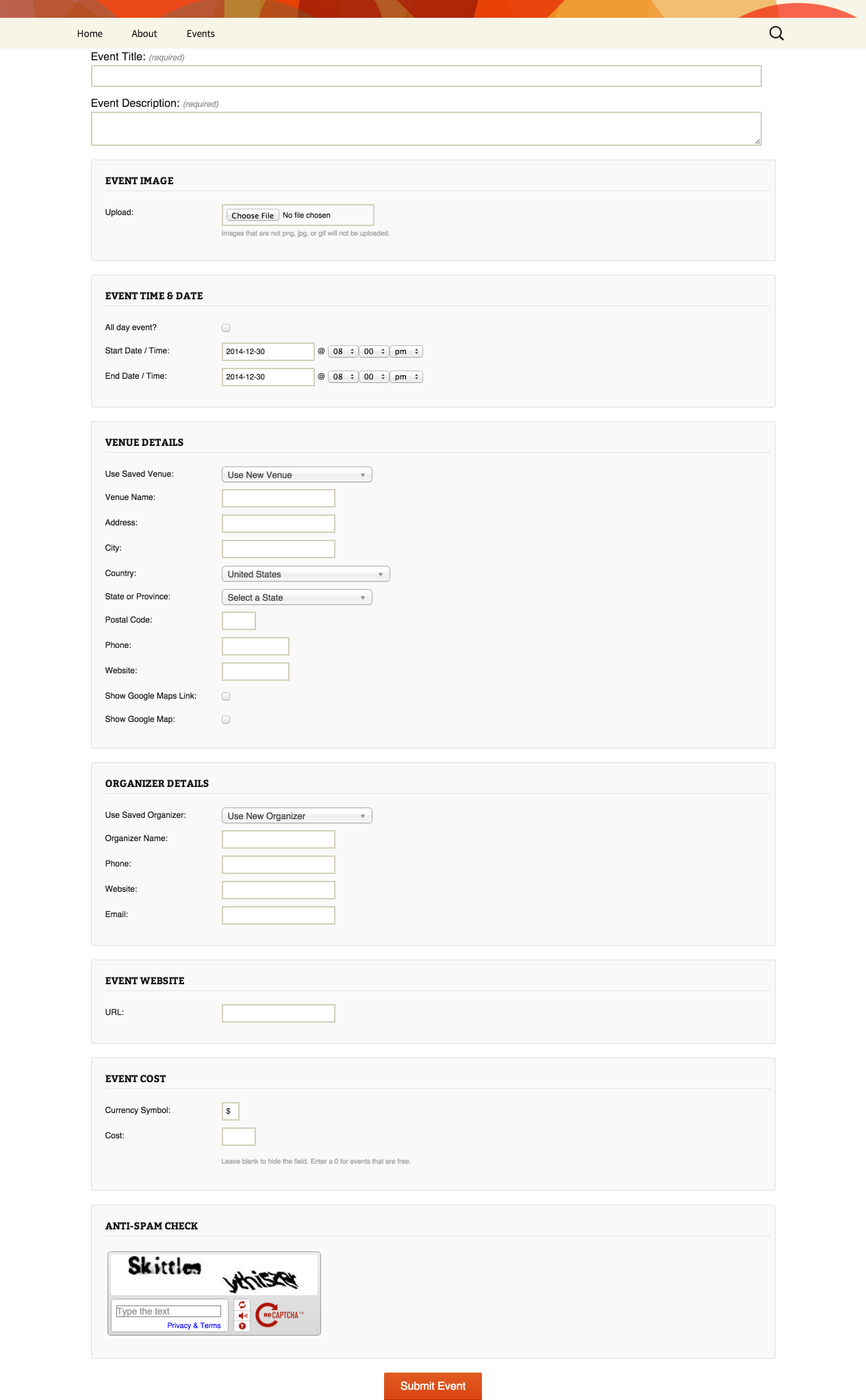
If you are seeing something different then that is most likely a theme css conflict.
Let me know and we can go from here.
Thanks
MemberHi,
I can help out here.
I found some coding that does still work. However, with the update to 3.10 in a couple days it would no longer work.
This coding here will work in 3.10 and prevent the ticket emails and remove the message from the order about getting the tickets in another email:
https://gist.github.com/jesseeproductions/7ec5827ffa34a3995dc9
If you really need it to work today change Tribe__Events__Tickets__Woo__Main to TribeWooTickets in both places of the snippet.
Also, if you think that is something you would like as a feature I encourage you to visit our User Voice Page and either upvote an existing request or make a new request there.
Cheers
MemberHi,
Thanks for the interest in our plugins.
We do not have a feature where you can show calendars on different pages with unique events.
However you can use the Event Categories to get event views (month, list, map, etc) of just those events in a category.
So the regular views for the calendars are usually at:
yoursite.com/events/
If you have a category of lettuce you have a category view at this url:
yoursite.com/events/category/lettuce/
The best way to test this out is with the Events Calendar found for free on WordPress.org:
Let me know if you have any follow up questions.
Thanks
MemberHi,
Thanks for using our plugins. I can help out here.
To display the additional fields on the list view you are going to want to move and edit those templates in your theme.
You can follow the themer’s guide:
https://theeventscalendar.com/knowledgebase/themers-guide/
Note in 3.10 the view directory is in /src/views/ before that it is just in /views/
And you can use this function to display the results of any additional field:
https://gist.github.com/jesseeproductions/3ba8c5679e188946988e
Change ‘Community Field’ to the name of the field you would like to display.
Let me know if you have any follow up questions.
Thanks
MemberI am glad to see you were able to figure it out and thanks for sharing the coding.
I am going to go ahead and close this ticket. If you have a similar issue or another in the future, please do not hesitate to create a new ticket.
Thanks!
MemberThis reply is private.
June 15, 2015 at 9:36 am in reply to: Event view and .csv import with Facebook exported .ics file #969500MemberHi,
Thanks for the interest in our plugins.
We do not have a iCal importer, but hope to release one soon, but it is stuck in beta to fix some issues.
The Facebook Importer does not have a demo, but you can purchase a license and request a refund in the first 30 days if it does not work out.
Please take a look at the Facebook New User Primer as that explains all the features of it:
https://theeventscalendar.com/knowledgebase/new-user-primer-facebook-events/
As for moving around content in templates we have our themer’s guide to help do that.
https://theeventscalendar.com/knowledgebase/themers-guide/
Let me know if you have any follow up questions.
Thanks
June 15, 2015 at 9:23 am in reply to: 3.10 – Disappointed that expired events on the day still show #969498MemberHi,
Sorry to disappoint and the issues you are having with this.
We do have a fix in this release to remove events from the Photo View, List View and Event List Widget after they have passed.
Is it happening in those views on your site?
I am seeing an issue where the query is using UTC 0 time and not the local time and events are removed to early for me as I am on the East Coast of the U.S.. I am working on getting that resolved before the official release of 3.10.
I think that would cause the issue for you as it would think it is much earlier in the day then it truly is for you.
However can you confirm as well that this is not a caching issue.
Sorry again for the glitch and thanks for bringing it up. I am working on it getting resolved now.
Cheers
MemberHi,
Thanks for the interest in our plugins.
The Facebook Add On for the Events Calendar is only able to import events into WordPress. It is not able to create events in Facebook.
According to Facebook they do not have a published method to create events either using their API.
Let me know if you have any follow up questions.
Thanks
MemberHi,
Thanks for using the Events Calendar.
Here on the pre-sales forum, I’m afraid we do not provide technical support. I would ask that you take any technical support questions across to our wordpress.org forum – our staff scan it periodically and other community members may also be able to help out.
Thanks again!
June 15, 2015 at 8:23 am in reply to: Events not showing on calendar when previous month is clicked #969458MemberHi Anya,
Thanks for using the Events Calendar.
Here on the pre-sales forum, I’m afraid we do not provide technical support. I would ask that you take any technical support questions across to our wordpress.org forum – our staff scan it periodically and other community members may also be able to help out.
Thanks again!
-
AuthorPosts