

Forum Replies Created
-
AuthorPosts
-
August 26, 2015 at 6:43 pm in reply to: Suddenly, Events Calendar causing pages to appear as blank in Chrome and Firefox #999415
Brian
MemberHi,
Thanks for the information.
I did not see any fatal errors so I am not clear on what is causing this as notices would show on all browsers.
I got it to work in Edge, but as you said Chrome and Firefox do not work. Usually it is the opposite though.
Does another theme bring back the site in all the browsers?
This is the first time I have ever seen it so it might take a couple tries to narrow down the cause.
Let me know and we can go from here.
Thanks
MemberHi,
Thanks for using our plugins. Unfortunately, we do not have any event notification or reminder features.
If you would like to request that feature please head to our UserVoice Page and add your own or upvote that feature as they will increase the chances of it being added to a future version.
http://tribe.uservoice.com/forums/195723-feature-ideas
Let me know if you have any follow up questions.
Thanks
MemberHi,
Thanks for using our plugins.
I have this snippet to help you out.
Add this to your child theme’s functions.php and replace “New Text Here” with the message you like or just put two quotes to blank it out.
https://gist.github.com/jesseeproductions/ec0756a728a65dec0266
Let me know if that works for you.
Thanks
August 26, 2015 at 6:27 pm in reply to: remove (actually move date) one event in recurring events #999411MemberI am glad to see you were able to figure it out.
I am going to go ahead and close this ticket. If you have a similar issue or another in the future, please do not hesitate to create a new ticket.
Thanks!
August 26, 2015 at 6:25 pm in reply to: Recurring community event not holding it's recurring end date. #999410MemberSounds good.
I am going to close this ticket, but if you need anything else related to this topic or another please post a new topic on the forum and we can help you out.
Thanks
MemberThanks for the link I see the images now.
Our css only provides a max height so that larger image hits that first causing the issue.
Try out this css to set a max width:
.tribe-events-list .tribe-events-event-image img {

    max-width: 300px;

}
Add that css to your theme’s stylesheet or through a plugin such as Simple Custom CSS.
Let me know if that helps.
Thanks
MemberGreat, glad it is moving forward.
This css should fix those other two issues:
.widget_tribe-events-adv-list-widget .list-date {

	display: none;

}

.widget_tribe-events-adv-list-widget .list-info h2.entry-title {

    margin: 0;

}
August 26, 2015 at 1:21 pm in reply to: Recurring community event not holding it's recurring end date. #999314MemberOh my bad I misread the issue.
So you settings in Community Events look something like this then:
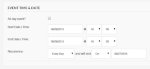
And when you edit it, it sets the end date to the first date.
I actually see the correct end date, but then a script rewrites the field changing it.
The good news is I tested in the next version of the Events Calendar and I could not reproduce the issue.
That version is in final testing and will be out soon (hopefully middle of next week)
Does that work for you?
MemberGreat glad it helps. The issue is the dash and date first formats are not working correctly in this release.
That is fixed in the next release though, which we are in the final testing for and will be out soon.
I am going to close this ticket, but if you need anything else related to this topic or another please post a new topic on the forum and we can help you out.
Thanks
MemberI am glad to see you were able to fix this issue.
Since the issue is resolved I am going to go ahead and close this ticket. If you have a similar issue or another in the future, please do not hesitate to create a new ticket.
Thanks!
MemberI only have this guide to doing manually updates:
Beyond that it is the WordPress Plugin Update Process.
If you have any custom coding or templates for the events in your theme you would want to look into removing those on upgrade and then adding them back.
The best practice for updates is to have a staging site to make the updates there first so if issues come up we can help fix them before updating your live site.
Let me know after the update and I can take a look.
MemberSorry it was working for me I would check your Event Category ID, but beyond that I cannot troubleshoot a customization.
And it is not possible to use the coding I provided to give a category based on a Facebook Page as that information is not saved with the event it just saves the Events Facebook ID.
Unfortunately, that is all I have for this and the only other method to get this would be to modify the Facebook Plugin Directly.
MemberOk thanks for that.
What happens if you remove that code from your code in my wp-config to disable global titles?
Also, what about removing any custom templates or coding for the Events Calendar?
I am not able to reproduce this issue and not found any recent reports so not sure of the exact cause.
Thanks
MemberOk, thanks for the information.
Can you try with another theme such as Twenty Fifteen and see if that resolves the issue.
That will helps us narrow down the issue here.
Thanks
MemberHi,
Thanks for using our plugins. I can try to help out here.
Do you have links to where the image is correct and where it is wrong?
Can you please provide those in a private reply and I can take a look.
Thanks
-
AuthorPosts