

Forum Replies Created
-
AuthorPosts
-
Brian
MemberHi,
So I can help out here, but in the future it is best to keep each thread to one topic so we can keep all on the same page of what is going on. I have tried to answer all your questions below:
If you go to http://triggr.nu/agenda, you will see that I have changed the default setting to ‘Picture’ view. The strange part though is that when you open it at first, only 5 future events are visible. When navigating to the next page, there is only 1 event visible… I do know I’d created more, so I went back to the previous page, and then all of a sudden all missing events on the initial page show up again.
I see you are using the Divi theme and it is their archive settings causing this as the Event Views are archives.
Head to Divi > Theme Options > General Settings > Number of Post displayed on Archive pages
Change that number to 10 or what you have as the number of events to show in our settings.
That should fix the issue.
Secondly, when using the Month-view, I’m not that pleased with the way the tooltips are showing. Scroll down the page a bit and try to mouse-over one of the top events, you will see that most of the tooltip disappears. I’d love to have the tooltip show below the actual event if it appears that the tooltip will not be entirely readable if shown upwards.
It looks like a theme conflict with your floating header.
Try out this css:
.tribe-events-month .tribe-events-calendar .tribe-events-tooltip {

    z-index: 99999;

}
Add that css to your theme’s stylesheet or through a plugin such as Simple Custom CSS.
Thirdly, I’m not getting why the following is set up the way it is now: You can disable or enable showing repeating events in the list-view (which applies to Picture-view as well), or you can give the user the choice to apply this filter. You can’t do both. And that doesn’t make sense to me: Why is it not possible to have the user still be able to select if he wants to view all parts of a repeat event or not? What I mean is that I still want to give the user the choice, but set it to ‘hide all but the first upcoming event’ by default.
The feature is coded to be either or. It is not coded for both, if you think that is something you would like as a feature I encourage you to visit our User Voice Page and either upvote an existing request or make a new request there.
Thanks
November 2, 2015 at 2:53 pm in reply to: all day events: events expired, but the date is ok #1021001MemberHi,
That open is there in the current version of 3.12.x or later.
That setting is at the bottom of the page of Events > Settings.
What theme are you using?
November 2, 2015 at 2:51 pm in reply to: CSS in Avada for Navigation links above the calendar in Month View #1020998MemberYou’re Welcome.
Do you have a link where is happening? I might be able to take a look and have another suggestion.
I followed the initial link your provided, but did not see it there.
Thanks
MemberGreat glad it helps.
I am going to close this ticket, but if you need anything else related to this topic or another please post a new topic on the forum and we can help you out.
Thanks
MemberYou’re Welcome
I am going to close this ticket, but if you need anything else related to this topic or another please post a new topic on the forum and we can help you out.
Thanks
MemberGreat glad it helps.
I am going to close this ticket, but if you need anything else related to this topic or another please post a new topic on the forum and we can help you out.
Thanks
MemberGreat glad it helps.
I am going to close this ticket, but if you need anything else related to this topic or another please post a new topic on the forum and we can help you out.
Thanks
MemberHi,
Thanks for using our plugins. I can help out here.
This is the settings I found work to create as you like: (8am start time for the middle event)
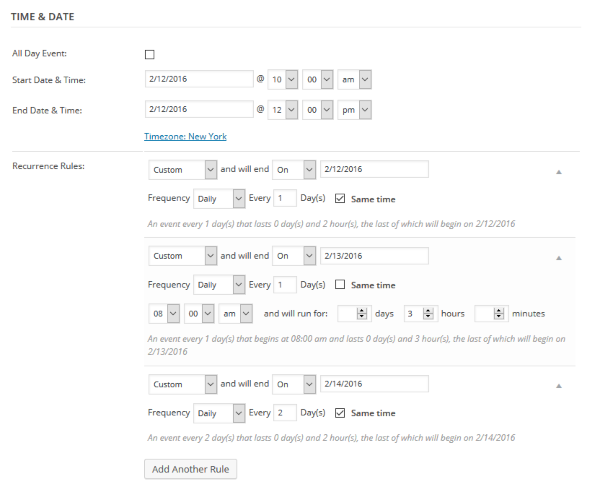
However, I did notice an issue and that when I change the event time it uses utc 0 and not the timezone I was in.
So although wrong, this is the actual settings I used to get the times correct on the East Coast of the U.S.: (Middle event 3am start time due to -5 hours from UTC 0 )
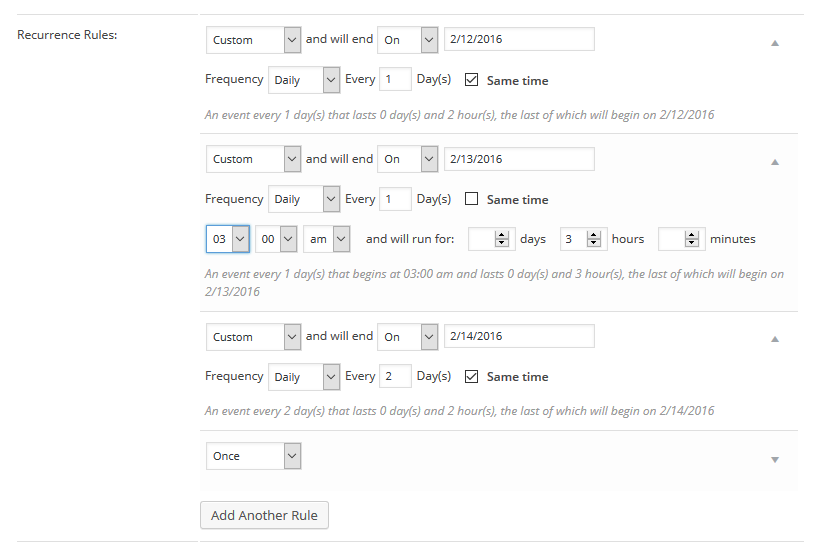
Do you know what your timezone is in relation to UTC 0?
You maybe to convert the new start time using that offset.
I have created a bug report for us to address this, but can help get this working for you too by working on that offset.
Let me know if you have any follow up questions.
Thanks
MemberHi,
Thanks for using the Events Calendar.
Here on the pre-sales forum, I’m afraid we do not provide technical support. I would ask that you take any technical support questions across to our wordpress.org forum – our staff scan it periodically and other community members may also be able to help out.
Thanks again!
November 2, 2015 at 8:31 am in reply to: Recurrence Rules and Exclusions only work the first moth #1020839MemberHi Marco,
Sorry for the issues here.
Here on the pre-sales forum, I’m afraid we do not provide technical support. I would ask that you login to theeventscalendar.com and post in the Events Calendar Pro Forum.
However, this is actually a known bug and we are working on a fix for it, but I do not have a release date for it.
It the mean time you can go in and delete the single events you do not want from the recurring series. It might take some time, but that is the only workaround for now.
Thanks
MemberHi Justin,
Thanks for the interest in our plugins.
Unfortunately, we have no features as you describe and although they might be possible it would take a significant customization and that is beyond the support we can provide.
You might have better luck with a Learn Management System (LMS) or a booking plugin as those are closer in features to what you are looking for.
Cheers
MemberHi Isabel,
Thanks for the interest in our plugins.
We have the Community Events Add On that creates a form to create events with.
https://theeventscalendar.com/product/wordpress-community-events/
That plugin works with the core version of the Events Calendar found for free on WordPress.org: https://wordpress.org/plugins/the-events-calendar/
Let me know if you have any follow up questions.
Thanks
MemberHi,
That is not a feature we support and I do not think it is possible without changes to the plugin that would be overwritten on each update.
If you would like to request that feature please head to our UserVoice Page and add your own or upvote that feature as they will increase the chances of it being added to a future version.
MemberHi,
Thanks for using our plugins. I can help out here.
We do not provide the translations for any of our plugins. So if you would like to change something please follow this guide:
https://theeventscalendar.com/knowledgebase/adding-or-updating-a-translation/
As for the After or Before Cost.
It means for the placement of the currency symbol ( $ )
So:
Before Cost $10
After Cost 10$Let me know if you have any follow up questions.
Thanks
MemberHello Again,
I can try to help out here.
First, if you set the start and end time to the same time it will not display an end time.
I tested the snippet on my site as well and it appears it does not work for the times in the detail section of the single events.
I looked at the template and it hard codes the end time. Although if you set the start and end time to the same as mentioned above it does work in this section to not show an end time.
If you need to remove it another way you can follow our themer’s guide
To move and edit this template in your theme:
plugins/the-events-calendar/src/views/modules/meta/details.php
Moved here (it might be in avada already)
avada/tribe-events/modules/meta/details.php
There on line 90 (or around there)
Change this:
esc_html_e( $start_time . $time_range_separator . $end_time );To this:
esc_html_e( $start_time );
To remove the end time.Let me know if you have any follow up questions.
Thanks
-
AuthorPosts