

Forum Replies Created
-
AuthorPosts
-
Brian
MemberHi,
Thanks for using our plugins. I can help out here.
For the Mini Calendar widget if you set the count to 0 it will disable the links and when clicking on a day with events it will take them to the Day View.
This works in the shortcode as well adding count=”0″
There is no way to disable the links all together without editing the template files following our themer’s guide:
https://theeventscalendar.com/knowledgebase/themers-guide/
That kind of customization we can try to help answer some questions to get you started, but per our terms and conditions unable to provide much more then that.
Let me know if you have any follow up questions.
Thanks
MemberHi,
Thanks for the interest in Event Tickets Plus. I can help out here.
We do not have any features in the Admin to do as you ask.
With Community Tickets this is possible on the front end. You could either have the organizer create the event and tickets on the front end so they have access. Or you could create them and then assign them to a user using the author field.
https://theeventscalendar.com/product/community-tickets/
For this to work it would require though purchasing Event Tickets Plus, Community Events, and Community Tickets.
Let me know if you have any follow up questions.
Thanks
January 19, 2016 at 5:47 am in reply to: Event Tickets Plus & The Event Calendar Pro Configuration of RSVP & Add to Cart #1058403MemberHi,
Sorry for the issues you are having. I can help troubleshoot this with you.
Thanks for the screen share that helped.
I noticed you set the Ticket Start Date to May 1st.
Since today is January 19th it will not show the Add to Cart Form as the date is out of range.
If you would like to show the ticket form now that date must be either January 19th or before to enable it.
Let me know if you have any follow up questions.
Thanks
MemberHi Nuno,
Thanks for your purchase.
We have this guide to creating an invoice directly in your account:
Cheers!
MemberThe Widget will use whatever setting you choose in it.
The snippet just increases the limit that is available to choose in the snippet.
January 19, 2016 at 5:19 am in reply to: Venue and Organizer not displaying on event single page view #1058383MemberGreat, glad it helps, I am going to go ahead and close this ticket, but if you need help on this or something else please post a new ticket.
Thanks!
MemberYou’re Welcome.
Since this is marked resolved I am going to close this ticket, but if you need anything else related to this topic or another please post a new topic on the forum and we can help you out.
Thanks
MemberGreat, glad it helps, I am going to go ahead and close this ticket, but if you need help on this or something else please post a new ticket.
Thanks!
January 18, 2016 at 6:52 pm in reply to: Venue and Organizer not displaying on event single page view #1058248MemberHi,
I took a look not sure if this is the ideal fix, but this css might work:
.single-tribe_events #main  #sidebar {

    margin-top: 510px;

}
Add that css to your theme’s stylesheet or through a plugin such as Simple Custom CSS.
Let me know if that helps.
Thanks
January 18, 2016 at 4:52 pm in reply to: tribe_get_events query returns past recurring events #1058195MemberHi,
Thanks for that.
I think I maybe have found the issue.
This event:
Social Event – Recurring
Has a start date of January 12 and the end date February 12
So set that way it is considered one long event for every day in between those dates, so it will always show first as the query considers it on going.
That event should instead be setup with the start and end date as the same date and then it is repeated daily until the 12th.
Like this:
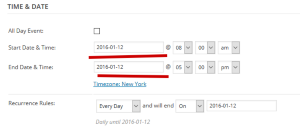
Thanks
MemberHi,
Thanks for the interest in our plugins. I can help out here.
With Event Tickets Plus and using the WooCommerce Ticket Module you can add tickets and products together in the same cart without issue.
The ticket itself is actually a product in WooCommerce and we do not modify the cart or checkout process in WooCommerce.
Let me know if you have any follow up questions.
Thanks
MemberHi,
Thanks for the interest in our plugins.
The Filter Bar is only for the main event views of Month,List, Map, Week, etc…
It does not work with the widgets.
If you think that is something you would like as a feature I encourage you to visit our User Voice Page and either upvote an existing request or make a new request there.
MemberHi,
Sorry for the issues you are having. I can help troubleshoot this with you.
If you have your events url set to camps and a page with the same slug it will cause the calendar to not show. If that is not the case then that message might just be overzealous.
I noticed you are using Catalyst for Genesis please review our guide here for why the calendar might not be showing:
Thanks
MemberHi,
Sorry for the issues you are having. I can help troubleshoot this with you.
I looked into it and I got this snippet to work:
// remove slug conflict admin notice

if (class_exists('Tribe__Admin__Notice__Archive_Slug_Conflict')) {

	remove_action( 'admin_init', array( Tribe__Admin__Notice__Archive_Slug_Conflict::instance(), 'maybe_add_admin_notice' ) );

}
If you use that snippet instead does it work?
Thanks
MemberHi,
Thanks for the interest in our plugins.
We do not have a video of the process, but it can take on average 5 to 10 seconds to do.
It can go quicker as people get more familiar with the system.
Let me know if you have any follow up questions.
Thanks
-
AuthorPosts