The Waitlist Feature for Event Tickets Plus
Estimated reading time:
1 minute
Managing high demand for events can be challenging, especially when spots fill up quickly. The newest waitlist feature for Event Tickets Plus offers a simple solution, automatically tracking interested attendees when an event is in pre-sales or sold out. It takes care of the process by notifying those on the waitlist as soon as spots open up, with customizable emails and reservation timeframes to keep everything running smoothly.
We’re confident that the waitlist feature will simplify your ticket sales, saving you time and eliminating stress. Let’s take a closer look at how it works and the key benefits it provides.
A Closer Look at the Waitlist Feature
We’re thrilled to roll out this waitlist feature! You can choose from a variety of waitlist options, all with automated management and customizable emails tailorable to your needs.
Types of Waitlists
There are two types of waitlists that you can add to an event: a tickets waitlist (for paid events) and an RSVP waitlist (for free events). For both types, there are three options to start a waitlist:
- Before the ticket sales or RSVP collection starts: This helps build a list of interested attendees before tickets are available. When ticket sales go live, everyone on the waitlist will receive an email notifying them that they can now purchase tickets.
- When the tickets or RSVPs reach capacity: If tickets sell out, this waitlist will track everyone who’s interested in securing a spot if one becomes available. Should a spot open up, those on the waitlist will be notified via email in the order they joined.
- A combination of both: Before ticket sales begin and after tickets reaches maximum capacity (whenever tickets/RSVP is not available)
With the flexibility to choose from multiple waitlist options, you can easily manage both paid and free events, ensuring a smooth and efficient process for your attendees.
Automatic Management
This feature automates the management process, making it easier than ever for you. Event Tickets Plus will collect the names and email addresses of interested attendees. When someone joins the waitlist, they’ll receive a custom email confirming their spot. If space becomes available or sales open, an automatic email will notify them. These emails are fully customizable, allowing you to adjust the subject, header, and content to match your messaging preferences.
Additionally, an unsubscribe button is conveniently included in the emails, giving users the ability to remove themselves from the list. This feature empowers attendees to manage their own preferences, allowing you to focus on other important aspects of event management.
Customized Emails
Effective and branded messaging is crucial for every business. The two automated emails sent to waitlist contacts include a confirmation email when they join the waitlist and a notification when a spot becomes available. You have the ability to fully customize the content of these emails to suit your needs. Additionally, we offer dynamic content that can pull ticket details directly into your emails (learn more about that here). Our backend also allows you to preview the email, so you can see exactly how it will look. These custom emails provide both flexibility and convenience.
By default, the waitlist subscribers for pre-sales will be emailed 20 minutes prior to when a ticket becomes available for purchase, giving them a head start and early access to purchase. This advantage is the primary benefit of subscribing, ensuring they get tickets before sales open to the general public. Even better? It’s fully customizable—while 20 minutes is the default, you can adjust the timing to fit your strategy.
Key Benefits of the Waitlist Feature
The waitlist feature streamlines your ticketing process and makes it easier than ever to manage pre-sales and waitlists. We know that this will provide several key benefits helping you manage events better:
- Save time by reducing manual administration. This feature automates the pre-sales and waitlist process, offering a convenient tool to save you time. Focus on other event details while we manage the waitlist in the background.
- Enjoy peace of mind with first-come, first-served spot allocation, ensuring a fair and efficient process for all attendees. When a spot opens up, users will be notified in the order they joined the waitlist, ensuring a simple and fair process.
- Avoid confusion and complicated setup with this simple solution. We’ve configured everything on our end so that you can put your energy into other areas of event planning.
- Maintain your brand with custom messaging on your personalized events. Whether your events are free or paid, big or small, this feature reinforces your company’s brand identity through personalization.
- If you have a sold out event, easily use this feature to create a stress-free waitlist experience. You won’t have to worry about creating a list or notifying people of openings.
- Elevate your marketing efforts by offering presale signups. This allows you to manage a list of interested individuals and notify them as soon as tickets or RSVPs are available, giving you a head start in promoting your event.
- Keep your events and performances full by letting us manage the queue for you. No matter how busy you are leading up to the event, you can rest assured that we’ll automatically reach out to individuals to ensure that all seats are filled.
We’re excited to see the benefits this feature brings to your organization. By handling waitlist management for you, it will free up your time to focus on other important aspects of your business.
Waitlist Feature in Action
Setting Up a Waitlist
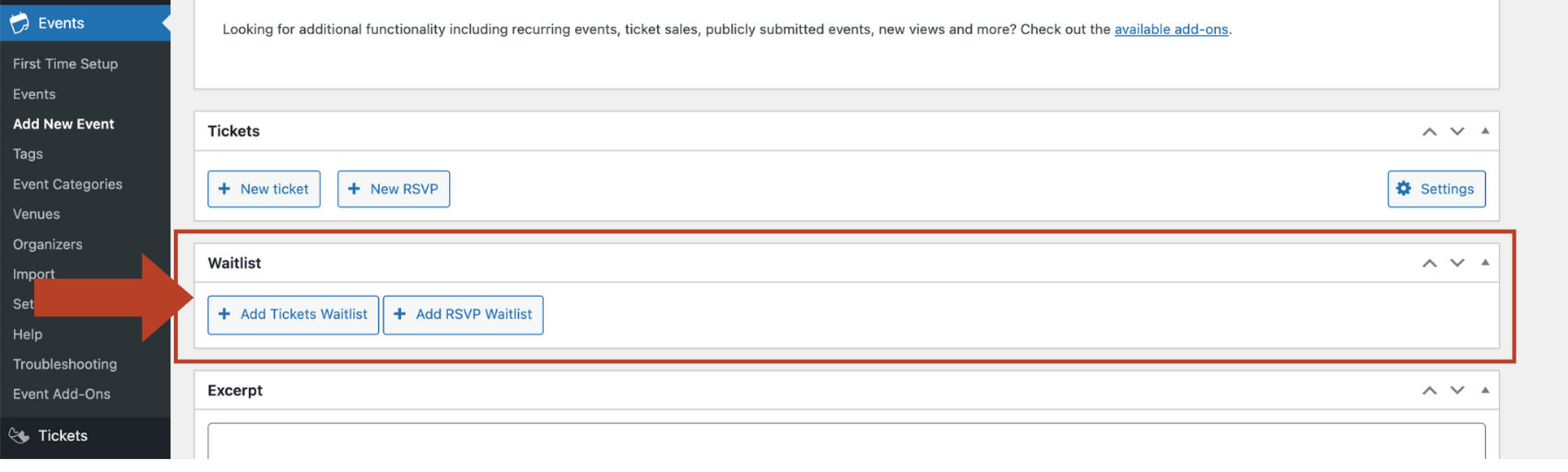
When you are editing an event, scroll down to Waitlist. From there, you can set up a Tickets Waitlist (for paid events) or a RSVP Waitlist (for free events).
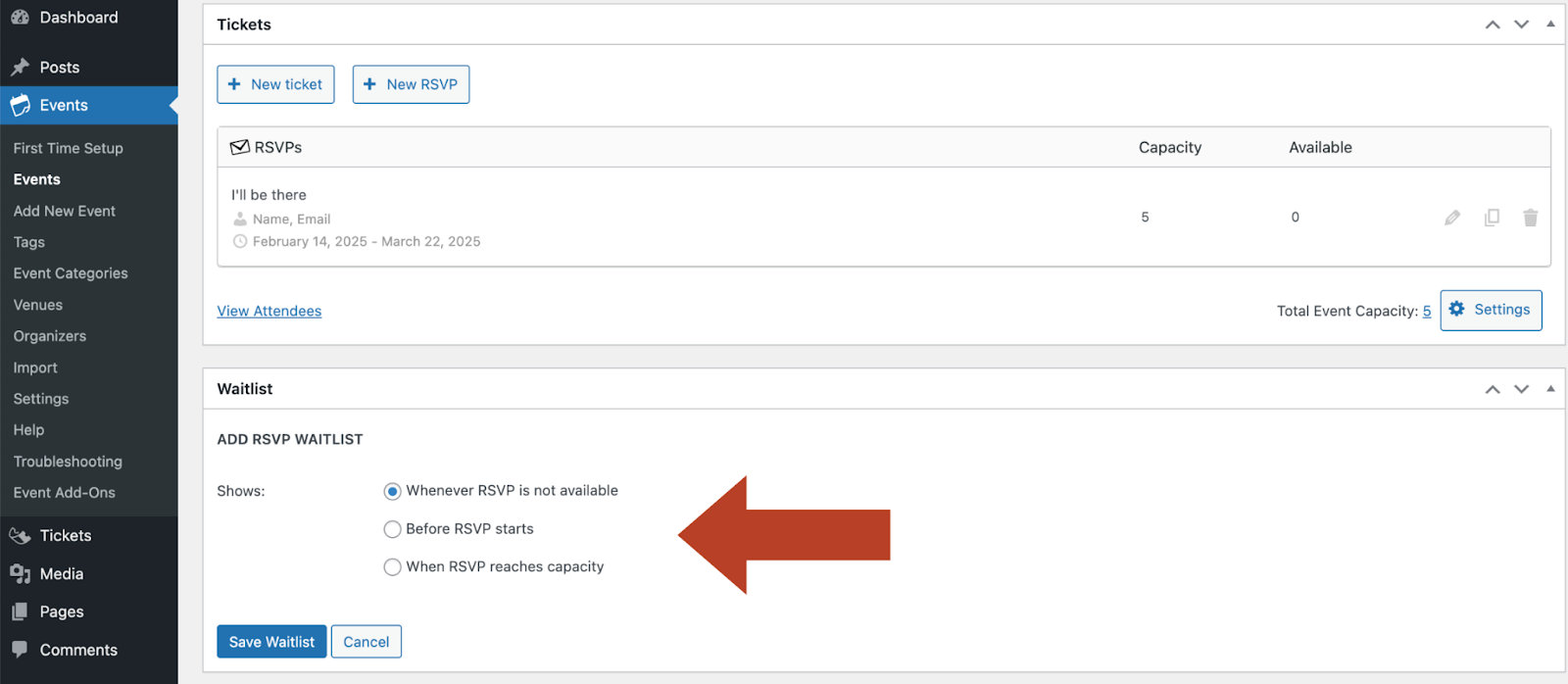
In this example, we’re adding a waitlist for RSVPs once available spots are filled. Click Save Waitlist.
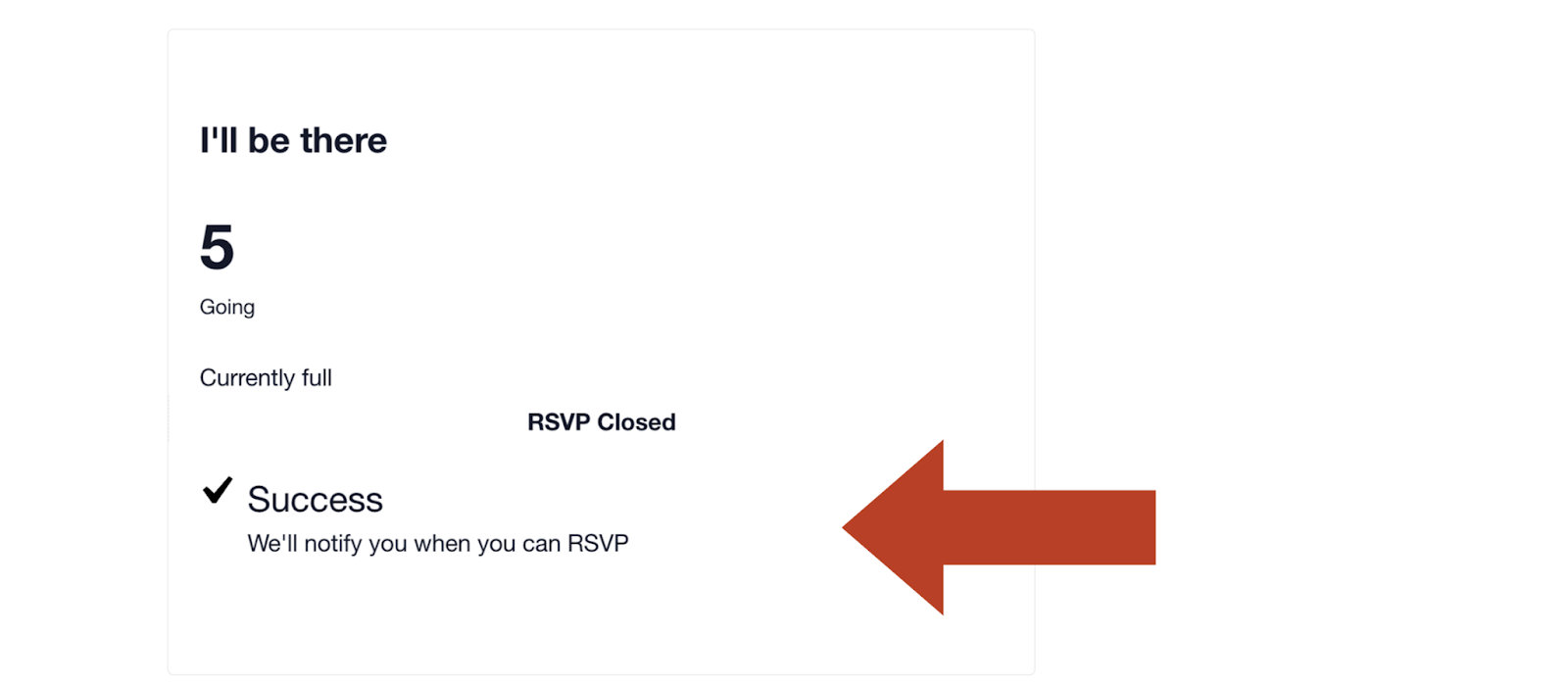
With this setup, when all spots are filled, users can sign up for the waitlist with their name and email address. Here’s how it will look to your users.
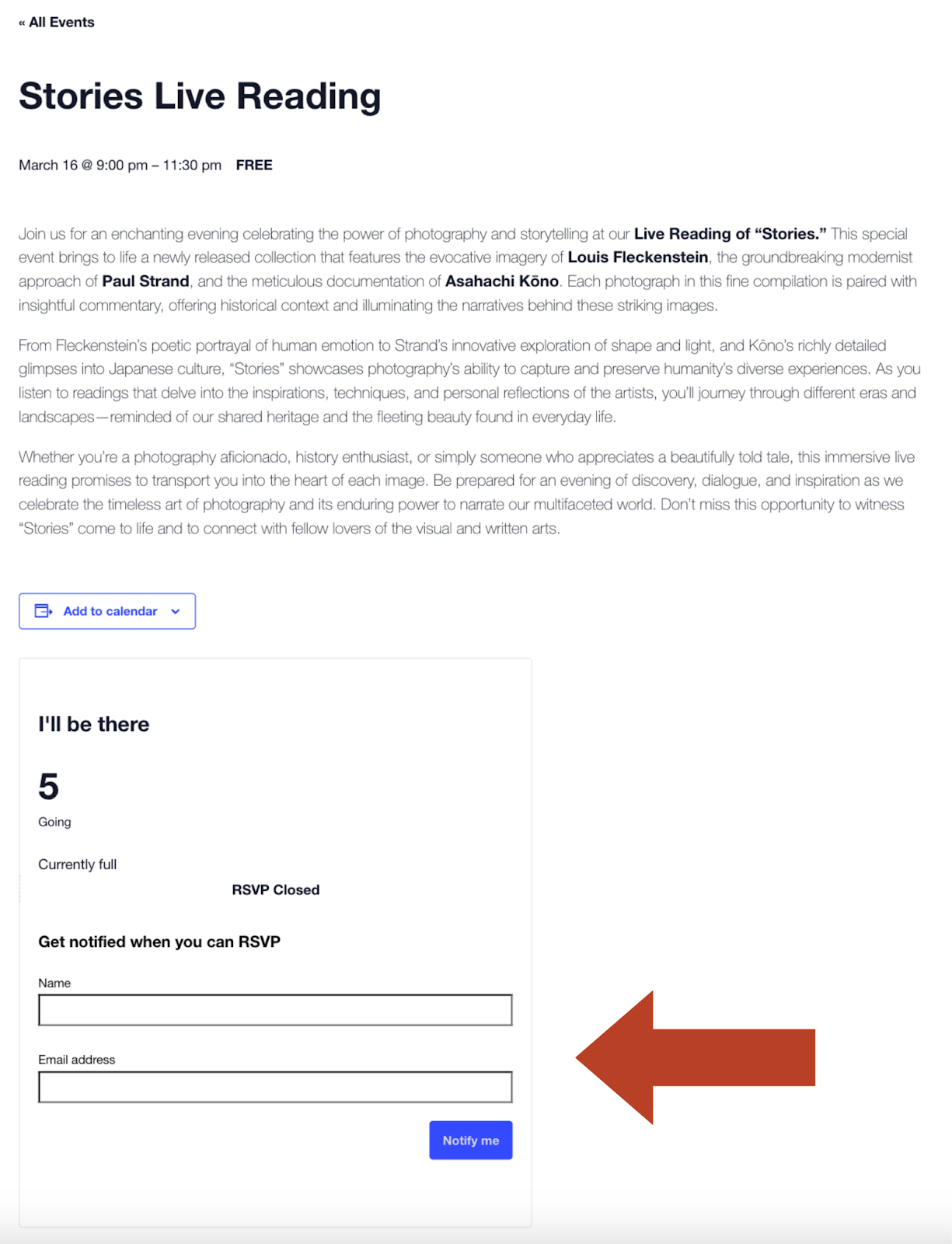
They can enter their name and email address to sign up for the waitlist. When they click Notify Me, they will be shown a success message that says they will be contacted when a user can RSVP. They will also be sent a confirmation email if it is enabled.
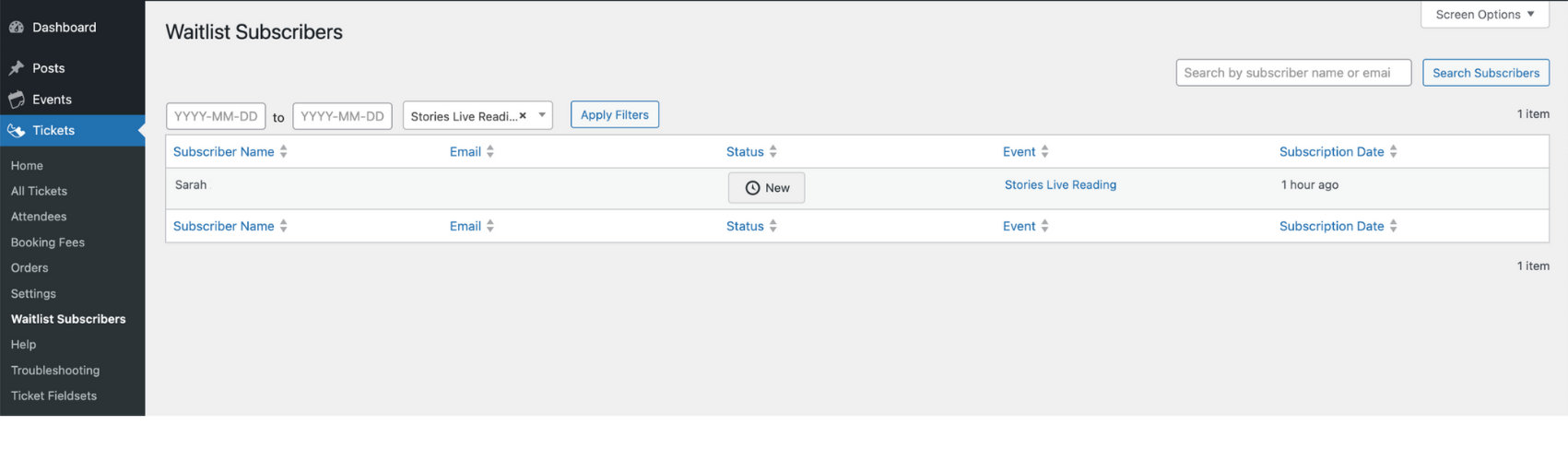
On the backend, you can view waitlist subscribers by visiting Tickets → Waitlist Subscribers.
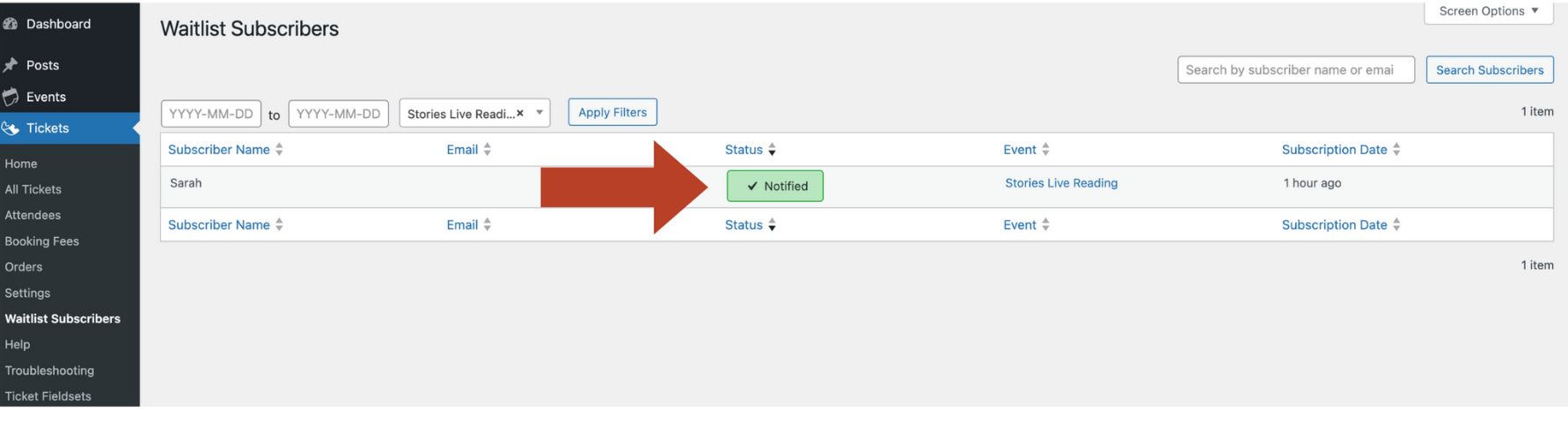
Once a spot opens up and a user is notified, the status will change to Notified, keeping you up-to-date.
You can repeat this process with both tickets and RSVPs, whether you are setting up a presale list or a waitlist.
Setting Up Custom Waitlist Emails
You can set up custom waitlist emails by going to Tickets → Settings → Emails. You can customize the Waitlist Spot Available emails and the Waitlist Confirmation emails.
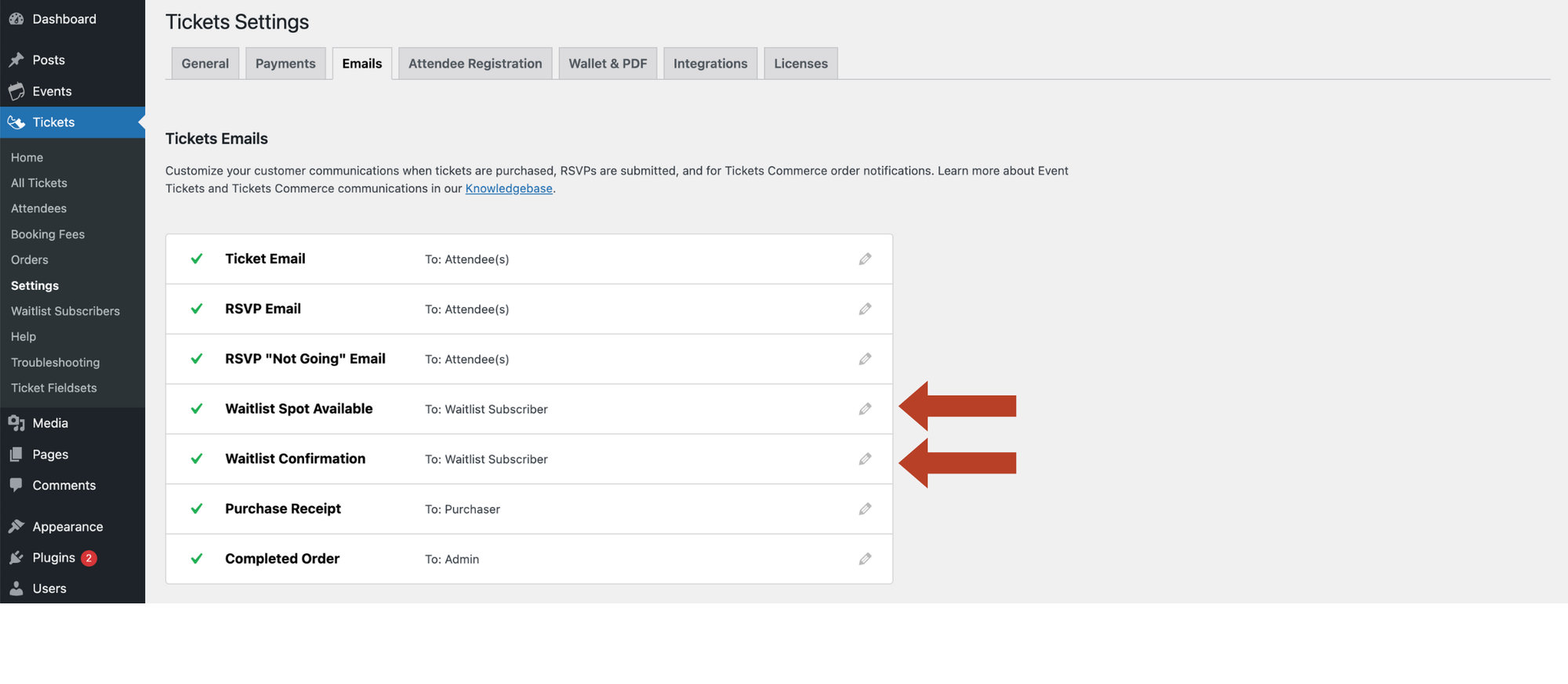
When editing either one, you can toggle the emails on or off. You can edit the subject, heading, and content while previewing what the email will look like for waitlist subscribers.
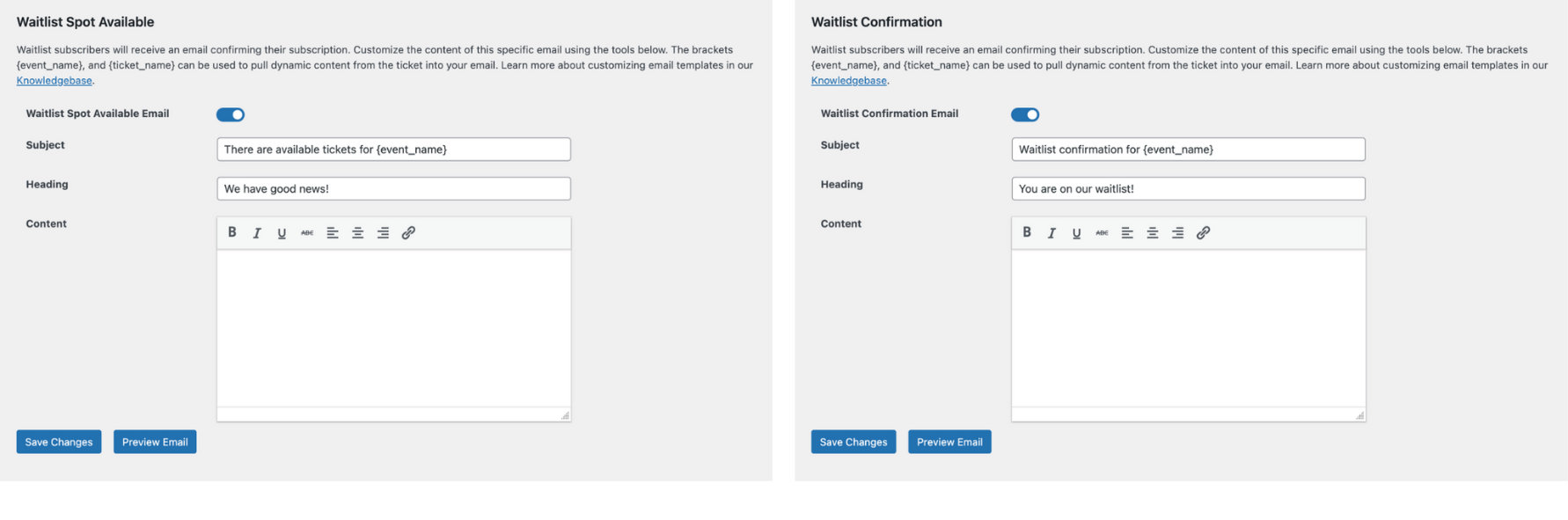
When you select Preview Email, you can glance at the email to ensure that formatting looks good.
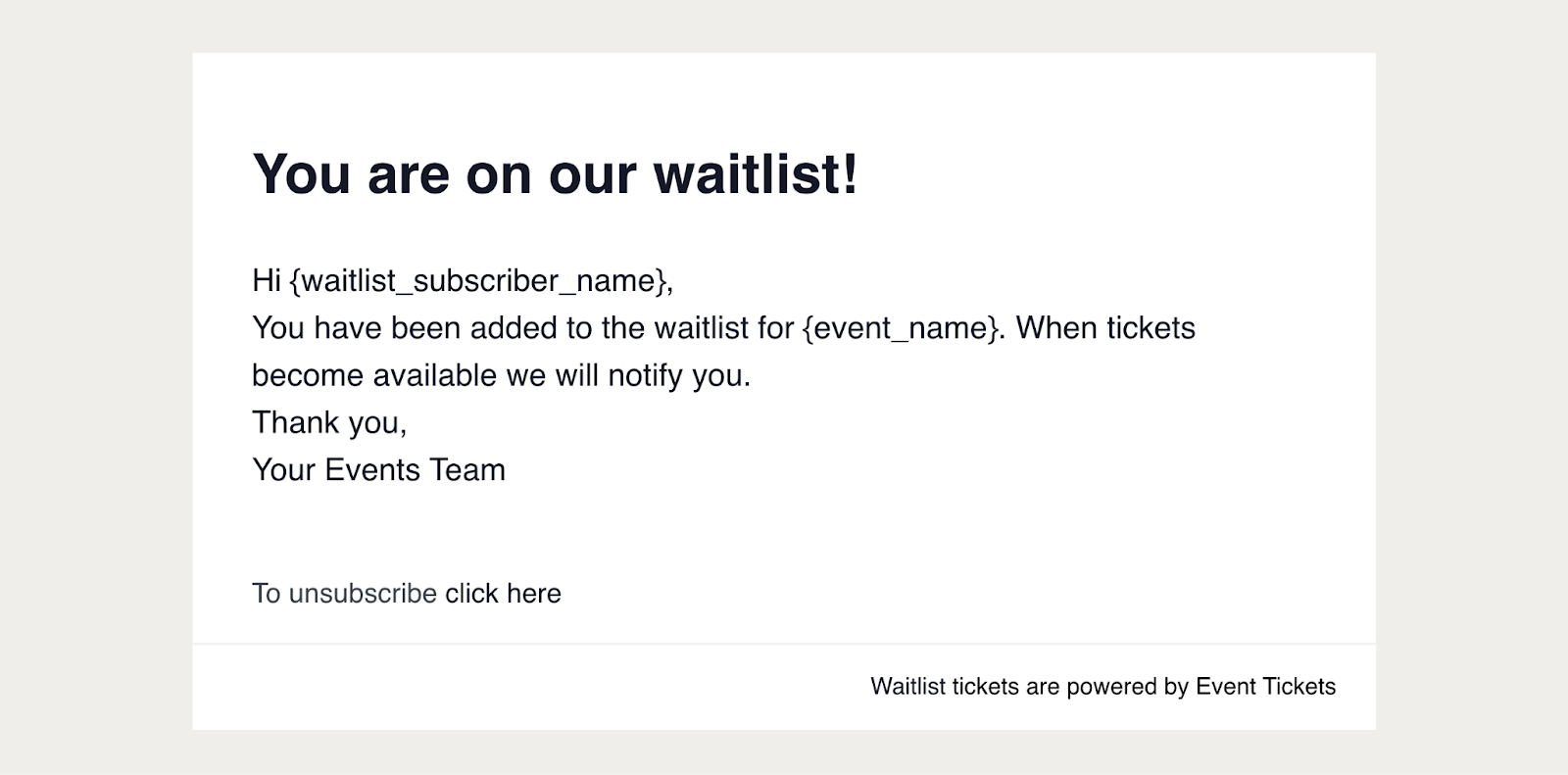
There you have it! The steps to setting up a waitlist are easy (for both you and your users!) If you have more questions about setting up your waitlist, head over to our knowledgebase article.
Managing Tickets is Easier than Ever
The waitlist feature for Event Tickets Plus makes tracking attendees a breeze when your event is in pre-sales or sold out. Save time and skip the hassle by automating the waitlist— let the system do the work while you focus on other areas of your business. This highly anticipated release is here, and we can’t wait to see how it boosts your efficiency and profit!
We’re just getting started– keep an eye out for more exciting product updates. 2025 is shaping up to be an amazing year!

Sarah
View author page