

Forum Replies Created
-
AuthorPosts
-
Nico
MemberStocked to hear 🙂
Multisite install have a different licensing model, you can full details on this here → Licenses for Multisites.
Please note that if you’ll need a multisite (or Business) license instead of the Personal one you got a few days ago we can refund the original purchase!
Best,
NicoMemberHey Kris,
Thanks for letting me take a look!
Still puzzled because I could successfully edit the widgets there, add and delete without issue (https://cloudup.com/cgoRsifmxJp). Sorry if I’m still missing something 🙁
Can you review my test and let me know what the issue is? Maybe is a browser thing? I’m testing this out in Chrome latest for desktop.
Please let me know about it,
Best,
NicoMemberHi Linda,
Thanks for getting in touch with us! I can help you on this 🙂
Can you please check there’s not ‘event’ directory in the root folder of your site?
Inspecting you site I see the events page is now accessible but I also see you are using Events Manager plugin there. Was this plugin active when you had the trouble with the ‘events’ URL?
Please let me know about it,
Best,
NicoNovember 15, 2016 at 8:23 am in reply to: Cannot download any data "The preview is taking longer than expected." #1192450MemberHi there Jason,
Thanks for getting in touch to report this issue!
I could verify this is not returning the preview at any point. But I think this is due to the ICS file being invalid (validation results). Anyway let me check with our dev team to see why this hangs and doesn’t show an error message as it should.
I’ll be back with more on this soon!
Best,
NicoMemberThanks for clarifying John!
Let me give this customization a try, I think a simple JavaScript snippet could do the trick here 🙂
I’ll send it your way when ready,
Best,
NicoMemberHi there Colm,
Thanks for getting in touch with us! I can help you here 🙂
First of all can you please let me know how are you filtering threads in http://www.gaytodo.com/dublin and http://www.gaytodo.com/ulster? Once I get a sense of how you are doing this I can let you know if it’s possible to filter the posts per page argument for each view.
Also, the filter isn’t working. If I select events from Dublin, men only, social…it displays many postings that aren’t in these categories
I couldn’t see the FilterBar in those pages, Can you please link me to the place where I can see it?
The site speed is slow and this may be preventing website from displaying in google results.
Indeed it’s loading a bit slow. If you deactivate the theme and other plugins, does it still load at the same speed?
Please let me know about it,
Best,
NicoMemberHey Felix,
I’ve touched base with the rest of the team but this is not a feature of our plugin at the moment. You are welcome to suggest this feature request at The Events Calendar user voice page, where we gather feedback from our community.
In the meantime using a third-party importer plugin sounds like the way to go.
Please let me know if there’s anything else I can help you with,
Best,
NicoMemberThanks for following up Daan!
I could find a work around for this, let me say it’s unsupported and while it seems to work on the basic samples it might not be perfect! Basically it’s just a wrapper for the shortcode that set’s the ‘eventDate’ variable. Paste this code in your theme’s (or child theme’s) functions.php file:
// [tribe_mini_calendar_date eventDate="2017-12-1"]

function tribe_mini_calendar_date_func( $args ) {
// add event date
if ( isset( $args['eventdate'] ) ) {
define ( 'DOING_AJAX', true);
$_POST['eventDate'] = $args['eventdate'];
}ob_start();
the_widget( 'Tribe__Events__Pro__Mini_Calendar_Widget', $args, $args );
return ob_get_clean();
}
add_shortcode( 'tribe_mini_calendar_date', 'tribe_mini_calendar_date_func' );
Give a try by using it this way [tribe_mini_calendar_date eventDate="2017-12-1"].
Hope this helps,
Best,
NicoNovember 15, 2016 at 6:31 am in reply to: I pasted a code you gave me, my site is not working #1192377MemberBuenisimo Bruno!
Prefiero que los eventos no tengan ningun excerpt… Que codigo necesito?
En que vista(s) necesitas ocultar el exceprt? Seguramente lo mas sencillo sea hacerlo con un snippet de CSS. Detallame en que vistas necesitas hacerlo y te paso el código.
Otra duda, como hago para que los usuarios vean el evento con su zona horaria. El evento dura todo el dia…
La zona horaria se puede definir por evento o los eventos pueden seguir la configuración global del sitio pero no hay ninguna opción para que cada usuario pueda verlos en su zona horaria lamentablemente. Podes elegir mostrar la zona horaria del evento junto a la fecha / hora si eso sirve de ayuda (WP-Admin > Events > Settings > Display > Show timezone).
Saludos,
NicoMemberHey Jeseph,
I think this should work! What is the best method of testing the email output?
I’m not sure what type of tickets you are using (RSVP, Woo, EDD, etc). Most customer use WooCommerce tickets, if that’s the case then it’s pretty easy: just edit the order you want to resend the ticket for and use the ‘order actions’ metabox to resend Order Email for tickets.
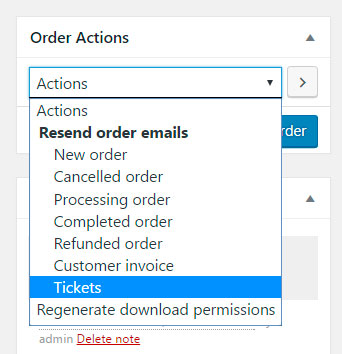
Please let me know if there’s anything else I can help you with,
Best,
NicoMemberHi there Jack,
Thanks for getting in touch with us on this!
While we cannot help much on customizations like this one I can surely help you getting started 🙂
So, to achieve this what I can think of is just limit the user to select one ticket ticket type. If other one is selected then the others should get set to ‘zero’. Makes sense?
One more thing, are users doing RSVPs logged into the site?
Please let me know about it and I’ll do my best to help you out,
Best,
NicoMemberThis reply is private.
MemberYou are welcome Kathrine 🙂
I’ll go ahead and close out this thread, but if you need help with anything else please don’t hesitate to create a new one and we will be happy to assist you.
Best,
NicoMemberThanks for the follow-up Neil! Please make sure to proceed with caution because as the note states this will delete data from the site.
Setting the thread back to ‘Pending Fix’ until the main issue here is solved (Facebook events are imported with organizer as blank).
Best,
NicoMemberHola @mastres, como estas?
Lamento escuchar sobre esta incompatibilidad 🙁
“He mandado un evento de prueba”: Te estas refiriendo a un evento enviando desde el front-end del sitio con Community Events? Si este es el caso dejame decirte que Community Events no es todavia 100% compatible con WPML y es probable que surjan errores como el que describís.
Para eliminar eventos por fecha de publicación podes usar un plugin como Bulk delete (hay varios similares).
Espero tu respuesta,
Saludos,
Nico -
AuthorPosts