
Home › Forums › Ticket Products › Event Tickets Plus › Customize Start Date in Emails
- This topic has 7 replies, 4 voices, and was last updated 9 years, 10 months ago by
Jeseph.
-
AuthorPosts
-
November 10, 2016 at 9:45 am #1190460
Jeseph
ParticipantI manage a tour that travels to 30 cities per year. In each city we have 2 events per-day. These events are closely related and advertised together more as “2 portion of a single event”.
As such I would like to create a single event <city name> that has 2 ticket types <session 1> and <session 2>. These have static times 2:30-4:30 for session 1 and 7-8:30 for session 2.
Is it possible to modify the start date ouput in email.php to reflect this? The current display is as follows: Nov 4 @ 2:30pm
In an ideal setting tickets for session 1 would display “Nov 4 @ 2:30pm” and tickets for session 2 would display “Nov 4 @ 7pm”
Thank you
November 11, 2016 at 10:37 am #1191073Nico
MemberHi there Jeseph,
Thanks for reaching out to us on this!
I’m not quite sure of how we can make this work as intended. Maybe including the time in the ticket name and then hiding the event start time in the email works for you? Do you see a problem in including the time in the ticket name? This might be the simplest way around this.
If for some reason you think this won’t work for the site we can think of other options. What kind of tickets are these: RSVP, Woo, EDD, etc?
Please let me know about it,
Best,
NicoNovember 11, 2016 at 10:42 am #1191076ParticipantHi Nico,
For my usage, adding the event time to the title would cause some issues in other areas of the site. I’m thinking I may be able to use a custom field (ACF) on the tickets to pull this data in.
Do you know if the email.php query would support this?
November 11, 2016 at 10:47 am #1191079MemberThanks for the quick follow up Jeseph!
You’ll certainly need to create a template override for the tickets email and include the fields output. The template you should override is located in ‘event-tickets/src/views/tickets/email.php’. Check out themer’s guide for more details on template overrides.
Please let me know if you need further assistance on this,
Best,
NicoNovember 11, 2016 at 10:55 am #1191083ParticipantI think this should work! What is the best method of testing the email output?
Can I manually trigger sending? (obviously I’ll need to test this a few times while making changes)
November 15, 2016 at 6:12 am #1192373MemberHey Jeseph,
I think this should work! What is the best method of testing the email output?
I’m not sure what type of tickets you are using (RSVP, Woo, EDD, etc). Most customer use WooCommerce tickets, if that’s the case then it’s pretty easy: just edit the order you want to resend the ticket for and use the ‘order actions’ metabox to resend Order Email for tickets.
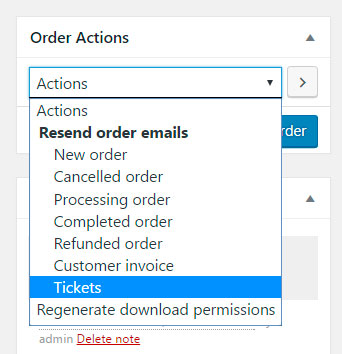
Please let me know if there’s anything else I can help you with,
Best,
NicoDecember 7, 2016 at 8:35 am #1202666Support Droid
KeymasterHey there! This thread has been pretty quiet for the last three weeks, so we’re going to go ahead and close it to avoid confusion with other topics. If you’re still looking for help with this, please do open a new thread, reference this one and we’d be more than happy to continue the conversation over there.
Thanks so much!
The Events Calendar Support Team -
AuthorPosts
- The topic ‘Customize Start Date in Emails’ is closed to new replies.