

Forum Replies Created
-
AuthorPosts
-
Neal
ModeratorHi Monty,
Can you provide me with the system info for the site this is on? In a private reply, can you provide the latest version of your WordPress theme or child theme in a zip file to me? You can share a link via Dropbox or Google Drive or whatever else is easiest for you.
Please make sure to use the files from your actual website where this is occurring. That way I’ll have access to any modifications that you may have made along the way 🙂
Cheers,
NealModeratorHey Jon,
Thanks for reaching out and asking. It’s always a great idea to keep plugins up-to-date.
Before you delete anything though, please read our guide here on manually updating your plugins: https://theeventscalendar.com/knowledgebase/manual-updates/. As outlined in the guide, be sure to make backups! It shouldn’t delete your data by deleting the plugin, but have a backup just in case.
If you have any other questions, please do let me know!
Cheers,
NealModeratorHey Bradly,
Thanks for reaching out. This looks to be an issue with some of the CSS. Luckily it’s an easy fix as far as that goes.
If you do not know how to add CSS to your page, please take a look at our guide here: https://theeventscalendar.com/knowledgebase/themers-guide/#customizing-styles
You’ll need to add in this CSS snippet below:
.tribe-mini-calendar-event .list-date .list-dayname {
  padding: 0px;
}
Let me know if that works out for you,
NealModeratorHi Mhairi,
Welcome back! Sorry you’re having trouble getting those buttons to show.
I’m not sure which events are supposed to be ticketed on your site. Can you give me a link to an event that should show the buttons? I tried accessing this link: http://penicuikarts.org/event/beeslack-senior-students-take-over-the-assylum/, but I’m not sure if it’s supposed to have tickets or not.
Also, just to make sure we have our bases covered, does your admin page for the event have a ticket like so?

Thanks Mhairi!
NealModeratorHey Waseem,
No worries, you’re in the right place! Thanks for reaching out 🙂
I’d definitely recommend printing out a copy of the attendees and their security codes, just in case the internet does go down (good thinking ahead!).
I looked through WooCommerce a bit, and I also do not see the Security Code in the orders. However, I did some digging and it looks like you can get a nice list of attendees and their security code in one place.
Instead of checking out the WooCommerce Orders, please go to Events > events on your admin panel. Do a search for the event you want to see the attendees for. If you hover over that link, you’ll see an option for Attendees. Go ahead and click on that.

Once you get to that page, I think that will be everything you need. You’ll also see a Print button for easy printing 🙂
Let me know if that helps Waseem,
NealModeratorHey Karoliina,
Thanks for reaching out so we can help :).
There’s a couple of things I think you could use to get your events to show. You should be able to insert shortcodes into your sections.
- https://theeventscalendar.com/knowledgebase/pro-widget-shortcodes
- https://theeventscalendar.com/knowledgebase/embedding-calendar-views-tribe_events-shortcode/ (Note: only one of these is allowed per page)
If some of those widgets are not exactly what you’re looking for, and you’re feeling up to coding a bit, you can try extending the plugins by following this guide: https://theeventscalendar.com/knowledgebase/themers-guide/. That will allow you to easily update our plugins without overwriting your modifications 🙂
Let me know if that works out for you Karoliina, and if you have any other questions.
Cheers,
NealModeratorHi Randy,
Welcome and thanks for reaching out. I’m sorry that your photo is not showing in your calendar. Before I can help you, can you help me out with some information?
If you could provide a screenshot of what’s happening with your photo not showing, it would go a long way. Also, would you mind providing your system information? You can follow this guide to do that: https://theeventscalendar.com/knowledgebase/sharing-sys-info/.
Cheers,
NealModeratorHey Harry,
Thanks for reaching out. Let’s see if we can figure out what’s going on here.
It looks like you’re using the EventRocket plugin, which I’m sad to say, has been known to break with the Events Calendar since version 4.
There’s good news however, we have a Event Tickets plugin which provides the same RSVP functionality you’re looking for. You can find that over here: https://theeventscalendar.com/product/wordpress-event-tickets/.
If you’re looking for more advanced functionality concerning RSVP fields, you may want to check out: https://theeventscalendar.com/product/wordpress-event-tickets-plus/. This is a paid product, but it is compatible with all of our other products.
We strive to make you happy, if for any reason you are not satisfied, you can always return for a full refund within 30 days.
Let me know if you need help with anything else or if you have anymore questions.
Cheers,
NealModeratorHey Monty,
Thanks for reaching out. Before I can help you a bit more, would you mind giving me your system information? You can find out how to do this here: https://theeventscalendar.com/knowledgebase/sharing-sys-info/.
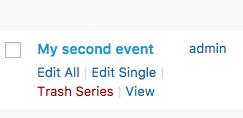
I’m making a bit of assumption here, but are you clicking on the Edit All link when you hover over an event?
Cheers,
Neal -
AuthorPosts