

Forum Replies Created
-
AuthorPosts
-
Brook
ParticipantSplendiferous news! Thanks for getting back Ginette. Let us know if you ever need anything else.
- Brook
ParticipantExcellent! Happy to hear it. Let us know if you ever need anything else. Cheers!
– Brook
ParticipantExcellent. Let me know if you have any more questions. Cheers!
– Brook
ParticipantHowdy David,
I would love to help you with this.
Our plugin does not yet include that info in either of those screens. The only way to view the info is either to export it or click on an order. We are definitely looking into including it in more places though based on feedback. Checkout this feature request that seems rather relevant to your needs: https://tribe.uservoice.com/forums/195723-feature-ideas/suggestions/14942232-allow-the-option-to-add-attendee-information-to-th
Does that make sense and answer your question?
Cheers!
– Brook
ParticipantAnyway, I will adopt the other strategy. I still think, for a variety of reasons, it would be useful for many EC users to be able to switch out the venue in a single occurrence of a recurring event (say, it has to move because the road is out but will be repaired in a month?!).
Absolutely. It is a useful feature. But it’s something our plugin does support. It is working great on all of our test systems and yours is the only site I’ve seen in which it’s not working. This is very strange.
I created a recurring event with three dates in sequence. None of them had a venue. I “single-edited” the middle event, adding a venue to it. I found that the venue I’d added to the middle event became the venue for all three, even though I had broken out the middle one. Then I tried to change that middle event to a different venue and I could not. It stayed, and I got that weird doubling of the Event Organizer that I originally sent you a screen shot of.
Thank you for detailing things so clearly.
At this point it is going to be very difficult to debug, I’m just going to say that up front. If you are up for some difficult debugging to figure out why your site is behaving differently than all the rest, read on. If instead you are happy with your current workaround I would just leave it.
You already tried a conflict test at the outset, and I am happy you gave that a whirl. You probably already tried this. Lust in case you did not the best next step would likely to try something similar again. Switch themes to Twenty Sixteen and disable all plugins except The Events Calendar and Events Calendar Pro one more time. With that done, create a new test even with 3 instances, assign them a venue and hit save. Now edit the middle one as you did before, Edit Single, and try changing the venue. Does it work this time? If not thing are getting really hairy. We should probably try a new WP installed in a different directory or on a different server, whatever is easiest for you. Then on this test install which is completely free of your existing plugins and data, try that test one more time with only The Events Calendar and Events Calendar Pro active. What’s the result?
Sorry this has been such a pain! Thanks for getting back.
- Brook
June 28, 2016 at 11:37 pm in reply to: How to make flat fee to charge per ticket sold instead of each event in an order #1133291ParticipantHowdy Tac,
- I would update to 4.2.1 if I were you as that is the version this snippet has been tested most extensively with. But it’s probably not necessary.
- It works great when PayPal split payments are not enabled.
- If you wish to see the fee temporarily you can go to WP-Admin > Events > Settings > Community and change it so that the fees are added to the total at checkout. You will then see Site Fees as a separate line item in your shopping cart, and can use this to guage fee totals. Once you’re satisfied it’s working as expected you can change it back to including fees in the ticket cost, assuming that is what you prefer.
You are very welcome. Let me know if you have any more questions or need the above clarified. Cheers!
– Brook
June 28, 2016 at 11:32 pm in reply to: Urgent Help Needed: Ticket Sold Counts Not Correct and Can't Launch Site #1133290ParticipantThank you for posting that! It was perfect timing, I shared the idea to our team on our weekly review of new requests.
We are by no means trying to say that the current way is the best one, or that we would not consider revising it. On the contrary this is certainly something I’m interested in championing to see if it might get change. What I was saying is simply that the current behavior is our intended behavior, and intended behavior is inherently not a bug. That’s why it will make the most sense as a feature request.
Thanks again. If anybody else comes across this topic please vote on the above feature request.
Chris, if you need anything else let me know. Cheers!
– Brook
ParticipantHowdy there!
What if we gave it to your for free instead? Download the MT Demo theme here!
If you really really want to pay we do accept donations for any of our free plugins including that theme. But if I were you I think I would rather grab a license to on of our addons and benefit from the year of support. 🙂
Did that download work? Donation or not I hope you enjoy the theme!
Cheers!
– Brook
ParticipantThis reply is private.
ParticipantThanks for giving that a whirl.
The venue chosen for that middle event became the selected venue for all three events. It wouldn’t let me change the middle event to something else, just kept showing the original venue on all three.
I’m not sure if I understand you here. You seem to say the venue you selected for the middle event became the venue for all three, but then you said that you could not change the middle event. Would you mind clarifying which of these it is? Are you definitely clicking “Edit Single” when modifying the individual event?
In fact, our events rotate between the same three venues. What I think I need to do is create three separate recurring events, each every third month with its own venue. In the meantime, you guys can figure out how to allow me to break into a series and reassign the venue to a singe, broken-out event. That would be nice.
That’s a great solution for now. That might even be the best long term solution as it means you won’t have to edit 2 of those events every month.
Thanks for getting back Jim,
- Brook
ParticipantHowdy Again,
The requests Tab would ordinarily be the default when viewing the Events page. It won’t popup on all pages, but it should popup on the events and look something like this:
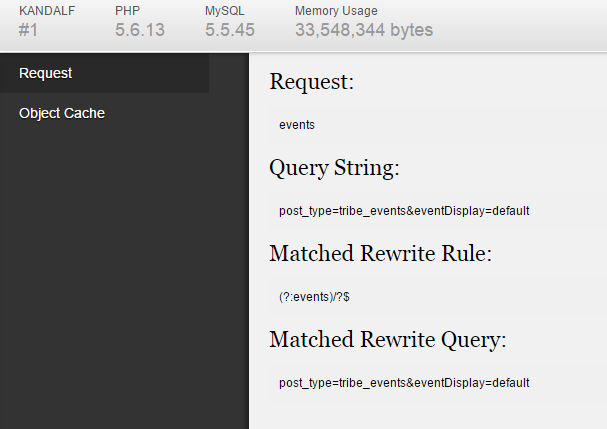
Are you able to find it now? Could you copy/past the 4 headings and their info here?
Cheers!
– Brook
June 27, 2016 at 11:35 pm in reply to: Dispaly text / image before the calendar on the event page #1132748ParticipantAhh so the box would work you are just hoping to hide it on certain pages? If that’s case you should checkout this mini plugin we’ve got: tribe-snippet-hide-html Download and install that like any other plugin. It adds a few options beneath the Add HTML box on the options page that let you select which pages to hide it from.
Let me know when you will provide a shortcode to include a calendar in a page. Something like a bloc into a page.
I would love it I had an ETA for that feature, but it’s still a ways out. It will likely happen within the year, but even that’s just a best guess.
Did that mini plugin help you do what you wanted?
Cheers!
– Brook
ParticipantExcellent! Thanks for getting back Frank. I am happy that helped. Cheers!
– Brook
ParticipantHowdy Simon,
Just copy the file’s URL. Usually this involves right clicking on the link to the file and clicking something like “Copy Link Address”. The exact name and steps will vary based on your web browser and operating system.
If you need further support mind logging in with the account you used to purchase the iCal Importer ? Then I can move this topic from the presales forum to the support one. Cheers!
– Brook
June 27, 2016 at 10:41 pm in reply to: Urgent Help Needed: Ticket Sold Counts Not Correct and Can't Launch Site #1132737ParticipantI appreciate your input jolaurin. If one of you guys would like to move this forward as a feature we would possibly consider please do add it to UserVoice. And if you would like to jumpstart it share the link here so that it will get a couple votes right off the bat.
To be forthright, we typically get close to 100 folks each week requesting features. The only way for us to track them all is UserVoice. I would love it if our community was small enough we could still track demand in forums comments like this, but we can’t. Hence why I am pushing y’all to UserVoice.
Cheers!
– Brook
-
AuthorPosts