Forum Replies Created
-
AuthorPosts
-
August 22, 2016 at 11:56 pm in reply to: shortcode or code snippet from the google overview map with the event markers #1154705
Brook
ParticipantI am happy you got a temporary solution going for now. Thanks for the idea on making this embeddable elsewhere!
Cheers!
– Brook
ParticipantOh I see what is happening. Events Calendar Pro is hooking into the ‘tribe_get_venue’ filter and returning the link when it thinks it is in the modules/venue.php file. Yours must be tripping it up a bit. That seems like a bug to me, I’ll log a ticket to see if there is a refined way for us to do this.
Regardless thought Mathew’s workaround is a great idea. That should keep working even after we patch this.
Thanks for pointing this out Kevin.
Cheers!
– Brook
ParticipantIf your goal is just to delete the photo before it gets saved then I do have a way. The filter ‘tribe_fb_event_img’ found inside Importer.php can be used to stop the image from saving. Something like this code should do that:
add_filter( 'tribe_fb_event_img', '__return_false' );
And that could be inserted in your theme’s php file.
Technically the images will still get imported to your server, so you are not truly filtering the Facebook API Request. But the image will get deleted along with any other temporary data once the Facebook import job is done.
Would that work?
Cheers!
– Brook
ParticipantIf it is still deleting events maybe not. I would not be surprised though if your deleting of the first post had halted the deletion process or has other unintended side-effects. The first post stores all of the data used for generating the recurrences. And while you only delete a portion of that post, I’m still not sure what will happen without all of it being present. You’re in unknown waters. Again it’s up to you though. If you want to be super safe, restoring and doing a proper cleaning is the best route. If you’re done hassling with it though, continuing down the path you’re already on could very well work out.
– Brook
ParticipantHowdy again Judy,
I got into the problem event and am updating it with no recurrences. It’s barely moved the orange bar.
Excellent Idea. Like I said this will take hours, possibly a few days worth of them, to complete. It makes sense the bar is barely moving.
I also deleted the event from the DB table in the server – not sure if I should have done that??
I would not have done that personally. You might restore your latest backup then go update the event again and give it a few hours to move the progress bar. It does have 15k posts to delete after all. You basically only deleted the first, and most important, of the 15000.
If you are in a huge hurry or simply do not wish to restore the backup, there is one other option. It’s fast, it’s fairly clean, and it will delete the rest of the recurrences. You will need to run another SQL query:
https://gist.github.com/elimn/e5de5d2037678de0b926c307022571c5
Again you will need need to change the wp_ prefix to match your wp_7hgtawyqcd_ prefix. Like the above query mention in it’s instructions/comments, you want to make a backup before running it. So if something does go wrong, you might need to restore your backup anyways.
It’s really up to you what you want to do at this point. You will probably see no problem side effects from running the fast delete SQL query, but there are a few theoretical scenarios where some problems can arise. My preference, just to err well on the safe side of caution, would be to restore your latest backup since you said you have daily ones, and then update the event as I originally outlined. This is the safest method, and while it can take many hours for it to finish it will not involve any SQL trickery, and thus behave exactly how WordPress was intended to.
Does that all make sense? Please let me know.
Cheers!
– Brook
ParticipantOh it looks like you might be on a multiuser site. That will change the URL slightly. Here let’s access that URL a different way. Go to your website, then go to WP-Admin > Events. You will now be viewing a giant list of events. Click Edit on one of them, any one. You will now have a URL similar to the above, it will end with “/post.php?post=SOMEID&action=edit” That ID number is the important part, change it to 3130 to access the event you’re after. Is that an edit page now?
Edit: We cross posted again! Good question Judy, but you should not need to include tribe_events in the URL. But hopefully the above steps will help get you to the proper place.
Cheers!
– Brook
ParticipantOoops we cross posted. I now see your update. There definitely is, if you go to: http://yoursite.org/wp-admin/post.php?post=3130&action=edit That should be the event. If you add a space to the description area, maybe after the rest of the content, then hit Update, it will regenerate that event.
Before clicking Update I would double check your recurrence settings. Are they setup to generate 15000 recurrences? Like is it set multiple times every day or anything? If they look good then just hit update, and any duplicate recurrences should get removed. You will see a progress bar at the top as it works to regenerate this sequences, it could take a good while to regenerate, but you can safely navigate away and it will continue working in the background, speeding up your site each hour that passes. Once the progress bar is complete you should be done! Does the progress bar appear as expected?
Cheers!
– Brook
ParticipantExcellent you got access!
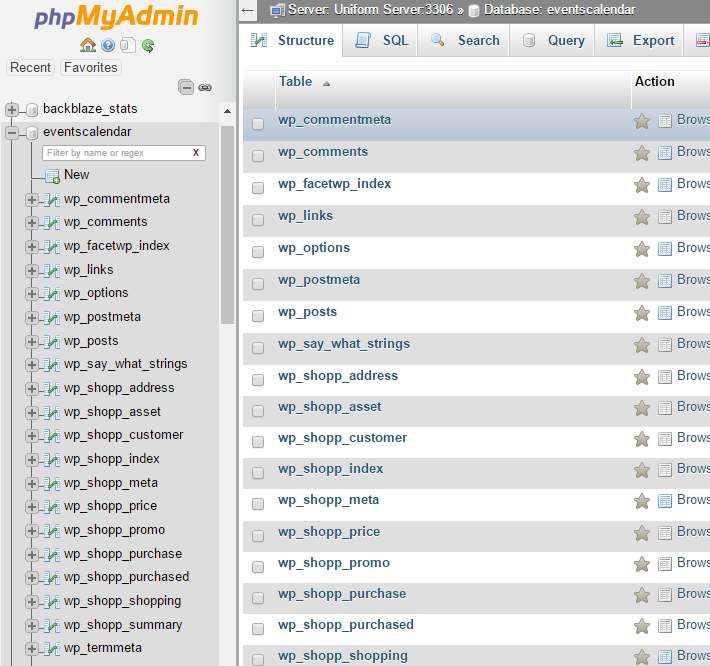
That’s interesting. Would you mind taking a screenshot of your PHPMy Admin’s database? You might need to click on the database in the left hand column, it looks yours is called a95d3217726726. Then it will show you a list of all tables in that database. Could you capture those as a screenshot and share it here? For instance here is what mine looks like:

From there I can hopefully determine what your posts table is called.
Cheers!
– Brook
ParticipantHowdy Rika,
Geoff asked me to take a look here. It’s nice to meet you, I’d love to assist with this.
What hosting plan are you on with GoDaddy? You probably still have access to PHPMyAdmin. Even their managed plans, such as the “Managed WordPress” one, still have access to PHP My Admin. Right now getting access to your SQL server would be incredibly helpful, and the typical way on almost every host out there is via PHPMyAdmin. Can you double check with GoDaddy that you do not have this access?
If you can get access, could you run through the steps Geoff outlined, In particular running that SQL query (https://gist.github.com/elimn/a998d7b67f6166dab5e17ec071eb35ee). Do note that sometimes your database has a different prefix than the default. The usual prefix is “wp_” and so that query attempts to select:
FROM
 wp_posts
But if yous is a different prefix, like rika_ then you would want to change that query to:
FROM
 rika_posts
Does that make sense? Are you able to get access and run the query?
Cheers!
– Brook
ParticipantHowdy Paul,
What you want is definitely possible as a small customization. You can do it even with the free version. We have a nice tutorial here that walks you through everything:
https://theeventscalendar.com/knowledgebase/relabeling-the-venue-organizer-sections-in-event-meta/
You can see there the example changes Venue to Company and Organizer to Speaker. Modifying that example a little bit will get you where you need to be.
If you do need assistance with anything you still might be interested in getting a license to one of our plugins. We offer a year of support with each license, and can help you if something like this is still giving you trouble.
Does that all make sense?
Cheers!
– Brook
ParticipantHowdy Kevin,
I would love to help you with this.
We have two relevant functions here:
https://theeventscalendar.com/function/tribe_get_venue/
https://theeventscalendar.com/function/tribe_get_venue_link/
Are you certain you are not using tribe_get_venue_link() ? tribe_get_venue() should only be returning the title.
Cheers!
– Brook
ParticipantHowdy JT,
Yes it will, and the iCal Importer too.
I have a question in to our strategist on how exactly the transition will happen. Likely it will be similar or identical to our introduction of Event Tickets Plus. That plugin also replaced a few disparate ones by combining their feature. Anyone who owned one of those legacy plugins that got replaces was automatically given a license to the replacement, and so at that point they could whatever they preferred at no extra cost.
Does that answer your questions?
Cheers!
– Brook
ParticipantHowdy Bob,
I wish there was some simple little thing you could do. But no, there is nothing super simple about that.
This is actually something we have discussed from time to time. The Tribe Bar and Filter Bar function pretty differently in their UIs, and they are both well suited for the tasks they accomplish. But we would love to find a new unified method for them to behave that way we could merge them on sites that want it. But for not that is just in the watercooler discussion phase, not something that will help you.
A theme override might be the best call here. It also might make more sense to use filters, it’s really up to your preference. We have a lovely little tutorial for customizing the Tribe Bar here:
https://theeventscalendar.com/knowledgebase/understanding-the-tribe-events-bar/
And that would allow you to add more items to the tribe bar. Or, you can also add filter to the Filter Bar by extending the Tribe__Events__Filterbar__Filter class and the instantiating your new class. This will make the filter appear in the backend Event > Settings > Filters area, where you can select the filter for usage on the front end. Here is an example of something that does that:
https://gist.github.com/elimn/bfcda80db4711aafbb36d708e25fb4b6
Although if I were you I think I would try extending the Tribe Bar, or outright replacing it with your own HTML/CSS concoction. The Filter Bar is a little more rigid it how it expects things to behave, and so adding things like a view switcher to it might be more difficult.
Does that all make sense? Will that work for you? Please let me know.
Cheers!
– Brook
ParticipantThis reply is private.
ParticipantThank you for getting back Venu. Definitely let us know if you ever need anything. Cheers!
– Brook
-
AuthorPosts