

Forum Replies Created
-
AuthorPosts
-
Brian
MemberGreat, glad it helps, I am going to go ahead and close this ticket, but if you need any other on something else please post a new ticket.
Thanks!
MemberGreat glad you got it working and thanks for sharing the coding.
I am going to close this ticket, but if you need anything else related to this topic or another please post a new topic on the forum and we can help you out.
Thanks
November 24, 2014 at 11:14 am in reply to: The event calendar pro is changing my profil links #897339MemberHow strange I have not seen that before. I tested on a couple sites I run and none of them have that redirect.
Can you leave The Events Calendar and The Events Calendar Pro active and follow our testing for conflicts guide and see if you can find the conflicting causing this in your site:
https://theeventscalendar.com/support/documentation/testing-for-conflicts/
Let me know what you find out.
Thanks
November 24, 2014 at 9:41 am in reply to: Issue with import organization events , both by org id and event id #897165MemberHi sorry for the issues with trying to import that event.
Sometimes even when all the settings are correct, the event is not importing and you see something like the following:
Facebook API Error: Unsupported get request.
or
The following errors have occurred: Either the event with ID fbeventidnumber does not exist, is marked as private on Facebook or we couldn’t reach the Facebook API. Please note that as a result, no events were successfully imported.
You maybe dealing with an Age or Country Restricted Event. Pages or Events that are associated with bars, breweries, adult entertainment, or similar things may be marked as age restricted by Facebook. Unfortunately, that means the Facebook API cannot import those events unless you or the Page owner is able to change the age restriction.
In some instances, it may be possible for you or the Facebook Page owner to change the age restriction on an event. However, this is not possible with Pages that Facebook has specifically deemed to be alcohol related or have adult content.
To try changing the age restriction, first login to the Facebook Page in question. Click on the Settings tab and look for the Age Restrictions Box.
Change the setting to Anyone(13+) and click save and try to import events again from your website. If you are still seeing the error, that means that Facebook itself has marked your content as 18+ or 21+. In these instances, we are unfortunately not able to import the event, either manually or automatically.
Let me know if you have any follow up questions.
Thanks
MemberHi Dave,
If you are looking to modify the look of the events the best thing to do is start with our Themer’s Guide
https://theeventscalendar.com/support/documentation/events-calendar-themers-guide/
That can help show you what files to look for and where to move to your theme to safely edit.
If by contributor you mean the Organizer you can follow that guide above and this template should get you started:
\the-events-calendar\views\modules\meta.php
It has a reference to the organizer template that you can remove that you can remove or comment out.
Let me know if you have any follow up questions.
Thanks
MemberHi,
Sorry for the formatting issues. I can help out.
I visited your site and not sure what I am looking for.
In Firefox the list is only one column.
This is how it looks for me:
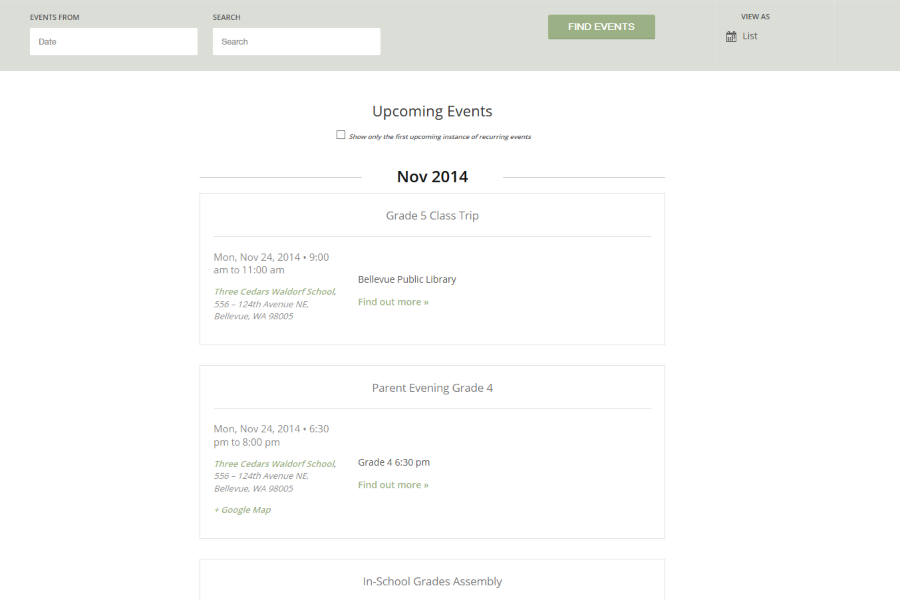
Is that wrong? Are you seeing something different? And can you let me know the browser you are using?
Also try to clear the cache of the browser and see if that helps.
Let me know and we can go from there.
Thanks
MemberThanks for providing the coding.
There is not much I can suggest with this, if it works for you it is the best way as it is not a feature we have or support.
I agree editing files is not the best way to make changes, but in this case I do not see a way around it if you have to have this functionality.
Unfortunately, the only things I can really do is what Casey said and to refer you to uservoice to request it.
http://tribe.uservoice.com/forums/195723-feature-ideas
I can answer any follow up questions you have, but not able to do much more then that.
Thanks
MemberEmail us at pro(at)tri.be and we maybe to help out there.
Thanks
MemberHi,
Sorry for the issues you are having.
I am getting an error when visiting your site to take a look.
Please let us know when your site is up again and I can take a look and we can go from there.
Thanks
MemberHi Mike,
Thanks for the interest in WooCommerce Tickets.
First our plugin just creates tickets for events so the payment gateway is still 100% WooCommerce so that should still work for you.
The tickets for the recital will not be a problem with the plugin, that is the standard feature.
I am not sure how recurring payments will work for the weekly events. We do not support tickets for recurring events and we have no feature to charge a recurring payment. So I think that would involve some customization that would be beyond the support we can provide.
Let me know if you have any follow up questions.
Thanks
MemberHi,
Thanks for using Pro and for your interest in WooCommerce Tickets.
I can try to help out here.
WooCommerce Tickets does not support recurring events. So the best thing to do with that is created the recurring event and then edit the first event only as a single event and add the tickets there. That way it will only show until that first event happens.
Is there a way to have only the first day of the lesson set clickable on the calendar view – showing the other days, but not being ‘active’?
Yes this could be possible, with would take some custom coding on your part for this to work.
If you follow my suggestion above with WooCommerce tickets that would break the first event out of the series. Then you could edit the remaining classes in the series and put a message about registering by the first event in them or something else you would like.
Let me know if you have any follow up questions.
Thanks
MemberHi,
Sorry for the issues you are having. I can help out.
Have you changed themes recently?
When on a Single Event Edit Page and you go to the Screen Options in the top right corner, do you see Feature Image Listed with the other Meta Boxes?
Let me know and we can go from there.
Thanks
November 24, 2014 at 9:03 am in reply to: The event calendar pro is changing my profil links #897071MemberHello,
Sorry for the issue with the profile links you are having. I can help out.
I am not sure exactly what profile links you are talking about. In the admin or on the front end? Are you using a plugin for profiles?
Let me know and we can go from there to resolve this.
Thanks
MemberHi Michelle,
I agree 144 votes is a good number and it is something we are reviewing to work on adding it to the development roadmap.
If you take a look at the top feature requests here:
http://tribe.uservoice.com/forums/195723-feature-ideas/filters/top
The Charge for Event Submission is number 10 on the list. So we can see the community would like this feature and we hope to get to is as we work our way down the list. We have started or already close to adding some of those features above it and then we will look at what we can do next and add this one to the list as we get the resources available to do it.
Does that answer your question?
MemberOk I can try to help out to get started.
I would start by looking here and seeing the different functions we use from WooCommerce to check ticket stock:
\wootickets\views\wootickets\tickets.php
Then you could use this function to get ticket ids:
function get_tickets_ids( $event_id ) {

		if ( is_object( $event_id ) )

			$event_id = $event_id->ID;
$query = new WP_Query( array( 'post_type' => 'product',
'meta_key' => $this->event_key,
'meta_value' => $event_id,
'meta_compare' => '=',
'posts_per_page' => - 1,
'fields' => 'ids',
'post_status' => 'publish', ) );return $query->posts;
}That is a function in the class-wootickets.php located here:
\wootickets\classes\class-wootickets.php
Community Events
If you would like to add this to the Front End Event List I would look at moving this file to your theme:\the-events-calendar-community-events\views\community\event-list.php
Following the themer’s guide
https://theeventscalendar.com/support/documentation/events-calendar-themers-guide/
Then make the edits there to how you would like the stock to show.
Let me know if you have any follow up questions.
Thanks
-
AuthorPosts