Featured Calendar: Criswell College

Estimated reading time:
1 minute
Many colleges and universities rely on The Events Calendar to manage and display their campus events. Our products provide flexibility to tailor a calendar to the unique needs of various campuses. By utilizing The Events Calendar, students, faculty, and the community can stay informed about upcoming activities, lectures, workshops, and social events.
This month, we’re featuring Criswell College. They use Events Calendar Pro to showcase their campus events, and we love how they keep things simple yet fun. There’s so much to learn from their use of our product!
The Main Events Page
Let’s get started by looking at the clean and simple main events page. We can’t help but love it!
General Design
The first thing you notice when clicking on their calendar is the seamless branding. Its clean, polished look perfectly complements the rest of the site. Everything is easy to spot at a glance, and it all feels super organized—nothing overwhelming here!
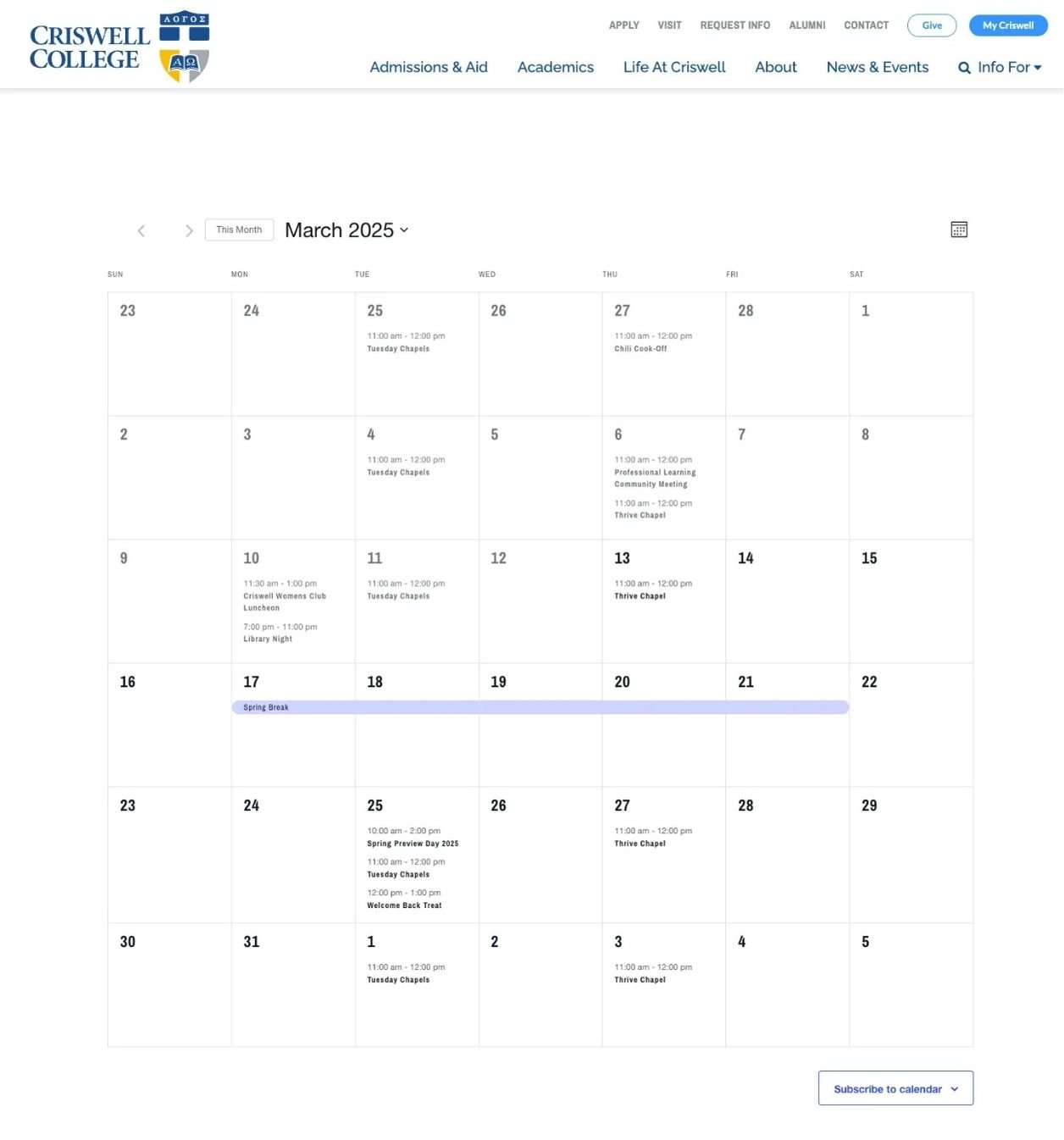
A solid events calendar is all about readability, and this one nails it! You can skim through and quickly catch the dates, times, and titles of events. We think readability is one of the standout features of this calendar—it’s simple, but it gets the job done!
Views
The month default view is a win for this calendar. In general, the month view is a great option for colleges, giving students a clear look at what’s coming up throughout the month. Plus, recurring events are super easy to spot!
We love how the month view makes it super easy to spot week-long events—like spring break—right away. Looking at the month view, you can instantly see when breaks are coming up. Talk about a clear visual shortcut!

Featured Images
They’ve opted out of using featured images, and honestly, I’m a little torn. On the one hand, the simplicity is refreshing and clean. But on the other, the right images could really boost engagement and make each event listing pop even more.
If they have the time to craft featured images that align with their brand, relate to each event, and have solid composition with consistent ratios, it could really enhance their calendar.
Navigation
This calendar keeps its navigational elements simple, with arrows to switch between months and a date selector. I understand the simplicity— everything is so easy to spot already. However, adding Filter Bar would open up more advanced filtering options. With this add-on, there are countless ways to filter events. It would be a great way for students to quickly search for specific types of events, making this calendar even more useful and customizable.
An Overview of the Main Events Page
This page’s simplicity feels like a breath of fresh air. Here are some takeaways from Criswell College’s calendar:
- They chose a perfect default view. The month view works super well. Recurring and week-long events are easy to spot.
- Their calendar fits their brand and the rest of the website. They incorporate touches of their blue and yellow in this simple calendar, striking the perfect balance between branded and clean.
- Creating great featured images and integrating an organized Filter Bar could elevate their calendar. Images makes event listings more engaging, while the Filter Bar would offer advanced search options, allowing users to easily sort through events.
Single Events Page
The single event pages look just as great! The event descriptions are simple yet thoughtful, providing just the right amount of information without overwhelming the reader. It is simple for users to quickly find the details they need.
We also love the clean, minimalist design, especially the pop of brand colors—blue and yellow—adding a vibrant touch without being too much.
And, check out the emojis in the description, which add some relevant fun to the details. This brings us to our next callout: emojis!

They frequently use emojis in their event descriptions—and we’re all for it! Using emojis can make the content more engaging and visually appealing. They help break up text, making it easier to scan and read, while also adding personality and a fun, relatable touch to the information. Emojis can also help highlight important details, such as dates, times, or event types, making key information stand out (check out their emoji usage below!)

The details, venue, and organizer information is also listed in a clean way. The simple yellow lines break up the text really well, making it easy to distinguish the categories. (Notice a theme here? They crush the simplistic, readable design!)

As previously mentioned, adding featured images could further enhance the listings. But, this page is nearly perfect.
Standout Features of Criswell College’s Calendar
Wow, there’s a lot of fantastic takeaways from this calendar. There are multiple best practices that are on display, such as:
- The calendar feels uncluttered. The layout of both pages is clean and organized, allowing users to easily browse through the events without feeling overwhelmed. Every detail has been thoughtfully placed to ensure a smooth browsing experience, and there’s just the right amount of information presented to keep it simple yet informative.
- The calendar’s appearance matches the rest of the website. The design is cohesive, maintaining the brand’s aesthetic and creating a smooth user experience. This consistency not only looks great but also strengthens the overall brand identity, ensuring that users recognize and connect with the site on every page.
- The event descriptions are straightforward. They provide just enough detail without being too long or too brief, making it easy for users to grasp the essential information.
- Information is up-to-date. This is crucial for any events calendar. Maintaining an updated calendar builds confidence with users and ensures that no one misses events.
All in all, these best practices work together to create an effective, user-friendly calendar that’s both functional and visually appealing.
Criswell College Keeps Things Simple and Fun
Criswell College’s use of Events Calendar Pro offers a great example of how to design an effective, user-friendly calendar. From the uncluttered main events page to the clean, minimalist design of the single event pages, they’ve done a fantastic job creating an experience that’s both visually appealing and easy to navigate. Their focus on readability, clear event descriptions, and seamless integration with the website’s branding ensures that users can quickly find and engage with the content.
While there’s always room for improvement—such as adding featured images or incorporating Filter Bar—Criswell College’s calendar already hits all the right notes. There you have it! If you’re a college or university interested in using our products, try them out with a free demo site. We also offer a nonprofit discount– check it out!

Sarah
View author page