

Forum Replies Created
-
AuthorPosts
-
February 22, 2016 at 7:03 am in reply to: Plugin conflict select_locale Event Calendar & Advanced Custom Fields Pro #1079713
Geoff
MemberHey Dimitri,
Thanks so much for this info! That makes a lot of sense–I went ahead and opened a ticket for us to fix this. Although I don’t have a timeframe for when it will be released, I have linked this thread to the ticket and I will be sure to follow-up with you when there’s more to share.
I appreciate you bringing this to our attention so we can clear it up!
Geoff
MemberHi April,
I see my last reply was marked as the correct answer. I’ll go ahead and close this thread but please feel free to open another if you have any other questions and we’d be more than happy to help. 🙂
Cheers!
GeoffMemberHi Bob,
Thanks for reaching out and I’m stoked to hear you’ve been getting great usage out of the plugins!
I went ahead and renewed your licenses for another year — there should be nothing else you need to do on your end to register the licenses. 🙂
Just a note, too, that our non-profit program has changed quite substantially and that we are now only providing Events Calendar PRO free-of-charge. That was a recent update and you won’t have to worry about that for another year, but wanted to let you know so that you have a heads up the next time renewals are up.
Thanks so much!
GeoffMemberRight on, that’s great! Thanks for following up to let me know and cheers. 🙂
Geoff
MemberHey Mike and thanks for reaching out!
The default ticket looks like this:
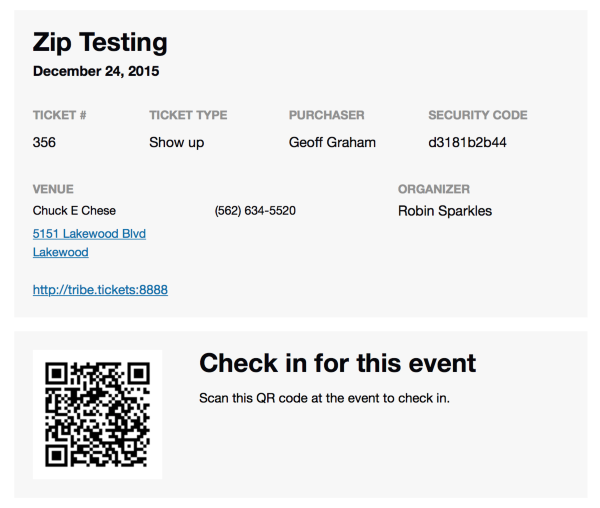
That said, you can add an image header for tickets, which would display across the top of the email like a large banner.
We also have a template override system that would allow you to customize the email layout and our Themer’s Guide is a good place to start for learning more about how that works.
Does this help answer your question? Please let me know. 🙂
Cheers!
GeoffMemberHey there, José!
Awesome, thanks for checking out the plugins–we appreciate your support. 🙂
Yes, it is possible to get a unique URL for options that are selected in the Filter Bar and then link directly to the query for those events. In other words, Filter Bar does not allow you to pre-select filters, but you can indeed do a filtered search and then re-use the URL of that search.
Is that what you were looking for, or is there any thing else I can help answer? Please let me know.
Cheers!
GeoffMemberHi Patty,
Thanks for following up!
I’m happy to help you with these additional questions but do want to note that we are fairly limited in how much support we provide for custom development. On that note, let’s see what we’ve got.
1. Remove Google Calendar button
This CSS should do the trick:
.tribe-events-gcal {
display: none;
}
2. Change text on iCal Export to “ADD TO CALENDAR”
3. Change “Details” to “Deadlines:
4. Change “Start” to “Entries Open” and “End” to “Entries Close”
5. Change “Venue” to “Location”
6. Change “Google Map” to “Get Directions”I would suggest following the steps in this tutorial, which covers how to change wording for anything in the calendar.
7. I would also like to remove the dates on the Event Title. I just want it to show the Event Title.
This CSS should clear that out:
.fusion-events-featured-image .fusion-events-single-title-content .tribe-events-schedule {
display: none !important;
}
I hope this helps!
Geoff
MemberHello Patty,
The Events Calendar unfortunately does not have a “driving directions” button, but it does include a map of the event locations that is tied to Google Maps and can be provided from there.
And, yes, the calendar is capable of exporting events to another calendar. Take this sample event, for instance, which includes buttons to either add the event to a Google Calendar or to download the ICS file for the event, which would be opened and added to a calendar app, including on iPhone/Android.
Does this help answer your questions? Please let me know. 🙂
Cheers!
GeoffMemberHi Kate, and welcome back!
Do you happen to have a link to where I can see how the advanced list widget displays on your site?
Also, will you please open your theme folder and let me know if you see a sub-folder in there called tribe-events. The reason I ask is because the date icon should show by default and the fact that it doesn’t show makes me wonder if there are any template overrides in the theme preventing it from happening. Knowing if there is a tribe-events folder in the theme (and what files are in there) would be a big help.
Thanks!
GeoffMemberThis reply is private.
February 18, 2016 at 11:37 am in reply to: Country select default won’t show "Select Country" #1077315MemberNice work, dude! That’s a heck of a lot of effort you put into it and I’m so glad it yielded results.
We do provide changelog updates with each release as we know how important those are for developers like yourself–in fact, here are the changes we pushed last night. While specific templates and files are often not identified, the impacts of those changes are noted. However, in the case of updating to 4.0, we made a significant number of changes across the board and did indeed detail all the breaking changes.
Thanks a ton for following up and letting me know what the fix was — let us know if any other questions pop up. 🙂
Cheers!
GeoffMemberHey there!
Just wanted to jump in here and let you know that we released Event Tickets Plus 4.0.5 last night and it included a fix for this issue. Please check your WordPress updates, or you can also grab the latest copy by logging into this site and heading to My Account > Downloads.
Thanks for your patience while we worked on this! Please feel free to open a new thread if you continue to experience the same issue or have any other questions that pop up during updating and we’d be happy to help. 🙂
Cheers!
GeoffMemberHey there!
Just wanted to jump in here and let you know that we released Event Tickets Plus 4.0.5 last night and it included a fix for this issue. Please check your WordPress updates, or you can also grab the latest copy by logging into this site and heading to My Account > Downloads.
Thanks for your patience while we worked on this! Please feel free to open a new thread if you continue to experience the same issue or have any other questions that pop up during updating and we’d be happy to help. 🙂
Cheers!
GeoffFebruary 18, 2016 at 11:10 am in reply to: Need to translate community event add page for different languages? #1077288MemberHey there!
Just wanted to jump in here and let you know that we released Events Calendar PRO 4.0.6 last night and it included a fix for this issue. Please check your WordPress updates, or you can also grab the latest copy by logging into this site and heading to My Account > Downloads.
Thanks for your patience while we worked on this! Please feel free to open a new thread if you continue to experience the same issue or have any other questions that pop up during updating and we’d be happy to help. 🙂
Cheers!
GeoffMemberHey there!
Just wanted to jump in here and let you know that we released Events Calendar PRO 4.0.6 last night and it included a fix for this issue. Please check your WordPress updates, or you can also grab the latest copy by logging into this site and heading to My Account > Downloads.
Thanks for your patience while we worked on this! Please feel free to open a new thread if you continue to experience the same issue or have any other questions that pop up during updating and we’d be happy to help. 🙂
Cheers!
Geoff -
AuthorPosts